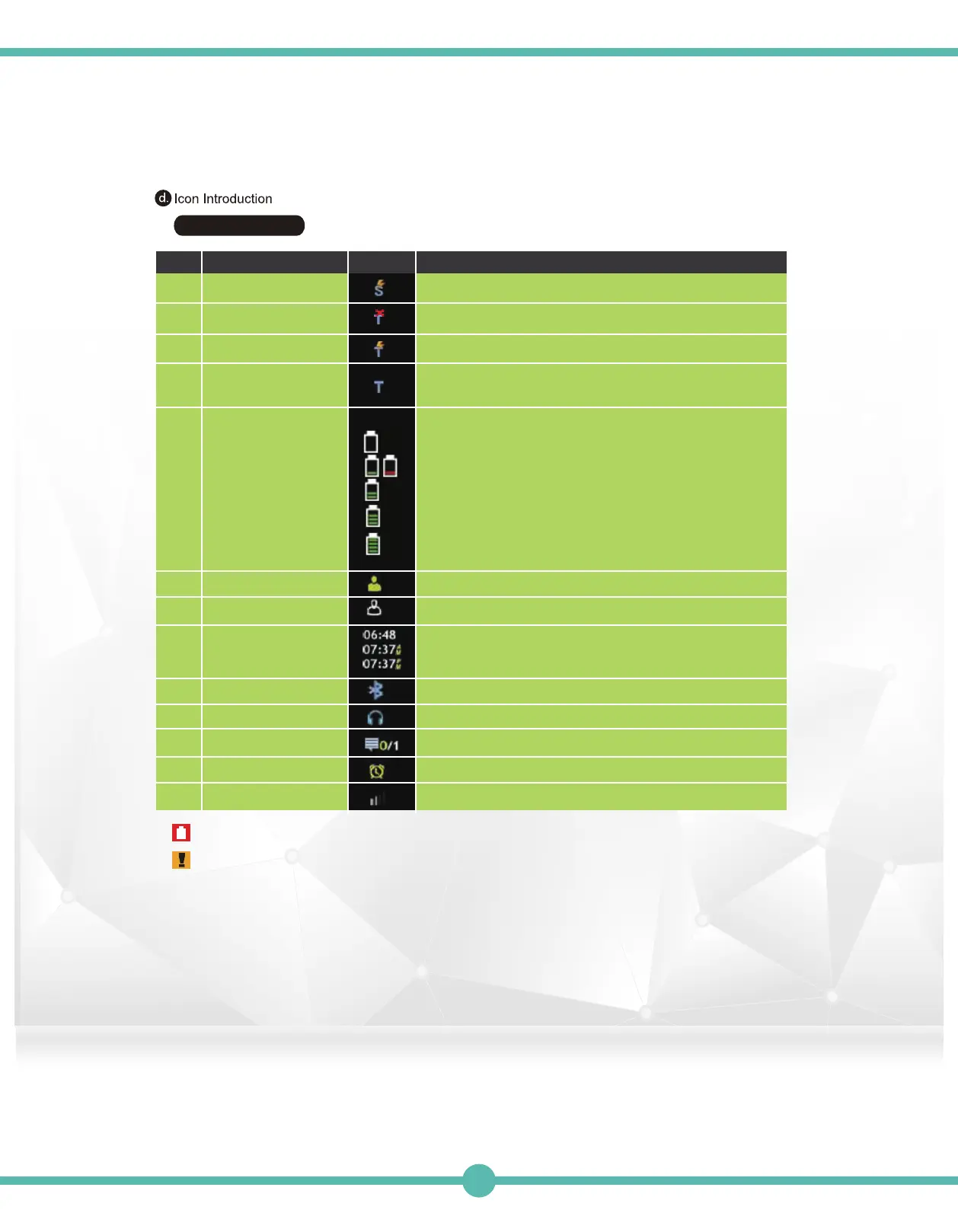
Status Bar Icon
Item IconNO.
Trunking Status
Trunking Status
Description
Trunking Status Indicator: Site Trunking
Trunking Status Indicator (Blinking): Out Of Range
d-1
d-2
Trunking Status Trunking Status Indicator: In Ranged-3
Trunking Status
Trunking Status Indicator (Blinking): Control Channel Hunting
Trunking Status Indicator: Control Channel Scanned
On Duty Indicator
Off Duty Indicator
Bluetooth is activated
Bluetooth Earphone is connected
Unread Message Indicator
Alarm Clock is activated
RF Signal Strength Indicator
d-4
The battery gauge indictator is located on the status bar
and keeps you informed of the battery level. The six
levels of indication are as follows:
Empty Battery: <=1%
1 Red Cell: 2%
1 Green Cell: 3% ~ 25%
2 Green Cells: 26 % ~ 50%
3 Green Cells: 51% ~ 75%
4 Green Cells: 76% ~100%
Time Display(24 Hour Format)
Time Display(12 Hour Format - AM)
Time Display(12 Hour Format - PM)
Battery Status d-5
On Dutyd-6
Off Dutyd-7
Time Displayd-8
Bluetooth d-9
Bluetooth Headset d-10
Message Hint d-11
Alarm Clockd-12
RF Strengthd-13
G4/G5 BATTERY NOTICE: Battery must be charged a minimum of 5 hours prior to usage.
IMPORTANT G4/G5 INFORMATION: For questions or help on your new G4/G5 device, you may reach our
support team at (817) 3039320
Press Option 1: “Digital P25 Support”
29



 To Next Page