Service Manual
38
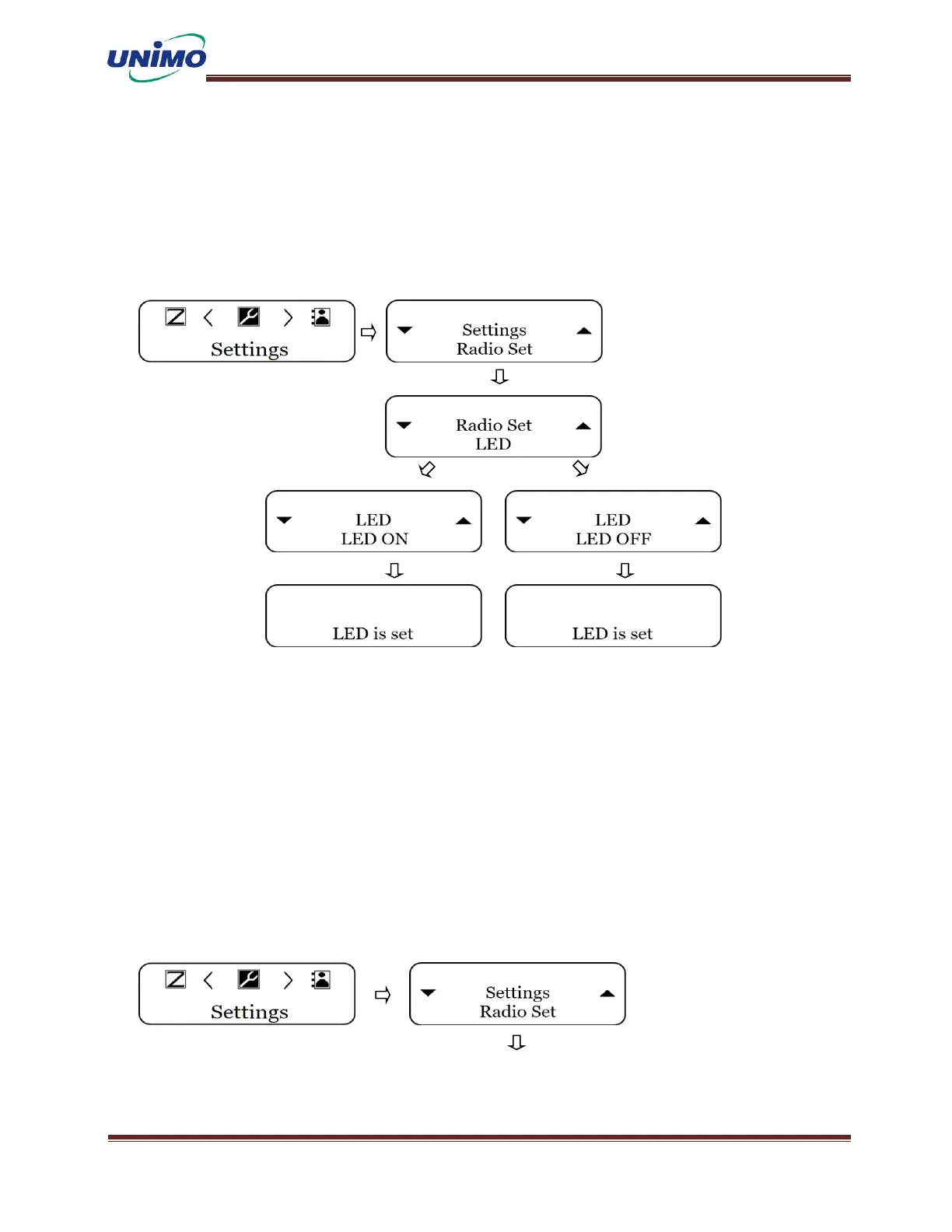
Radio Setting - LED
◼ Press ‘MENU’ button to select the settings. (LCD display: “Radio Set”)
◼ Press ‘MENU’ button again (LCD display: “LED”)
◼ Press ‘MENU’ button again and use the ‘UP, DONW’ keys to select on/off.
(LCD display: “LED ON”, “LED OFF”
Radio Setting – Tone(Profile)
◼ Press ‘MENU’ button to select the settings. (LCD display: “Radio Set”)
◼ Press ‘MENU’ button again (LCD display: “Tone”)
◼ Press ‘MENU’ button again and select a profile using the ‘UP, DONW’ keys.
(LCD display: “Profiles”)
◼ Press ‘MENU’ button again and use the ‘UP, DONW’ keys to select silence or general.
(LCD display: “Silent”, “General”)



 To Next Page