5
For help see pages 34-37.
You are now ready to use your Universal Car Remote!
STEP 2 (of 2)
Pairing your Universal Car Remote to your vehicle
Before you begin, it is highly recommended you read through all the instructions to familiarize
yourself with the procedure. You will need any existing remotes for the vehicle present when
beginning the PAIRING procedure.
Before continuing, ensure you have the following:
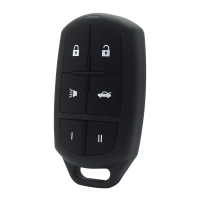
• Universal Car Remote.
• Any existing remotes for the vehicle (if applicable).
• A working ignition key for the vehicle.
1. Locate the PAIRING CODEVSHFL¿FWR\RXUYHKLFOH¶VPDNHPRGHODQG\HDURQWKH
VEHICLE LOOK UP list on pages 15-25 if you have not already noted it on page 4.
2. Locate the matching PAIRING CODE number from the PAIRING section of this guide
on pages 26-33 and follow the step-by-step instructions.
button 2 times.
3. Now press the FUNCTION I and PANIC buttons at the same time. The STATUS LIGHT
ZLOOEULHÀ\WXUQRII
4. Your remotes STATUS LIGHTZLOOÀDVKEDFNWR\RXWKHVDPHACTIVATION CODE
sequence. For example, if the ACTIVATION CODE you entered is 512, the STATUS
LIGHTZLOOHPLWDVHULHVRIÀDVKHVWKDWPDWFKWKHACTIVATION CODE you entered in Step #2.


 To Next Page
 Loading...