GETTING STARTED
battery installation
COUNTDOWN TIMER
PROGRAM
ON/OFF
CD
SET
RANDOM
RESET
1
4
2
1
1
2
1
2
remove the battery cover from
the back of the timer
place two button cell batteries
between terminals observing
proper polarity then replace cover
PROGRAM
ON/OFF
CD
SET
RANDOM
RESET
3
5
7 9
2 4 6 8
10
1
5
6
7
8
Press SET
Day select with
Press SET
Hour select with
Press SET
Minute select with
3
5
7 9
2 4 6 8
10
9
10
3
Press SET
Second select with
Press SET
1
4
2
5
6
7
8
Press SET
Start ON or OFF select with
Press SET
Hour select with
Press SET
Minute select with
9
10
3
Press SET
Second select with
Press SET
Press SET
Minute select with
CLOCK
The to-the-second countdown feature of this timer starts from the ON or OFF
position and counts down to zero when activated.
Press once from
LEARN
PROGRAM
ON/OFF
CD
SET
RANDOM
RESET
Go to using
CLOCK
To activate/deactivate Daylight Saving Time (DST) function, press
and hold both and together for 3 seconds in mode;
solid for DST.
To toggle between 12/24 hour format, press RANDOM during
clock setting.
Stop countdown timer function with CD or ON/OFF
1
2
remove the battery cover from
the transmitter
place two AA size batteries into
compartment observing proper
polarity then replace cover
3
1
2
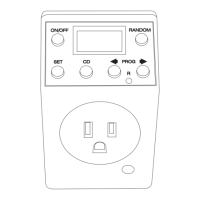
button descriptions
COUNTDOWN
SET
ON/OFF
RANDOM
RESET
PROGRAM
TIMER OPERATION
Programmable Timer Photocell Transmitter
RCT100 + RT601
Programmable
Timer with
Wireless Photocell Transmitter
OWNERS
MANUAL
Congratulations on your
purchase of a UPM remote
control product. Please
take the time to read and
understand this manual so
you can begin to enjoy the
convenience and energy
saving benefits this product
has to offer.
!
!
433 M z RF technology
H
Activates timer at dusk
Timing Control Dial -
(30mins, 1, 2, 4, 6, 8,
10hrs, or continuous
Brightness Dial - for light
sensitivity adjustment
Transmission range: up
to 40m in open area
!
!
!
PROGRAM SETTINGS
disable program/master disable
PROGRAM
ON/OFF
CD
SET
RANDOM
RESET
1
3
5
7
2 4 6 8
PROGRAM
ON/OFF
CD
SET
RANDOM
RESET
1
4
3
1
4
2
5
6
7
8
Press SET
Day select with
Press SET
Hour select with
Press SET
Minute select with
3
Press SET
Program select with
1
2
Press SET
Press ON/OFF to disable ( )X
3
For select PROGRAM with
or go to using
single disable
F master disable
2
Press SET 3 times to exit (single disable)
OR press SET 4 times to exit (master)
CLOCK
Programs are arranged in a circular pattern
with the clock and countdown functions:
CLOCK
Program 1-20
CD
4
Repeat steps to to undo disable )(X
LEARN
PROGRAM
ON/OFF
CD
SET
RANDOM
RESET
1
4
Press CD to start the countdown function
TIMING CONTROL DIAL
MODE SWITCH
BRIGHTNESS DIAL
NEW CODE BUTTON
RF “TRANSMIT” BUTTON
!
!
!
!
!
20 ON/OFF settings
Countdown timer
3 random functions
12/24 hour clock
15A, 1800W (resistive)
PROGRAMMABLE TIMER
PHOTOCELL TRANSMITTER
LED INDICATOR
PHOTOCELL
PHOTOCELL TRANSMITTER
*
The LED INDICATOR of the transmitter will:
1
Once you insert batteries into the transmitter, you will automatically enter
the user setting mode. This mode will last for two minutes in which you
can easily adjust the brightness or light sensitivity of the photocell sensor.
Alternately, you can press the RF button on the transmitter to enter the
user setting mode.
2
In user setting mode, turn the BRIGHTNESS DIAL to adjust the light
sensitivity of the photocell sensor.
setting the clock
user setting mode
> TURN ON - when the photocell sensor detects that it is bright
Use the LED INDICATOR (on front of transmitter) as a reference, so that
you can fine tune the light sensitivity as desired.
> TURN OFF - when the photocell sensor detects that it is dark
*
1
2
PAGE 1 PAGE 2 PAGE 3
PAGE 9PAGE 8PAGE 7
http://waterheatertimer.org/UPM-timers
-and-manuals.html

 Need help?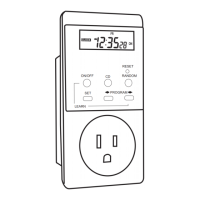

 To Next Page
 General