3
•
Keep the packaging materialout of the reach of children duetothe risk of
suffocation.
• Dispose of packaging material immediately in accordance with the local ly applicable
regulations.
• Do not modify the productinany way. Doing so voids thewarranty.
• Usethe product for itsintended purpose only.
• Protectthe productfromdirt, moistureand overheating, and only use it in adry
environment.
• Use the item only in moderate climatic conditions.
• Do not operate the product outside the power limits given in thespecications.
• Do not attempt to service or repair the product yourself.Leave any andall service
work to qualied experts.
• Do not throw the battery or the product into re.
• Do not tamper with or damage/heat/disassemble thebatteries/rechargeable
batteries.
5. Start-up and operation
Note –Pairing the controller
• Note that the maximum range for Bluetooth® is 10metreswithoutobstacles
such as walls, people, etc.
5.1 Connecting the controller
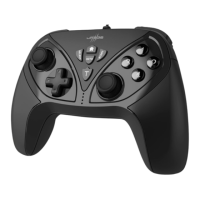
• On your Nintendo Switch, open the menu item "Controller" à "Change grip/order".
Now press the Home and Bbutton together.
Note -Automatic disconnection
• Be awarethat you wil lneed to carry out this procedureeach time youlog on to
the console.
• Note that the controller automatically loses the connection to theconsole after 5
minutes of inactivity.
5.2 Charging the battery
Warning –rechargeable battery
• Only use suitable charging devices or USB connectionsfor charging.
• As arule, do not charge devices or USB connections that aredefective anddonot
try to repair them yourself.
• Do not overcharge the product or allow the batterytocompletely discharge.
• Avoid storing, charging or using the device in extremetemperatures andextremely
low atmospheric pressure(for example, at high altitudes).
• When stored over along period of time, batteries should be charged regularly (at
least every threemonths).


 To Next Page
 Loading...