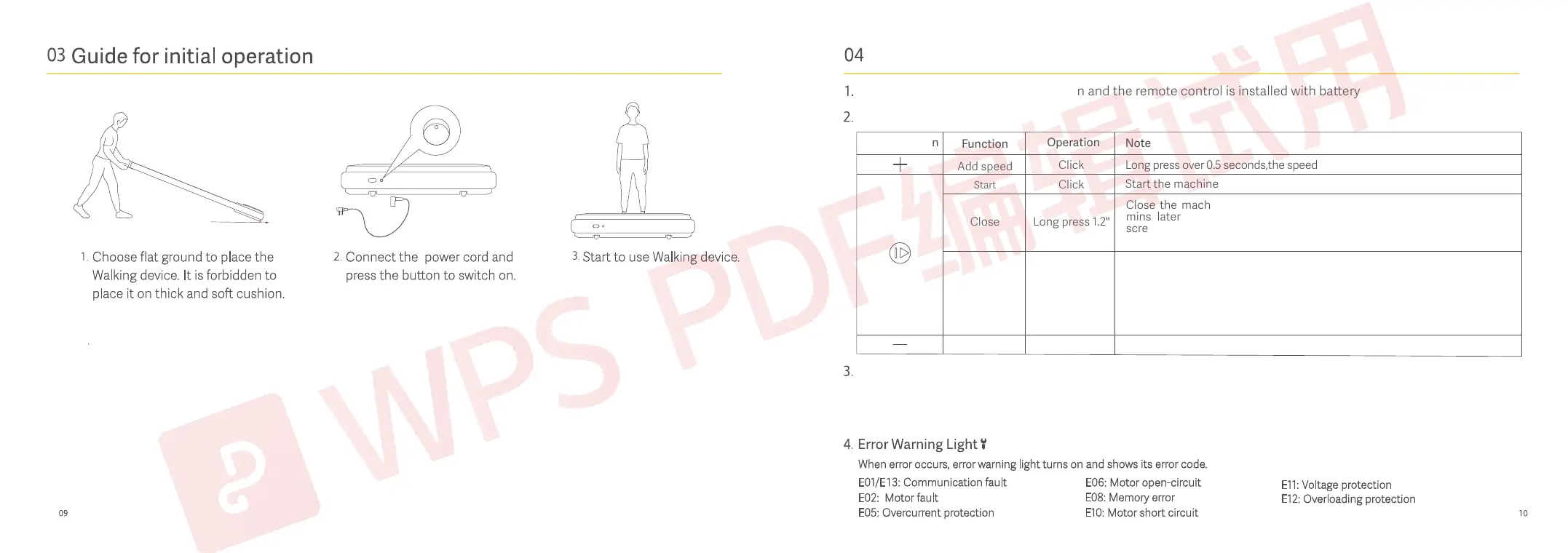
How to use
Controller icon
Function
Add speed
Click
Click
Long press 1.2"
Click
Click
(in start mode)
Start
Close
Pause
Reduce speed
Operation
Long press over 0.5 seconds,the speed constantly add.
Long press over 0.5 seconds,the speed constantly reduce.
Note
Start the machine
Ensure that the machine is powered on and the remote control is installed with baery
Functions
A. Long press the start-stop buon of the remote control and turn on the power switch of the machine at the same time. Aer 6
seconds, the machine will emit a beeping sound, which means the pairing is successful.
B. When the remote control do not respond or replace with a new remote control, perform the above operations.
Remote control pairing
1,When pause mode within 10 mins,the screen will show "PAU",the time/step/-
calorie/distance,data will retaining display,the speed will start from the
minimum speed.
2,When pause mode over 10 mins,the system will change to the economic
mode,turn off the screen, and all the data will recover to 0;press any key to
activate the system,enter into the standby mode.
Close the machine(all data recover to 0),the screen will show "END",10
mins later, the system will change to the economic mode,turn off the
screen, and all the data will recover to 0;press any key to activate the
system,enter into the standby mode.



 To Next Page
 Loading...