Page 5
PREPARATION & SET UP
This user manual highlights the basic requirements to enable the smooth operation of the
weighed indicator.
1. Plug the scale into a wall socket to avoid interference with other electrics.
2. Ensure there is no load when the indicator is turned on.
3. The initial installation (or movement from a location) may require that you
4. calibrate the scale before using it to weigh any load.
FEATURES
• Stainless Steel or Mild Steel Enclosure
• 1” Digit in LED or LCD display option
• Weighing Units LED: lb, kg
• Weighing Units: LCD lb, kg, oz, lb:oz, g
• Gross Weighing
• Multiple Tare Functions
• Pre-Set Tare Option
• Zero Button
• Multiple Hold Functions
• Counting Pieces Function
• Accumulation / Batch weighing
• Checking Weighing: Overload/
Underload with alarm
• Power saving mode
• Automatic date and time update
• Modify gravity based on location
• 100% manual zero range setting
• Automatic error warning alarm
• Splash proof keyboard and display
• RS-232 Port for optional Scoreboard
• RS-232 Port for connecting to Printer
or PC
• Displays up to 50,000 graduations
• Includes Bracket & Mounting Hardware
• 110V Power Adapter Included
• Easy to Calibrate Indicator (5 Steps)
• Full Duplex RS-232 Serial Port
• Powers up to (6) 350 ohm load cells
• 2-year Manufacturer warranty
• NTEP approved for 5,000 divisions
Indicator Model Options
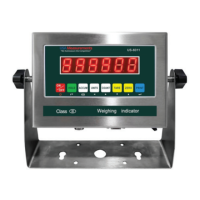
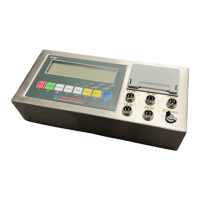
The US-6011 indicator comprises of four models the US-6011MS-LCD, US-6011MS- LED, US-
6011SS-LCD and US-6011SS-LED. The mild steel (MS) and stainless steel (SS) models feature a
red digit display type for LED, while the display type for LCD is black digits.
The purchase includes, US-6011 digital indicator, rechargeable battery, stainless steel
mounting bracket, 2 adjustable knobs for bracket, spare connectors, plastic splash guard, 15’
stainless steel braided cable, power adapter, as well as this user manual.



 To Next Page
 Loading...