※ see page 11.
Cleansing
Bidet
Stop
Dry
-
-
-
-
-
-
-
-
-
-
-
-
-
-
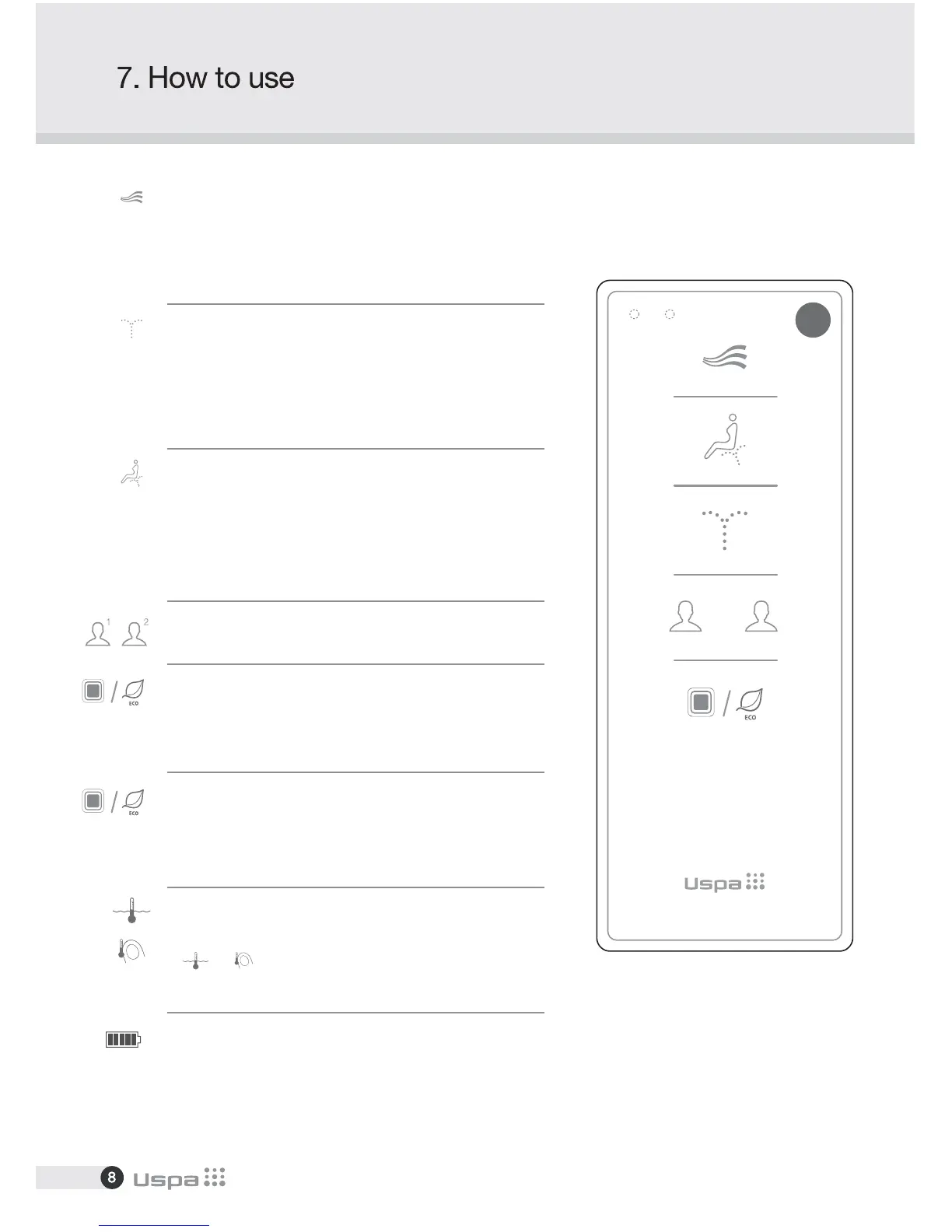
Press "Dry" Warm air will come out for 3 minutes.
To alter the strength of drying, press the button again.
Dry temperature can be adjusted by pressing LOW or HIGH
button to 5 levels.
Press "Cleansing" to clean your posterior. The function will stop
in 2 minutes automatically.
Press this button again to activate oscillation. The nozzle moves
back and forth automatically to widen cleansing area.
Oscillation wash stops if this button is pressed again.
Press "Bidet" for feminine wash. The function will stop in
2 minutes automatically.
Press this button again to activate rhythmical wash for massage
effect.
Massage wash stops if this button is pressed again.
Press "Stop" to stop current operation.
When a user stands up, all operation will stop automatically.
(Except for Kids function)
User Setting
Eco
- Press "Eco" for 2 seconds to activate the power saving mode.
Seat and water temperatures will set to low but temperature
will keep remain at room temp.
Temperature Adjustment
Battery Alarm
(water / seat)
Temperature of seat and water can be adjusted by pressing
or button.
There are four levels, Room temp - Low - Medium - High.
Change the batteries if the battery icon on LCD is flickering
(LED on the front also flickers)
[Front]
1 2


 To Next Page