EasyManua.ls Logo

V-Show B198 - Menu Structure; Menu Structure and Navigation

Default Icon
15 pages
Print Icon
To Next Page IconTo Next Page
To Previous Page IconTo Previous Page
Loading...
9
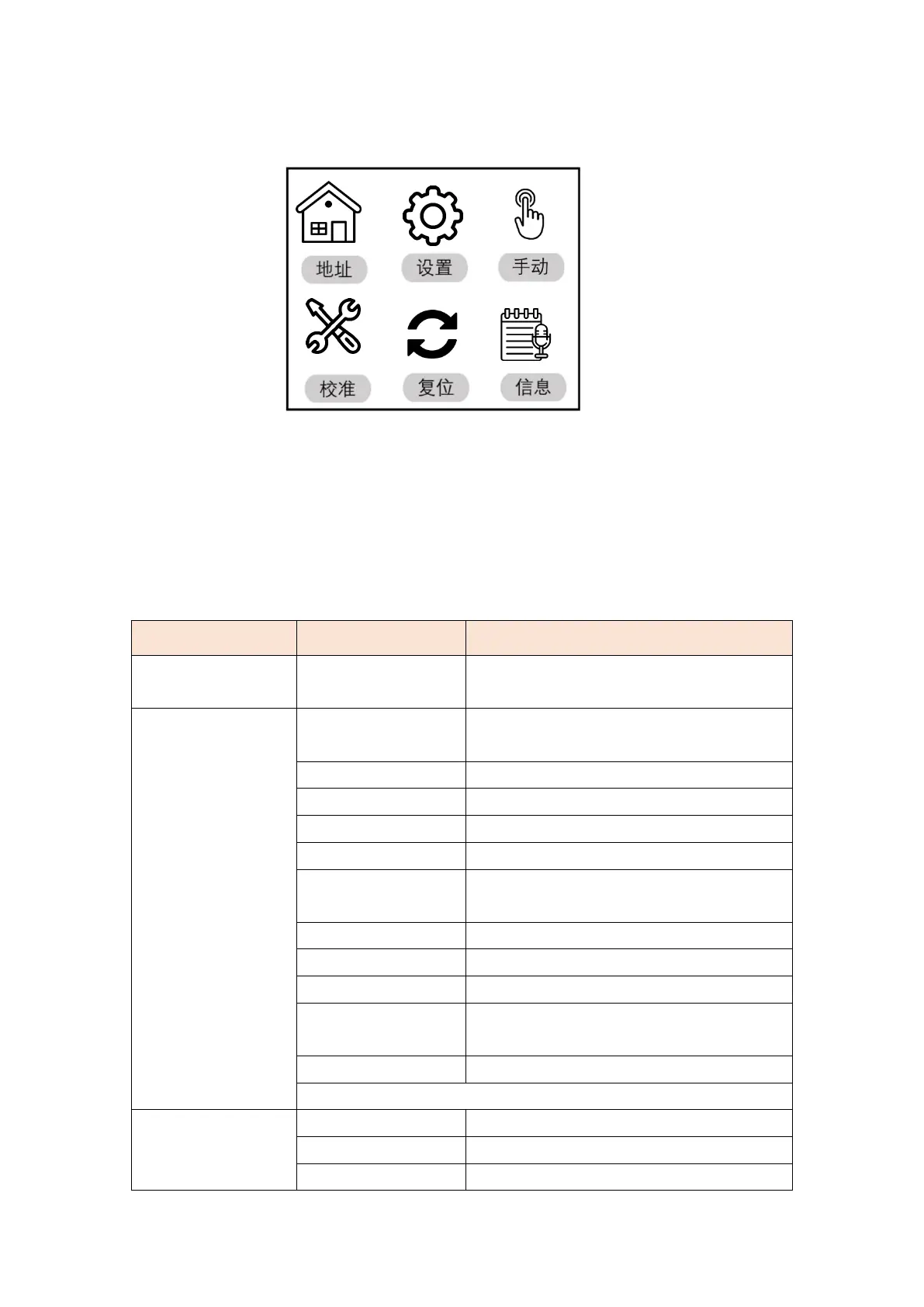
9.Menu top interface
Address: Click to enter the address code setting
Settings: Click to enter the system settings
Manual: Click to enter manual mode
Calibration: Click to enter the password to enter the system calibration mode
Reset: Click to enter the system reset mode
Information: Click to enter to view system information
10.Menu structure
Main menu
Secondary menu
Three-level menu/parameter
address
001-512
(Add the number of channels each time,
subtract the normal)
System
settings
Operating mode
DMX/sound control/self-propelled
1/self-propelled 2
Channel mode
17CH
Horizontal reversal
switch
Vertical reverse
switch
Hall error correction
switch
Optocoupler error
correction
switch
Signal hold
switch
screen protector
switch
Screen flip
On/off/auto
Synchronization
Update
switch
Language
Medium/EN
reset
Manual mode
Color wheel
000-255
Strobe
000-255
Dimming
000-255