13
4 5 6 3 4 5 6 7 8 9 0 1 2 3 4 5
8
5 6 7 8 9 0 1 2 3 4 5 6 0 1 2 3 4 5 6 7 8 9
5
4 5 6 3 4 5 6 7 8 9 0 1 2 3 4 5
8
5 6 7 8 9 0 1 2 3 4 5 6 0 1 2 3 4 5 6 7 8 9
5
Adjust Mounting and Cable Management Rails.
Warning: Do not attempt without assistance. Do not adjust rails while equipment is installed.
The 4 mounting rails are preinstalled and can be adjusted independently.
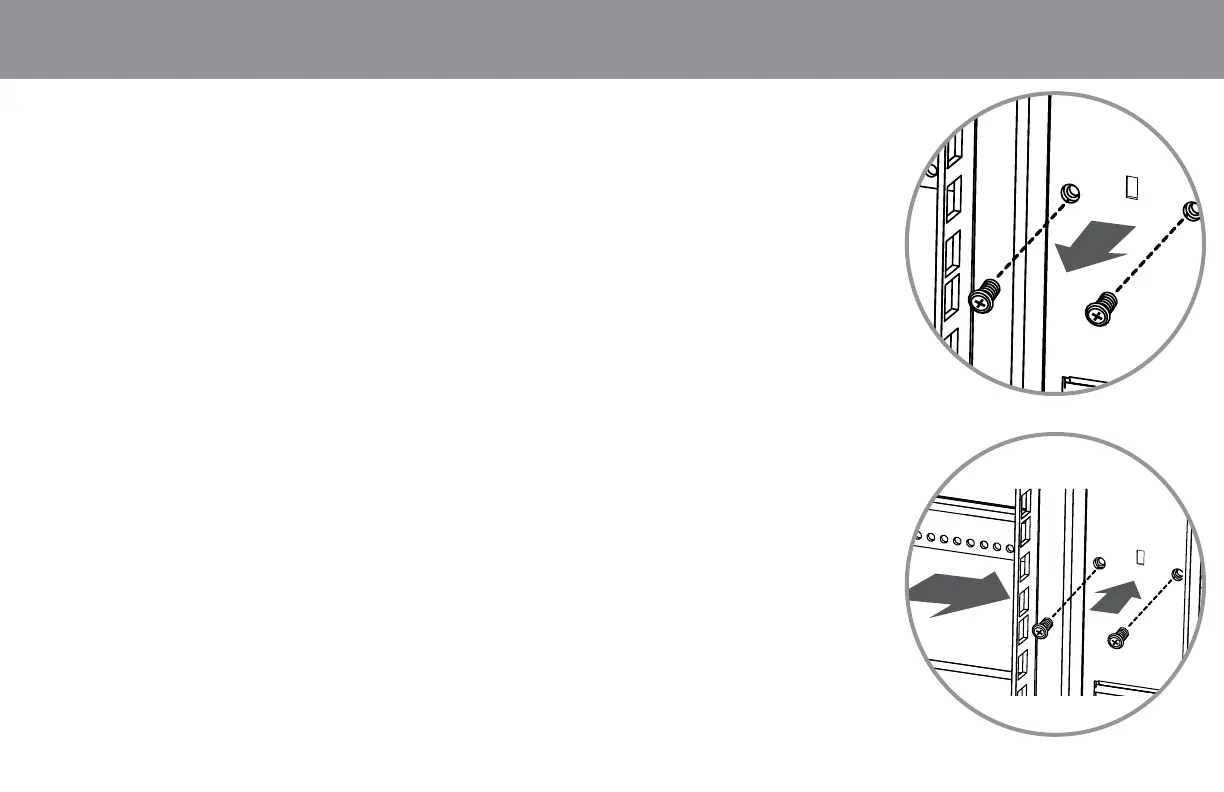
1. Each rail is connected to the enclosure with 6 screws –1 pair at the upper beam, at the middle and at the bottom
2. Remove the screws fastening each of the rails
3. Slide the rails to the desired depth and re-attach
4. The depth of the Cable/Accessory Rack can be adjusted using the same method.
Adjust Mounting and Cable Management Rails.
Warning: Do not attempt without assistance. Do not adjust rails while equipment is installed.
The 4 mounting rails are preinstalled and can be adjusted independently.
1. Each rail is connected to the enclosure with 6 screws –1 pair at the upper beam, at the middle and at the bottom
2. Remove the screws fastening each of the rails
3. Slide the rails to the desired depth and re-attach
4. The depth of the Cable/Accessory Rack can be adjusted using the same method.
Adjust Mounting and Cable Management Rails.
Warning: Do not attempt without assistance. Do not adjust rails while equipment is installed.
The 4 mounting rails are preinstalled and can be adjusted independently.
1. Each rail is connected to the enclosure with 6 screws –1 pair at the upper beam, at the middle and at the bottom
2. Remove the screws fastening each of the rails
3. Slide the rails to the desired depth and re-attach
4. The depth of the Cable/Accessory Rack can be adjusted using the same method.
Enclosure
Conguration
•
Enclosure
Conguration
•
Enclosure
Conguration
•
Enclosure
Conguration
•
Enclosure
Conguration
•
Enclosure
Conguration


 To Next Page
 Loading...