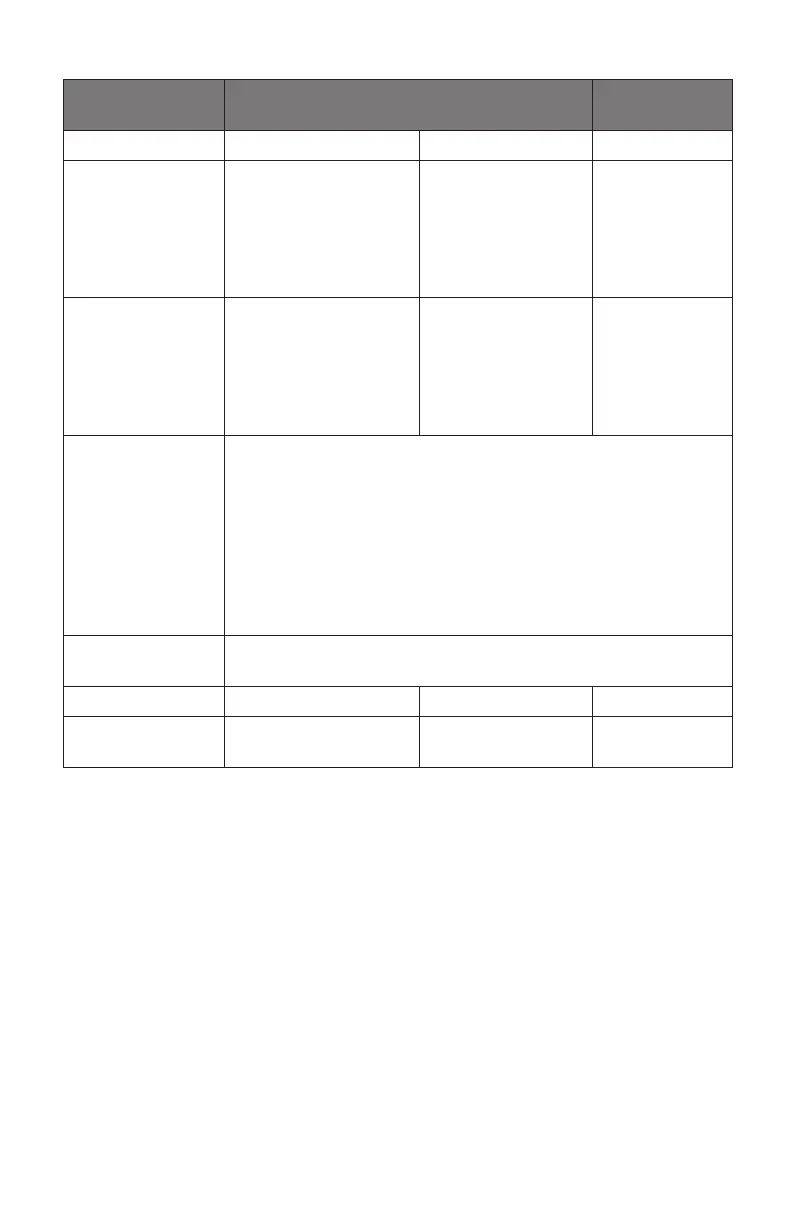
ANC function Connect with your device by Bluetooth or
3.5mm audio cable
Feature Device Status Operation Details
ANC 1 / 2 / o Power on Press ANC button
to turn on ANC level
1 (high level), press
again for ANC level
2 (low level). Press a
third time to turn o.
The ANC
button will ash
blue LED
Ambient Sound Power on Double press ANC
button to entry
ambient sound
(transparent mode),
double press again
to turn o ANC
The ANC
button will ash
blue LED
Note:
1. When ANC is o, the headphones will power o if there is no
connection within 10 min. When ANC is on, the headphones
will stop pairing if there is no connection within 10 minutes.
If the headphones are not paired with a device andANC is o,
the headphones will power o after 2 minutes.
2. When connecting the AUX 3.5mm audio cable to headphones,
Bluetooth connectivity is automatically disconnected.
Voice Assistant
function
Feature Device Status Operation Details
Voice Assistant Power on Long press power
button for 2s
N/A


 To Next Page