EasyManua.ls Logo

Vakaros Atlas 1 - User Manual

Vakaros Atlas 1
11 pages
Print Icon
To Next Page IconTo Next Page
Loading...
Atlas 1 User Manual
This document is distributed for Atlas 1 users that want the original user
manual. We suggest that you also look at the Atlas 2 documentation. While
some of the hardware capabilities are different, the Atlas 1 will receive many
of the same software features via continuing updates.
Welcome to the future of sailing. The Atlas is the culmination of years of work
and the cornerstone of a growing ecosystems of sensors and displays. This
guide covers the last version of the Atlas 1 firmware prior to the release of the
Atlas 2. New versions are released regularly with new features and
improvements—see Vakaros Connect, below, for more details.
Question and Answer IconNeed help?

Do you have a question about the Vakaros Atlas 1 and is the answer not in the manual?

Overview

The Atlas 1 is a sailing instrument designed to provide crucial data and insights to sailors, from beginners to seasoned racers. It offers a comprehensive suite of features to enhance performance, improve navigation, and simplify race management. The device is regularly updated with new features and improvements through software releases.

Function Description:

The Atlas 1 serves as a central hub for displaying various sailing metrics. Its primary functions include:

  • Data Display: The device features a clear, high-contrast display that can show multiple data points simultaneously through customizable "widgets." These widgets can display information such as:

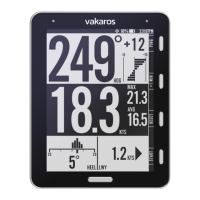
    • Speed: Current boat speed (KTS), maximum speed (MAX), and average speed (AVG).
    • Heading: Current heading (HDG).
    • Heel and Trim: Displays the current heel and trim angles of the boat, along with consistency bars to indicate how steady the boat is.
    • Wind Information: Provides wind direction (true and apparent), wind speed, and estimates of the wind direction (midpoint between Port and Starboard reference angles), dead downwind angle, tacking angle, and average upwind speed.
    • Line Menu / Start Line Setup: Assists in race starts by providing a highly accurate measure of distance to line (DTL). It allows users to record the locations of the marks defining the starting line, set up line bias and advantage information, and displays shift tracking reference angles. It includes a 5-minute countdown timer for race starts.
    • Shift Tracking and Reference Angles: Helps sailors track wind shifts and optimize their course. It offers both automatic and manual methods for setting Port and Starboard reference angles. The automatic method captures reference angles by sailing a short upwind leg, while the manual method allows users to set these angles by pressing buttons on the ANGLE screen.
    • Timer: A start timer for race management.
  • User Interface: The Atlas 1 features a user-friendly interface with a Power/Menu button, four contextual buttons (Button 1-4), and a Home button.

    • Power/Menu Button: Used to power the device on/off and access the main menu.
    • Contextual Buttons (1-4): These buttons' functions change based on the displayed screen, indicated by labels on the button bar. They are used for setting starting marks, accessing the Line Menu, Angle Menu, RESET, and START functions.
    • Home Button: Returns the user to the home screen and allows cycling through configured layouts.
    • Info Bar: Displays device information like Battery Level and Current Time.

Important Technical Specifications:

While specific technical specifications like battery life in hours or display resolution are not explicitly detailed, the manual highlights several key aspects:

  • Display: High-contrast display, optimized for visibility in various conditions.
  • Connectivity: Features a USB end for charging and connecting to a magnetic charging port. It also supports wireless connectivity with iOS and Android apps (Vakaros Connect) for firmware updates, live data view, and customization.
  • Durability: Designed for use in salt water environments. The device is described as having an anti-reflective and hydrophobic coating on the glass.
  • Mounting: The Atlas 1 can be attached to a mast track, bulkhead, or any flat surface using provided 6-32 screws or a velcro strap. It can be mounted in either orientation (release tab facing up or down). A quick-release mechanism allows for easy removal.
  • Magnetic Compass: The device incorporates a magnetic compass, heel, and trim sensors, which means it should be mounted in a fixed location on the boat (not on a boom or rotating mast) for accurate readings.

Usage Features:

  • Customizable Screens: The Atlas 1 allows users to configure up to four different screens, each with four widgets, to display various kinds of data. The main screen, at right, has four widgets: Heading, Speed, Heel, and Trim. The heading widget includes a shift tracking display, with a lift/header indicator in degrees and a trend graph.
  • Race Start Assistance: The Line Menu provides detailed information and tools for precise race starts, including DTL, line bias, and countdown timers.
  • Wind Shift Tracking: Both automatic and manual methods for setting reference angles help sailors identify and capitalize on wind shifts.
  • Vakaros Connect App: The companion app enhances the device's functionality by allowing for firmware updates, live data viewing, customizing settings, and downloading sailing data.
  • Easy Mounting and Removal: The quick-release mount simplifies attachment and detachment from the boat.
  • Security: A safety line can be tied to the lanyard loop for maximum mounting security.

Maintenance Features:

  • Cleaning:
    • After sailing, rinse the device with fresh water to remove salt and salty water.
    • Clean the charging port with a damp cloth or soft brush prior to charging. It is crucial not to charge the Atlas with salt present on the connector. The charging port should be clean and dry prior to charging.
    • To clean the Atlas itself, use a soft cloth dampened with water if necessary.
  • Storage: Store the Atlas in its case to prevent scratching the anti-reflective and hydrophobic coating on the glass.
  • Environmental Considerations:
    • Do not leave the Atlas outdoors when not in use.
    • Do not leave the Atlas submerged in water for extended periods.
  • Software Updates: Regular firmware updates are available through the Vakaros Connect app, ensuring the device remains up-to-date with the latest features and improvements.

Vakaros Atlas 1 Specifications

General IconGeneral
BrandVakaros
ModelAtlas 1
CategoryThermometer
LanguageEnglish