20 FR
Using the appliance
B
Using your dishwasher
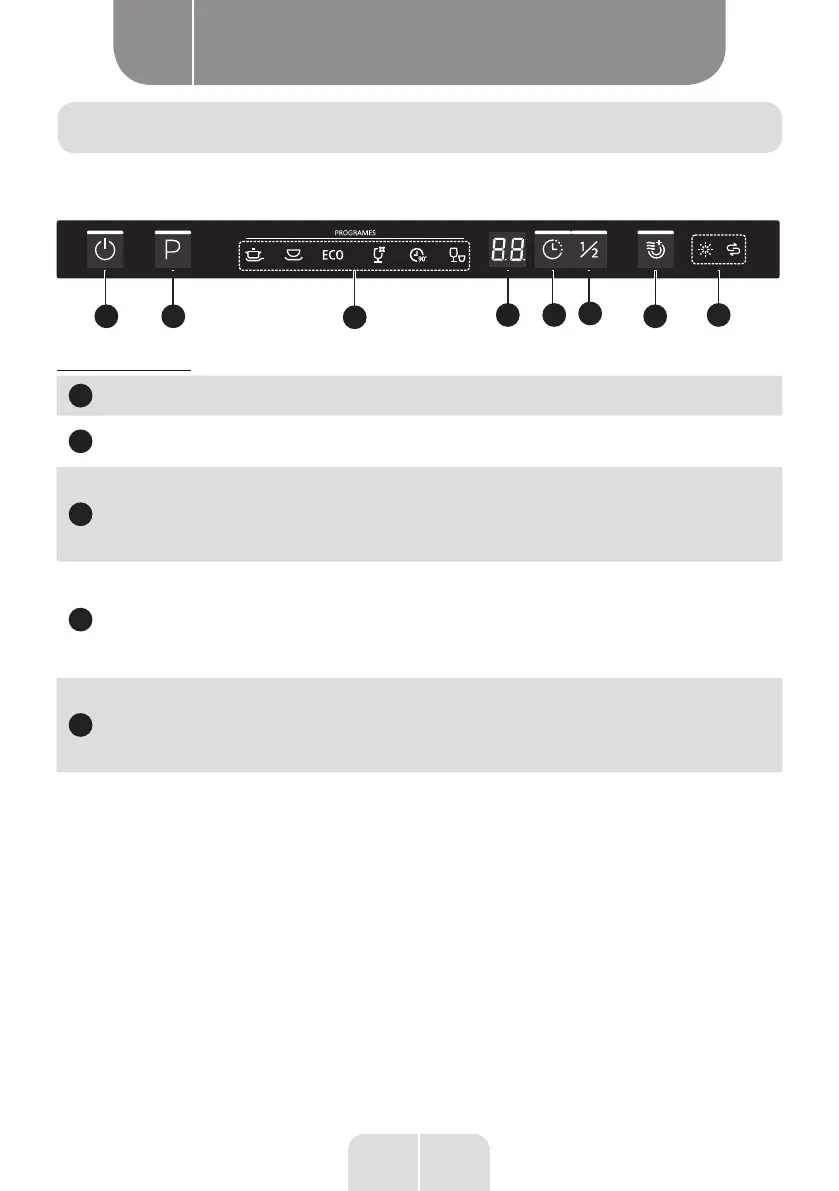
Control panel
1 2
3
4
5
78
6
Control (buttons)
1
Power button
Press this button to start the dishwasher.
2
Programmes
Press this button to select the appropriate wash programme; the
corresponding indicator light will turn on.
3
Delay Start
Press this button to set the number of hours to delay the wash
cycle. You can delay the start of the wash for up to 24 hours.
Each press of this button delays the start of the wash by one
hour.
4
Half load
When you only have about 6 place settings to wash, you can
choose this function to save energy and water. (It can only be
used with the Intensive, Universal, ECO, Glasses and 90 min.
programmes.) When you press this button, the corresponding
indicator lights up.
5
Additional
drying
This function allows the dishes to be dried further (it can only
be used with the Intensive, Universal, ECO, Glasses and 90 min.
programmes). When you press this button, the corresponding
indicator lights up.




 To Next Page