12
Step 1:
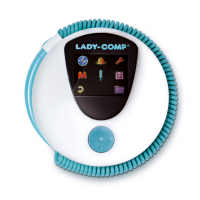
Activate your Lady-Comp
1. Remove the strap from the device.
2. Set the alarm for the next morning to activate your Lady-Comp. To do so,
please press one of the 3 buttons and press the circle button to open the
menu. Then, press the plus button to get to the alarm clock icon and press the
circle button to select. Then, set the alarm time with the help of the plus and
minus buttons. Confirm the entry for each field by pressing the circle button.
The alarm clock is activated when you enter a checkmark in the last field by
pressing the plus button and confirmed with the circle button. An alarm clock
symbol will appear in the upper right corner of the initial time/date screen.
Your first measurement must be taken +/ – 3 hours from your set alarm
time.
3. You can now use Lady-Comp – but a measurement is only possible the next day.
After the first successful measurement, you can also measure without the alarm.
If you have accurate records of your menstrual data, you can add them the day before the first measure-
ment. After the first measurement, this is no longer possible. You can switch from degrees Celsius to
degrees Fahrenheit in the personal settings. This will also change the date display (month/ day).


 To Next Page