st:l b
SET
START USING THE BODY COMPOSITION MONITOR
1) Unit Conversion
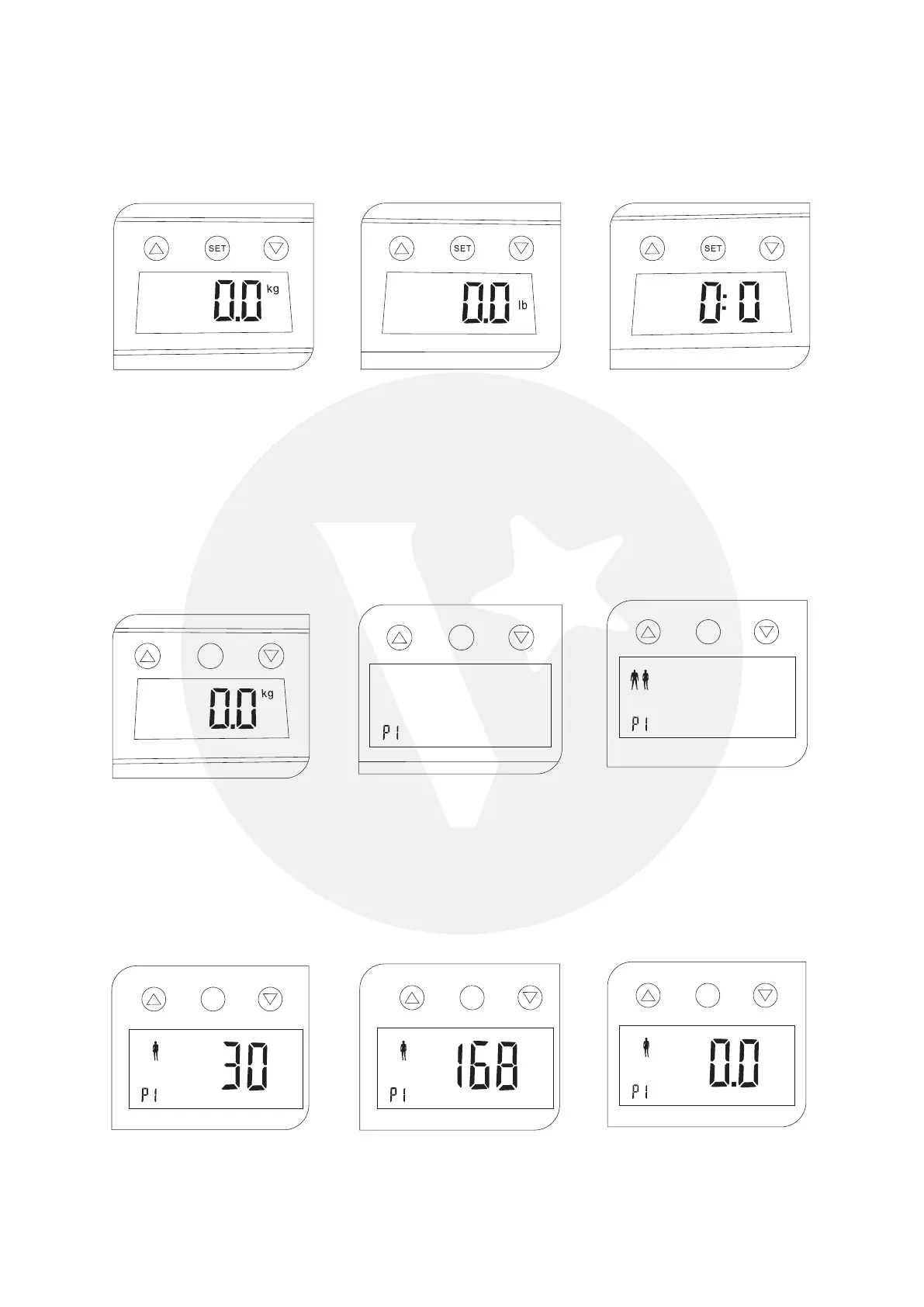
Press the ‘Up’ button to select measuring unit(kg/lb/st). The default unit is Kg.
Note: kg=kilograms, lb=pounds, st=stone
2) Personal Data
You must enter user parameters in order to measure your body fat percentage and other
physical data.
Press ‘Set’ to turn on display for user selection (P0-P9).
Press ‘Up’ or ‘Down’ to change the user number, press ‘Set’ again to select gender.
Press ‘Up’ or ‘Down’ to change the gender, press ‘Set’ again to select age.
Press ‘Up’ or ‘Down’ to change age, press ‘Set’ again to select height.
Press ‘Up’ or ‘Down’ to change height, press ‘Set’ again to complete.
Display will indicate 0.0kg, it is ready to measure.
SET
SET
kg
SET
age
SET
cmcm
SET



 To Next Page