Model #: XL-1
Please call for replacement parts or assistance: 1-866-942-5362
VAS Furniture Mfg. Inc. Factory No. 55-12029 Page 15
Assembly Instructions
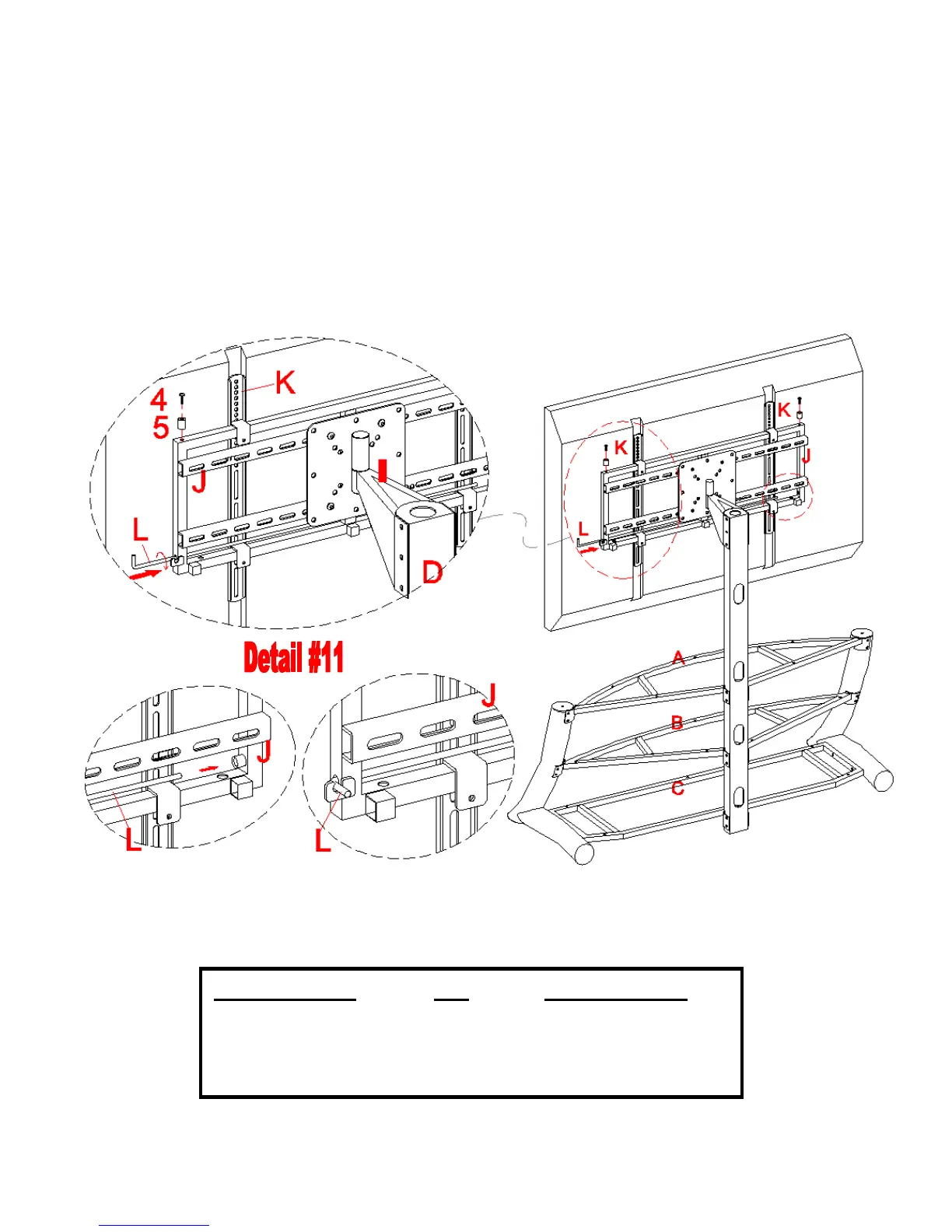
20. Now you can hang your Plasma by placing the Monitor Bracket (K) over the XYZ
Mounting Frame (J). Once the TV is in place, insert the Safety Bar (L) completely into the
bottom taper holes on the XYZ Mounting Frame. Make sure that it sits over the bottom
hook of the Monitor Bracket and the bent end is faced toward wall and turned into the
slot of back hook for additional security. See detail #11.
21. Attach two Stoppers (5) with the 1 1/4” Bolt (4) at each end of the XYZ Mounting Frame (J)
to prevent the TV from falling. See detail #11.
Parts Required Qty Tools Required
L – Safety Bar (1) Allen Wrench
(4) – 1 1/4” Bolt (2)
(5) – Stopper (2)


 To Next Page