19
designed this way such that when the user returns from being
away, hot water will be available.
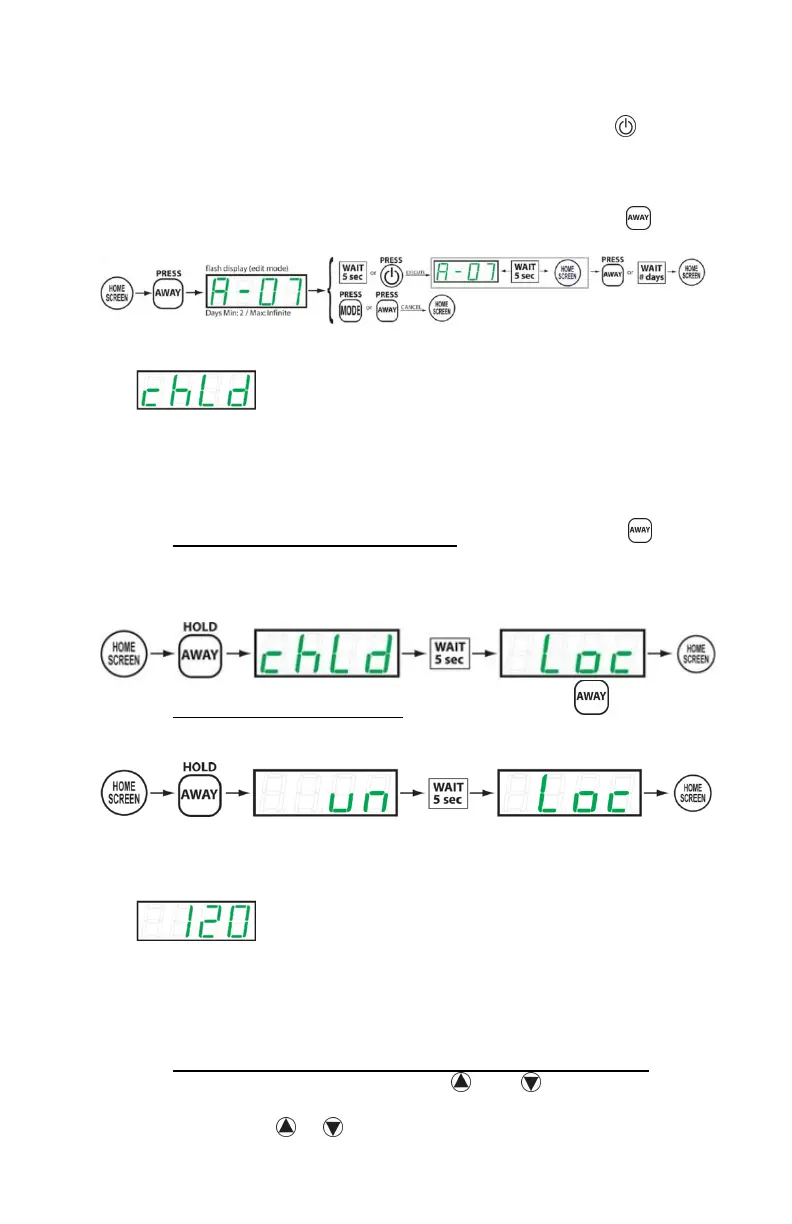
Once the desired time period is displayed, press the
button to save the selection. The water heater will now be in
Vacation mode. The display will show “A-##”, where “##” is
the number of days remaining in the vacation mode period.
To manually cancel or end Vacation mode, press the
button once.
F. CHILD LOCK
Child Lock is essentially a button locking mechanism. If the
user wishes, he or she may set the child lock, which will
disrupt any future attempt to change modes, change the set
point, etc. The user will be locked out of performing any
function on the device until the child lock is released.
To activate the Child Lock feature, press and hold the
button until “chLd” is displayed on the screen. The controller
is now locked.
To deactivate the child lock, press and hold the button
until “un” is displayed. You will be returned to the home
screen.
G. TEMPERATURE SETPOINT
The temperature setpoint represents the desired approximate
temperature of the water inside the heater. The setpoint may
be adjusted to your liking. There are pre-defined temperature
limits to prevent extremely hot or freezing water in the unit
and surrounding piping.
To change the temperature set point for hot water output,
from the home screen, press the AND buttons on the
controller. The display will flash the new temperature set
point as the or buttons are pressed. Once the desired



 To Next Page