PARKING
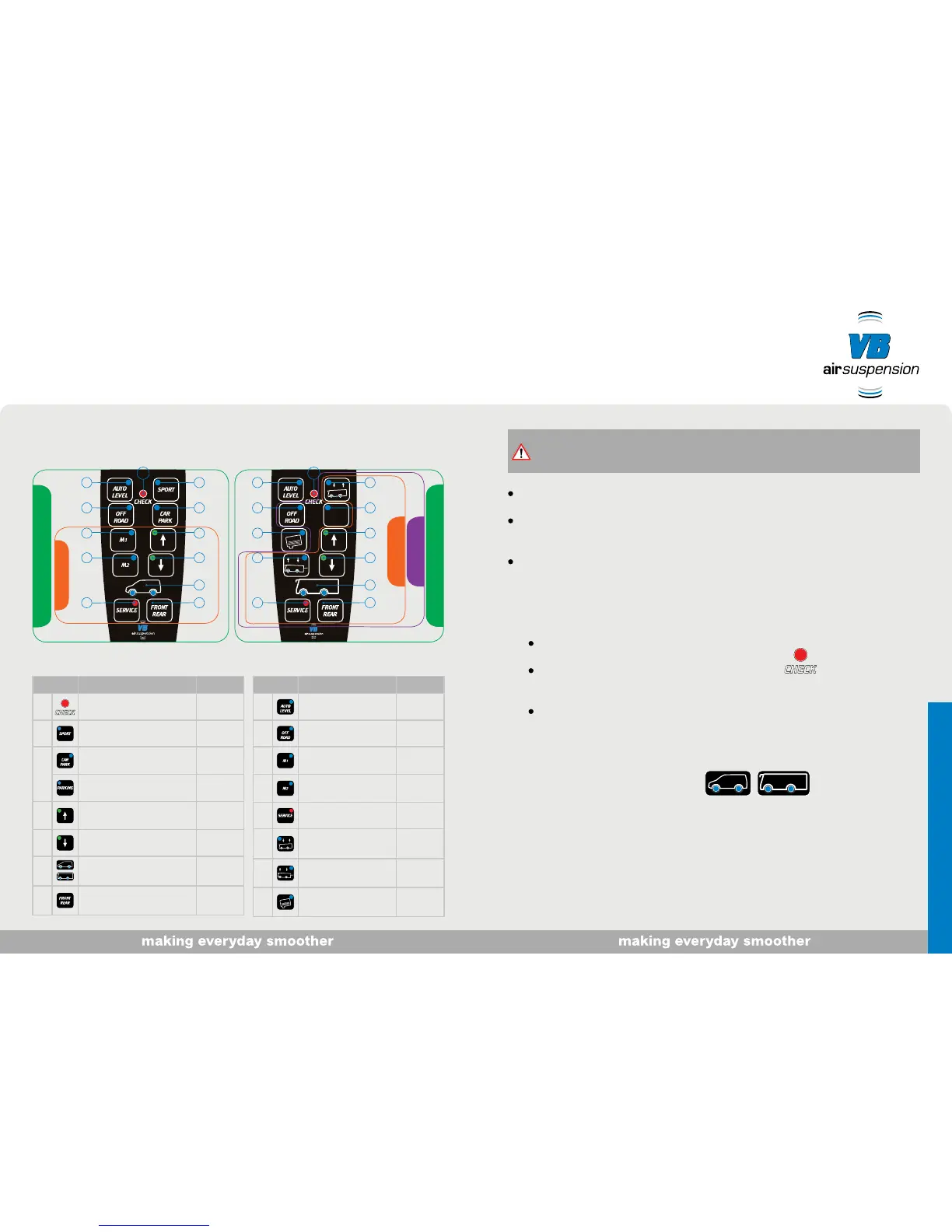
VB-FullAir 4C
VB-FullAir 2C
VB-FullAir 3C
VB-FullAir 4C
VB-FullAir 2C
28
39
4
10
5
11
7
12
6
1
13
8
39
4
15
5
14
7
12
6
1
8 9
The air suspension system is ready for use when you switch on the ignition.
While driving, the control functions are limited or unavailable. In such situations, the safe
ride-height is controlled automatically.
When raising or lowering with the handbrake on, tension or noises may occur in the vehicle.
If you then release the handbrake, there may be unexpected, slight up-and-down movements.
Starting the air suspension system
1. Switch on the air suspension system
The check light comes on for one second:
The system has started correctly.
LED for the front and/or rear axle comes on:
The vehicle is at the ride height.
The height of the selected axle(s) can be adjusted.
LEDs for the front and/or rear axle and a function button come on:
The selected level is reached.
‘Selected axle’ display
One or both LEDs in the vehicle shown indicate the axle(s) for which manual adjustment is enabled.
Button Summary Speed
1 Check light
2
Sport
> 0 km/h
3
Car Park
< ±
30 km/h
Parking
< ±
30 km/h
4 Vehicle height - up
< ± 5 km/h
5 Vehicle height - down
< ± 5 km/h
6
Selected axle
display
< ± 5 km/h
7 Front - Rear
< ± 5 km/h
Button Summary Speed
8 AutoLevel
9
OffRoad
< ±
30 km/h
10 Vehicle height 1
< ± 5 km/h
11 Vehicle height 2
< ± 5 km/h
12 Service
< ± 5 km/h
13 Forward position
< ±
30 km/h
14 Backward position
< ± 5 km/h
15 Water tank
“Your remote control may not include all functions. Find out what you can do.”
MotorhomeCommercial vehicle
Note:
When raising or lowering, make sure there is enough space above, below and along the
sides of the vehicle.
Operation



 To Next Page