28
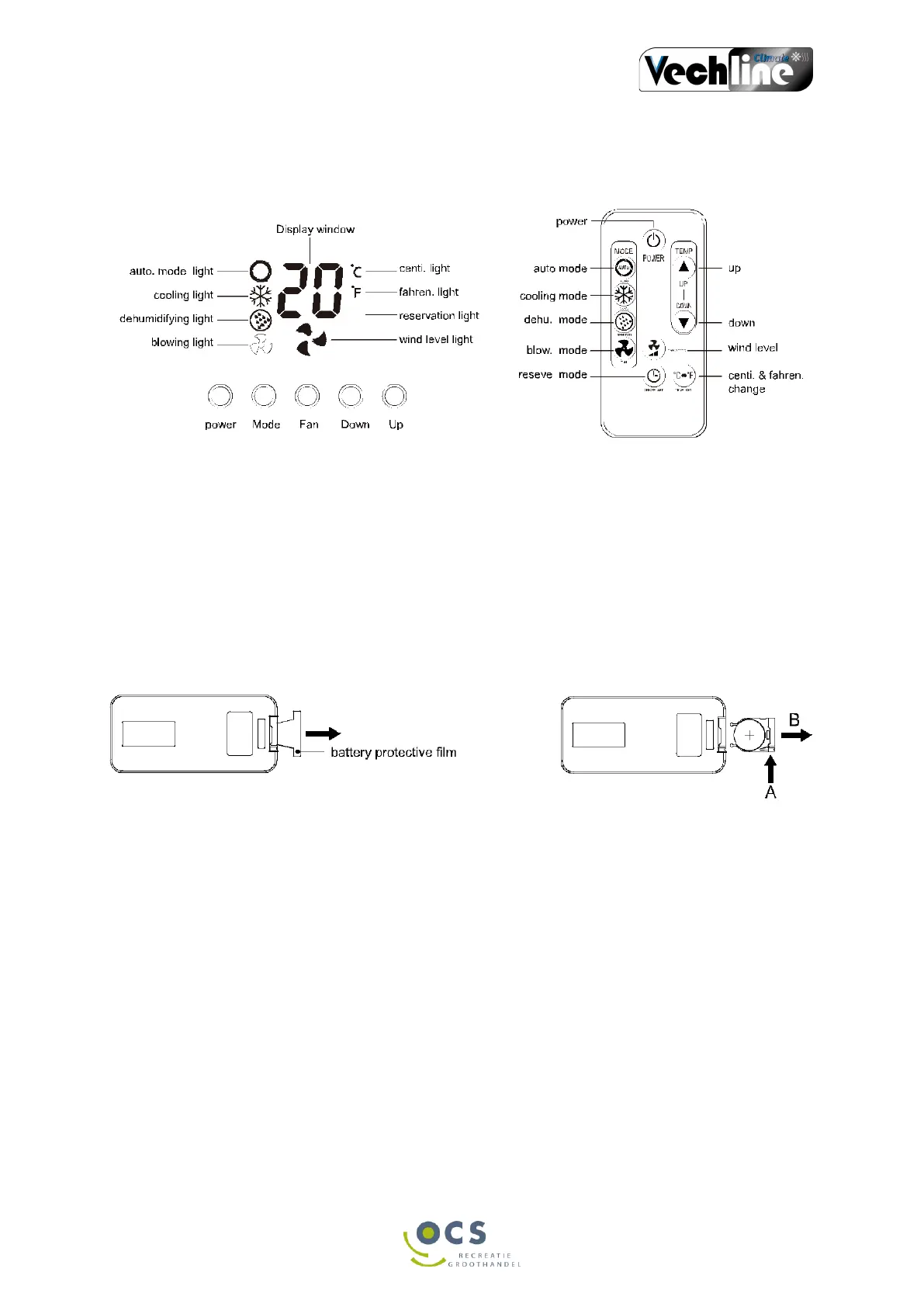
CONTROLS/ DISPLAY/ REMOTE CONTROL
Temperature change and time setting can only be controlled by remote control
• Power: On/ off switch.
• Mode: Select the automatic, cooling, dehumidifying or ventilation mode.
• Reserve: Time setting
• Temperature, up/ down: To set the desired temperature and hours.
• Fan speed: Fan speed.
• Wind light: Displays the set wind speed. high or low.
• Reserve light: The time can be set as soon as this light comes on.
• Celsius/ Fahrenheit light: Select the desired unit, C or F.
Remote controle battery
• First remove the protective film for the battery with a new battery. Press A and slide the
cover in direction B as shown above, and replace the old battery. The + points upwards.
Use the battery model CR 2035 3V.
o Remove the battery if you will not be using the remote control for a long time.
o Point the remote controller at the indoor unit to operate it.
o Avoid moisture near the battery.
• Always use the remote controller to the indoor unit.


 To Next Page