ENVIRONMENTAL
CONSIDERATIONS
Vector 4
SBC
Power Requirements
For
accurate
troubleshooting
or
operation,
make
sure
that
the Vector 4 is
supplied with current which meets
the
specifications
outlined
in
Appendix A.
Use another appliance,
if
necessary,
to
test
whether the power
outlet
used for
the Vector
4 is functioning. A typewriter, clock, or desk lamp
will
suffice.
Be
sure
to
remove the appliance before installing the Vector 4.
Make
sure
that
no
machinery or motor-driven equipment drawing large amounts
of
current,
such as a copier or
air
conditioner, is connected
to
the same line
as your Vector 4.
Any
equipment which
pulls
a heavy and
intermittent
load
from
the
power
line
can
cause
the
Vector 4
to
lose current
and
shut down.
This
may
cause loss of
data
during operation.
Connectors
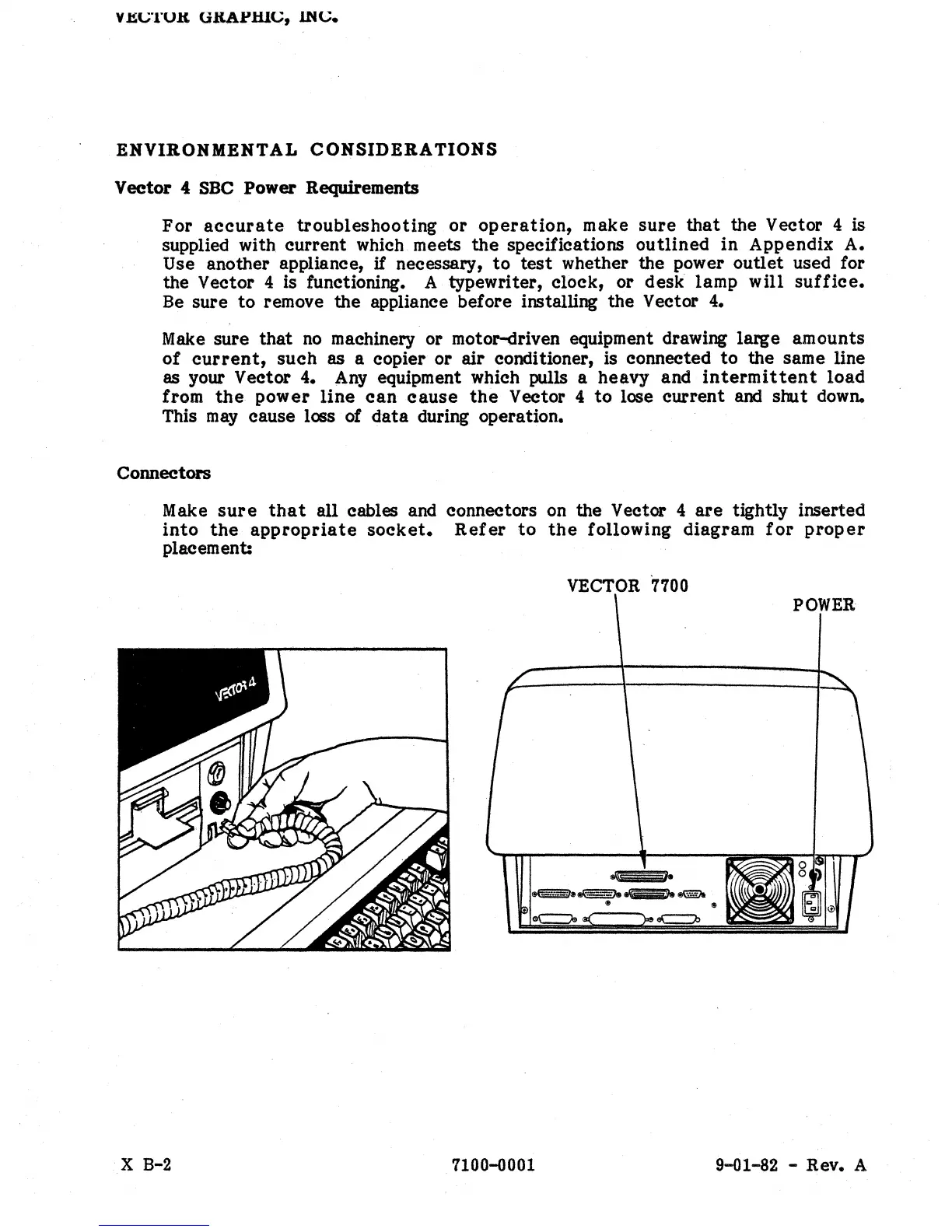
Make
sure
that
all cables and connectors on the Vector 4
are
tightly inserted
into
the
appropriate
socket.
Refer
to
the
following diagram
for
proper
placement:
VECTOR
7700
POWER
X B-2
7100-0001
9-01-82 - Rev. A


 To Next Page
 Loading...