Usq
Diskettes
VECTOR 4
USER1S
MANUAL
STARTING UP YOUR VECTOR 4
Diskettes
are
in
many ways
the
most important
part
of your system. All
the
information
that
you
store
on your Vector 4 will be
stored
either on
diskettes
or
on
the
hard
disk.
An
improperly-mounted
diskette
can
cause a loss of
valuable information.
The
following
section
gives
a
brief
introduction
to
the
proper methods for
using diskettes with your
Vector 4.
If
you have never used
diskettes
before,
read
through
this
section
before
continuing
with
the
start-up
instructions.
Even
if
you
plan
to
do
most
of
your
work
on
the
hard
drive,
you
should
periodically back up your work on diskettes.
Loading
Diskettes
There
are
two
steps
to loading a diskette: insertiDi' and rnountiDi'.
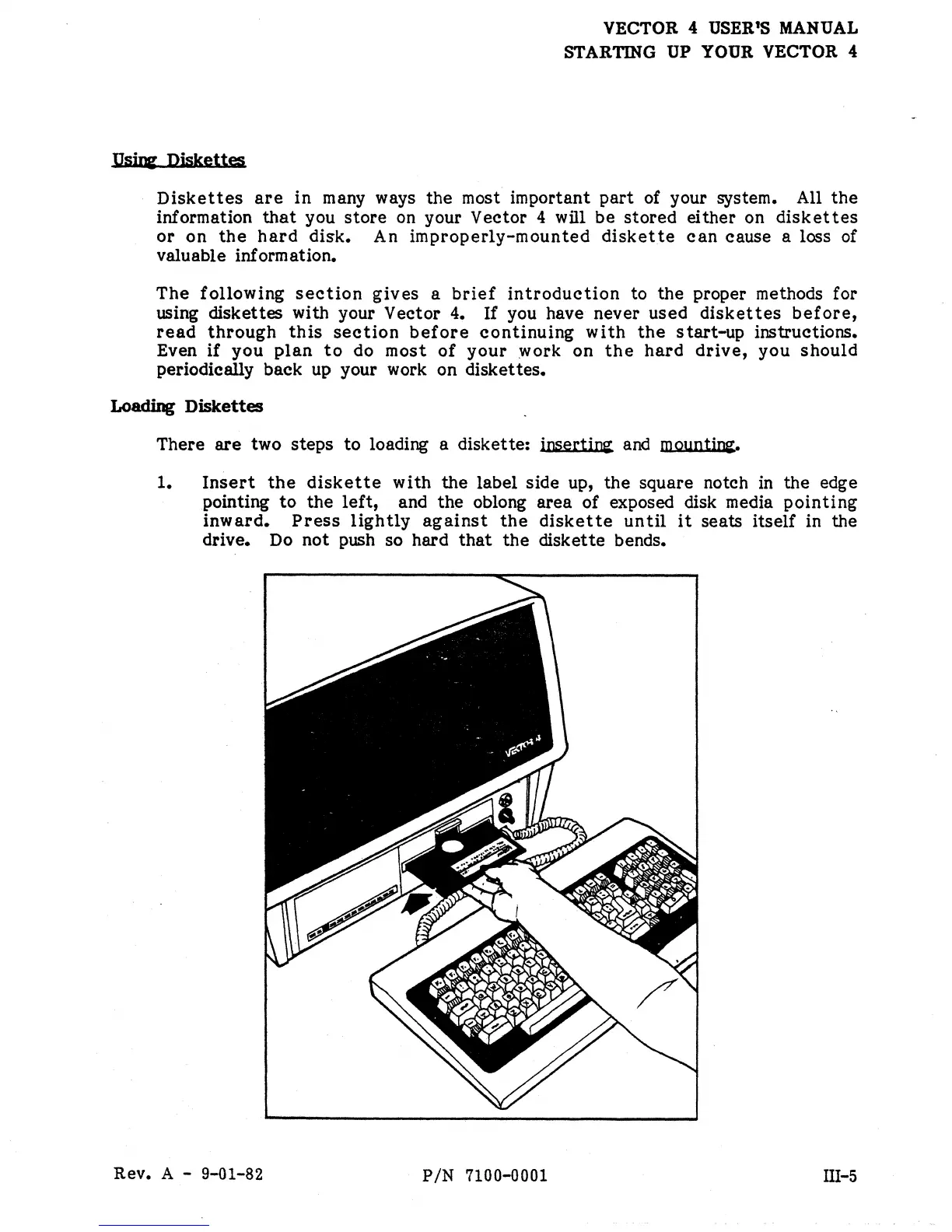
1.
Insert
the
diskette
with
the
label side up, the square notch
in
the edge
pointing
to
the
left,
and
the
oblong area
of
exposed disk media
pointing
inward.
Press
lightly
against
the
diskette
until
it
seats itself in the
drive. Do not push so hard
that
the
diskette bends.
Rev. A -
9-01-82
PIN
7100-0001
III-5


 To Next Page
 Loading...