EasyManua.ls Logo

Vector 4 - Page 185

Vector 4
227 pages
Print Icon
To Next Page IconTo Next Page
To Previous Page IconTo Previous Page
Loading...
VECTOR
GRAPHIC,
INC.
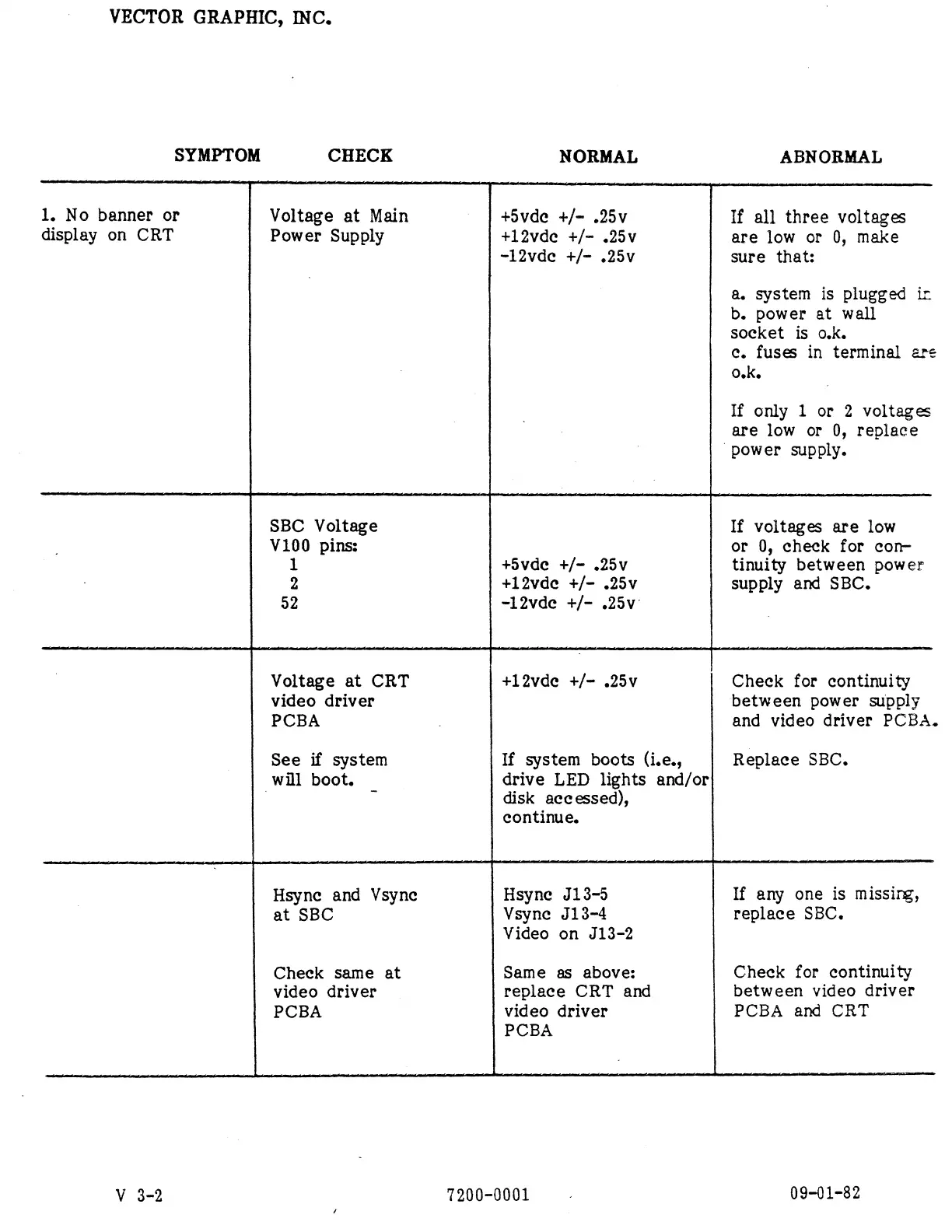
SYMPTOM
CHECK
NORMAL
ABNORMAL
1.
No
banner
or
display
on
CRT
Voltage
at
Main
Power
Supply
+5vde
+/=
.25v
+12vde
+/-
.25v
~12vde
+/-
.25v
If
all
three
voltages
are
low
or
0,
make
sure
that:
a.
system
is
plugged
ir
b.
power
at
wall
socket
is
o.k.
c.
fuses
in
terminal
&re
0.K.
If
only
1
or
2
voltages
are
low
or
0,
replace
power
supply.
SBC
Voltage
V100
pins:
1
2
52
+Svde
+/-
.25v
+12vde
+/-
.25v
-12vde
+/-
.25v
If
voltages
are
low
or
0,
check
for
con-
tinuity
between
power
supply
and
SBC.
|
will
boot.
Voltage
at
CRT
video
driver
PCBA
See
if
system
+12vde
+/-
.25v
If
system
boots
(i.e.,
drive
LED
lights
and/or
disk
accessed),
Check
for
continuity
between
power
supply
and
video
driver
PCBA.
Replace
SBC.
continue.
Hsync
and
Vsyne
Hsyne
J13-5
If
any
one
is
missing,
at
SBC
Vsyne
J13-4
replace
SBC.
Check
same
at
video
driver
PCBA
Video
on
J13-2
Same
as
above:
replace
CRT
and
video
driver
PCBA
Check
for
continuity
between
video
driver
PCBA
and
CRT
V
3-2
7200-0001
09-01-82