The Velleman VMA419 is a 32x16 dot matrix display designed for use with Arduino® prototyping platforms. This device allows users to display text and graphics, making it suitable for various DIY electronics projects, educational purposes, and small-scale display applications.
Function Description:
The VMA419 functions as a visual output device, capable of displaying characters, lines, circles, and filled rectangles on its 32x16 LED grid. It interfaces with an Arduino® board, receiving instructions to control individual pixels or draw predefined shapes and text. The display supports both static and scrolling text modes, offering flexibility in how information is presented. It requires specific libraries (TimerOne and DMD419) to operate, which are integrated into the Arduino® IDE for programming. The display's operation is based on shifting pixel data into its internal registers, with timing controlled by a clock signal.
Important Technical Specifications:
- Display Resolution: 32x16 dots (LEDs).
- Power Input: Requires a 5V power supply. It is crucial not to power the DMD directly from the Arduino® or USB power, as these sources are typically limited to 0.5A and may not provide sufficient current for the high-brightness LEDs, potentially causing damage. A separate 5VDC connection, such as from the VMA416, is recommended.
- Connectivity: Features a pin layout for connection to an Arduino® board, including pins for OE (enable/disable LEDs), A, B, C, D (pins to select 1/4 of the DMD), CLK (clock pixel data), SCLK (latch shift register content), R (raw pixel data stream for red), and G (raw pixel data stream for green on HUB12 connector, unused). Multiple GND pins are also provided.
- Libraries: Requires the TimerOne and DMD419 libraries for proper functionality.
- Programming Language: Utilizes the Arduino programming language (based on Wiring) and the Arduino® software IDE (based on Processing).
Usage Features:
- Text Display:
- Static Text: Users can display single characters or lines of text at specified (x, y) coordinates. The display supports two built-in fonts:
SystemFont5x7 (small) and Arial_Black_16 (large).
- Scrolling Text: The device supports scrolling text from right to left. Users can define a string variable (up to 255 characters) to be scrolled across the display. The scrolling speed can be adjusted by modifying the
timer variable in the drawText function.
- Graphics Display:
- Pixel Control: Individual pixels can be activated or deactivated using the
dmd.writePixel(x, y, GRAPHICS_NORMAL, z) function, where z is 1 for ON and 0 for OFF.
- Geometric Shapes: Functions are available to draw basic geometric shapes:
dmd.drawLine(x1, y1, x2, y2, GRAPHICS_NORMAL): Draws a line between two specified points.dmd.drawBox(x1, y1, x2, y2, GRAPHICS_NORMAL): Draws an unfilled rectangle.dmd.drawFilledBox(x1, y1, x2, y2, GRAPHICS_NORMAL): Draws a filled rectangle.dmd.drawCircle(x, y, r, GRAPHICS_NORMAL): Draws a circle with a specified center (x, y) and radius (r).
- Arduino® Integration: Designed as an open-source prototyping platform component, it integrates seamlessly with Arduino® boards, allowing for easy programming and control.
- Multi-DMD Support: The libraries are designed to support multiple interconnected DMDs, allowing for larger display configurations by adjusting
DISPLAYS_ACROSS and DISPLAYS_DOWN definitions in the sketch.
Maintenance Features:
- Environmental Protection: The device is for indoor use only and must be kept away from rain, moisture, splashing, and dripping liquids to prevent damage.
- Temperature Acclimatization: If the device has been exposed to temperature changes, it should not be switched on immediately. It should be left switched off until it reaches room temperature to prevent damage.
- User Manual for Reference: The user manual should be kept for future reference, containing important safety instructions, connection diagrams, and programming examples.
- Warranty Information: Velleman® provides a 24-month warranty on production flaws and defective material for consumer products. However, the warranty does not cover damage from improper handling, environmental factors (oxidation, shocks, falls, dust, dirt, humidity), or unauthorized modifications.
- Recycling: The device should not be disposed of as unsorted municipal waste. It should be taken to a specialized company for recycling or returned to the distributor or a local recycling service, adhering to local environmental rules.
- Software Updates: Users are encouraged to visit www.velleman.eu for the latest version of the manual and product information, which may include updates or changes to the device's functionality or programming.
- Troubleshooting: Before seeking repair, users are advised to reread the manual and check for obvious causes of any flaws, as returning a non-defective article may incur handling costs.

 Need help?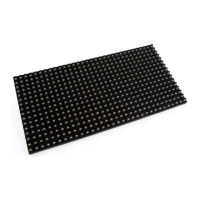

 To Next Page
 General