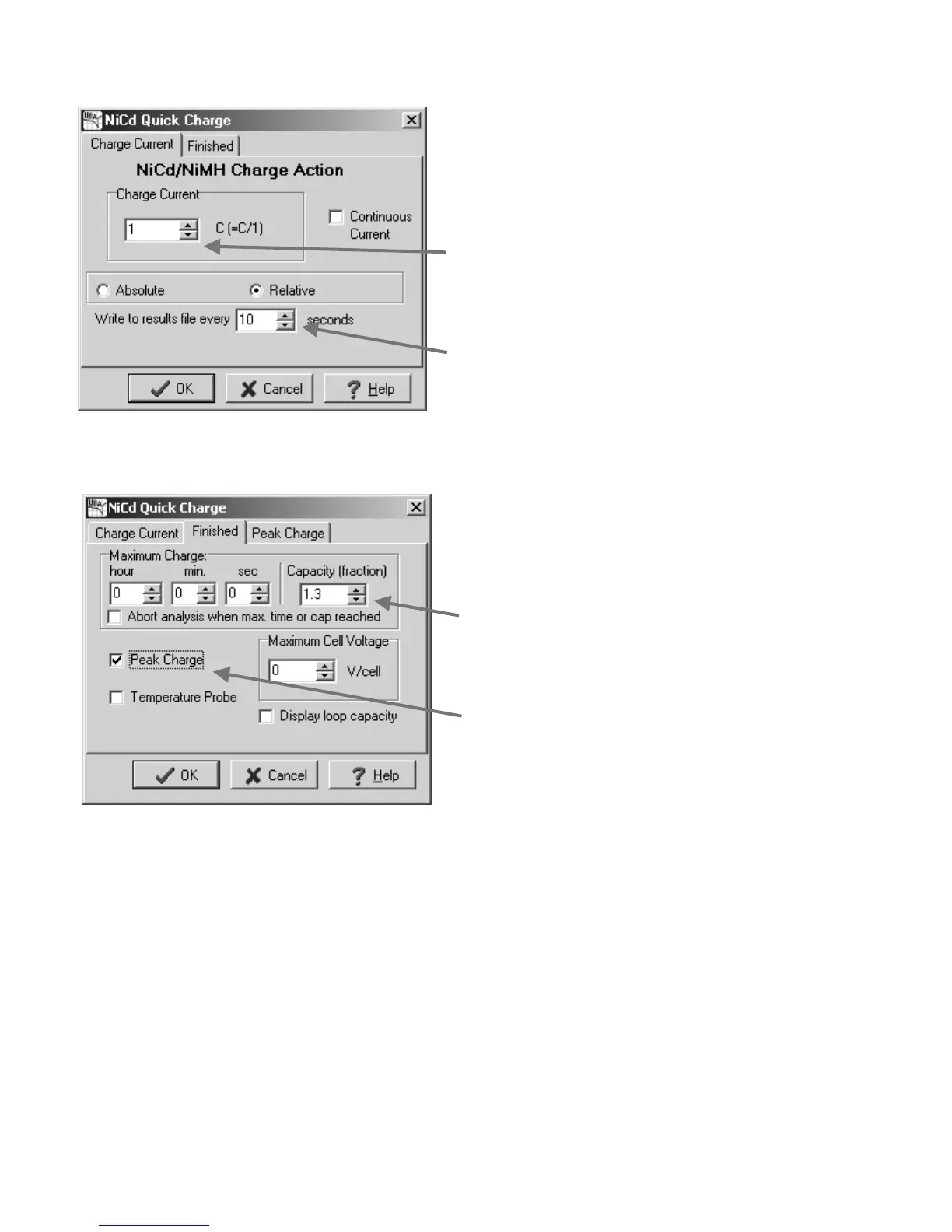
Now to get this BAR to actually analyze a battery you need to set the charge and discharge values. Click on the NiCd
Quick Charge action and enter the parameters as shown below.
Figure 21: Charge Action: Entering the charge current parameters.
Now click the Finished tab to enter the parameters that determine when the quick charge cycle ends.
Figure 22: Charge Action: Entering the finished parameters.
The UBA Let's Get Started Guide Page 15
Enter “10” for the Sample Time.
The battery voltage and charge
current will be saved every 10
seconds to the results file.
Enter “1” for the Charge Current
which gives a current of 1C.
This will charge the battery in
approximately one hour.
Enter “1.3” for the Maximum
Charge Capacity. Thus quick
charging will end when the battery
has been charged 1.3 times its
rated capacity. This is a fail safe
feature to limit over charging.
Click on the Peak Charge
checkbox. This adds a Peak
Charge page.


 To Next Page