16
• Replace the tank and press the COOL
button. The sound of the water owing
should be heard.
• Select the desired speed with the
button SPEED between:
• Remeber:
• If the COOL button is not turned on
the ventilation will only be activated
at room temperature and the desired
speed can only be selected with the
button SPEED.
Horizontal automatic oscillating function;
The internal vertical slats oscillate,
alternately directing the air to the right
and to the left.
Programme the automatic switch-o of
the operating unit.
By pressing this button, the ion generator
will begin to release negative ions into
the environment to purify it while the
indicator light (-Ion) remains on.
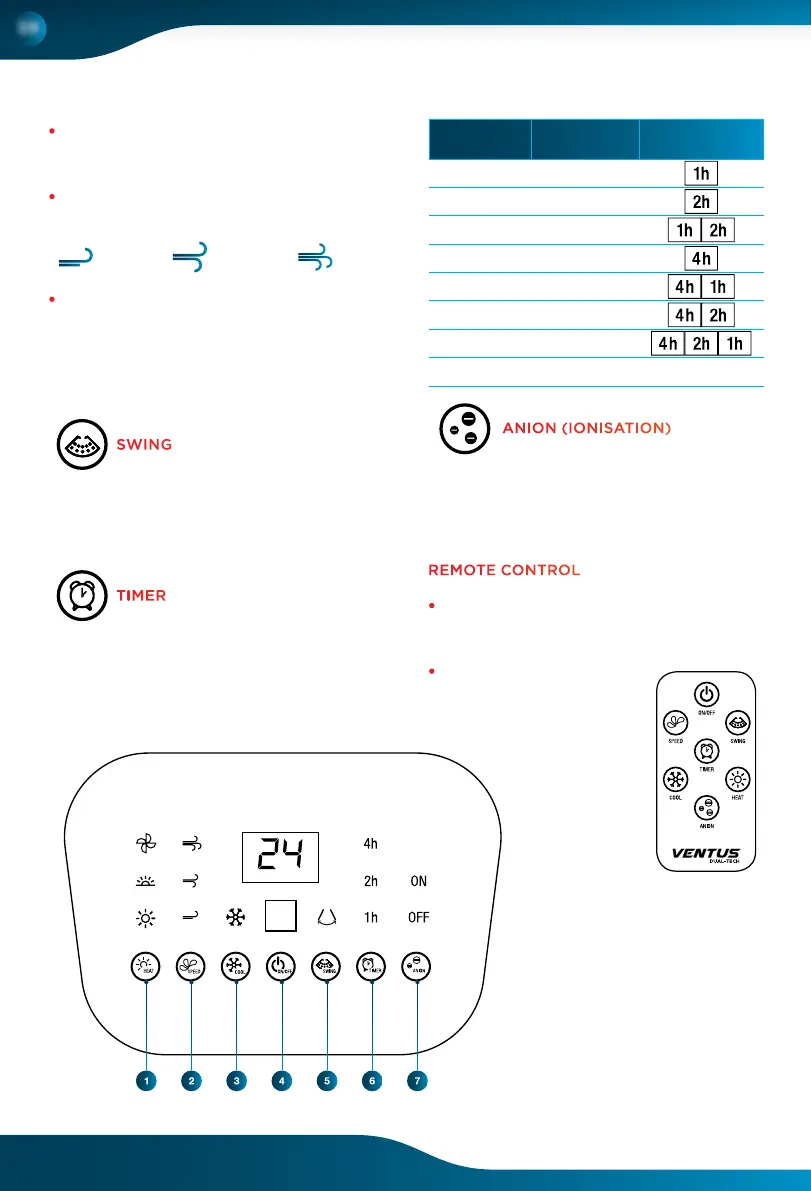
REMOTE CONTROL
•
It has the same functions as those
described in the control panel (show
how to install).
• Use CR2025 batteries.
LOW
MEDIUM
HIGH
1. HEATER
2. SPEED
3. COOLER/HUMIDIFIER
4. ON/OFF
5. SWING
6. TIMER
7. ANION (IONISATION)
TIMER
Push Timing Button panel
Once 1 hour
Twice 2 hours
3 times 3 hours
4 times 4 horas
5 times 5 hours
6 times 6 hours
7 times 7 hours
8 times OFF OFF
ANION (IONISATION)
EN
SWING



 To Next Page