EasyManua.ls Logo

Veria 301 - Page 46

Veria 301
Print Icon
To Next Page IconTo Next Page
To Previous Page IconTo Previous Page
Loading...
45
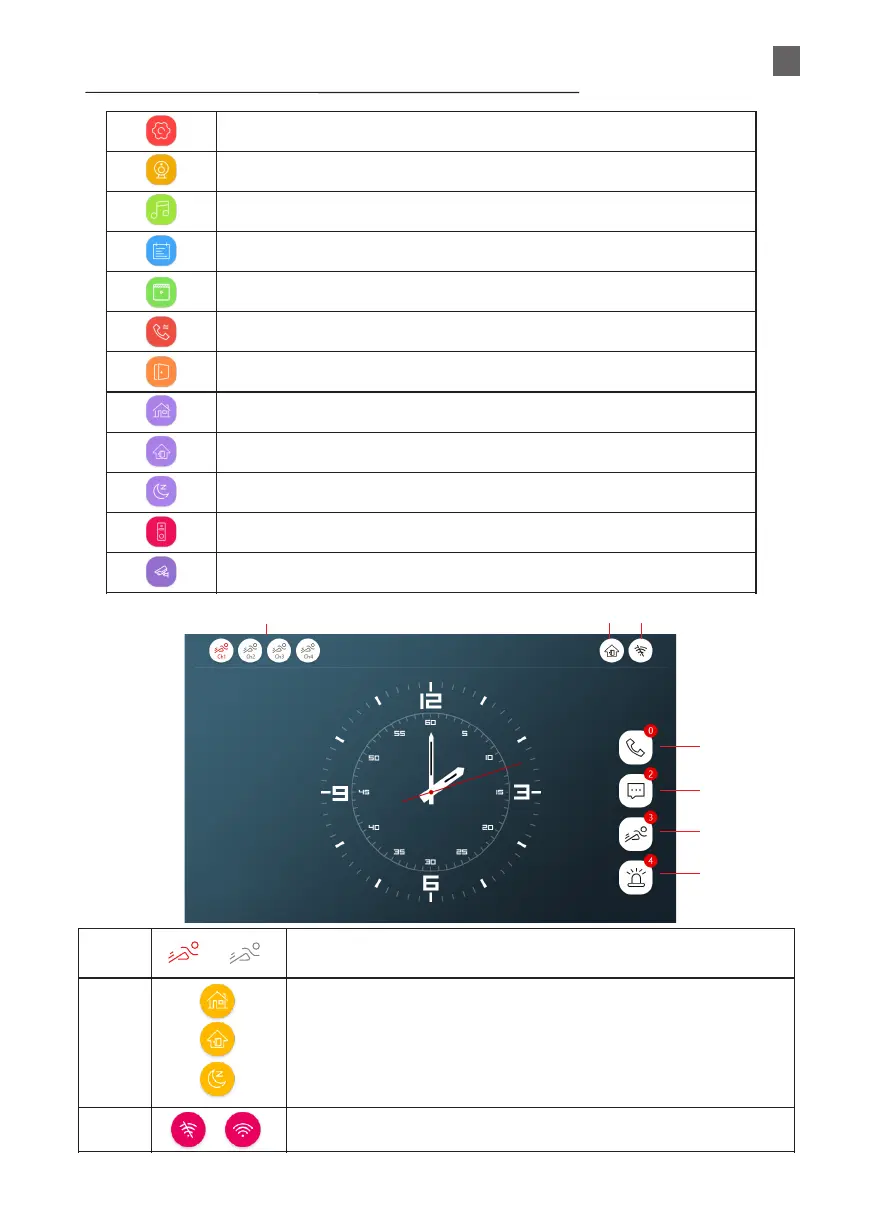
TOUCH SCREEN ICON FUNCTION DEFINITION:
System settings
Device parameter setting
Ringtone settings
Record file playback
Multimedia playback
Transfer calling
Independent unlock
At home mode
Not at home mode
Sleep mode
Outdoor units
Surveillance camera
2021-01-01 Wed
Red indicates that motion detection is enabled on this channel.
Gray indicates that motion detection is disabled on this channel.
HOME mode- normal working condition. Notifications in the mobile app.
NOT AT HOME mode - allows the visitor to leave a message with a video.
Notifications in the mobile app.
DORMANT mode - the ringing on the monitor is suppressed, the outdoor unit
will ring. Notifications in the mobile app.
Network connection status indication.
EN