34
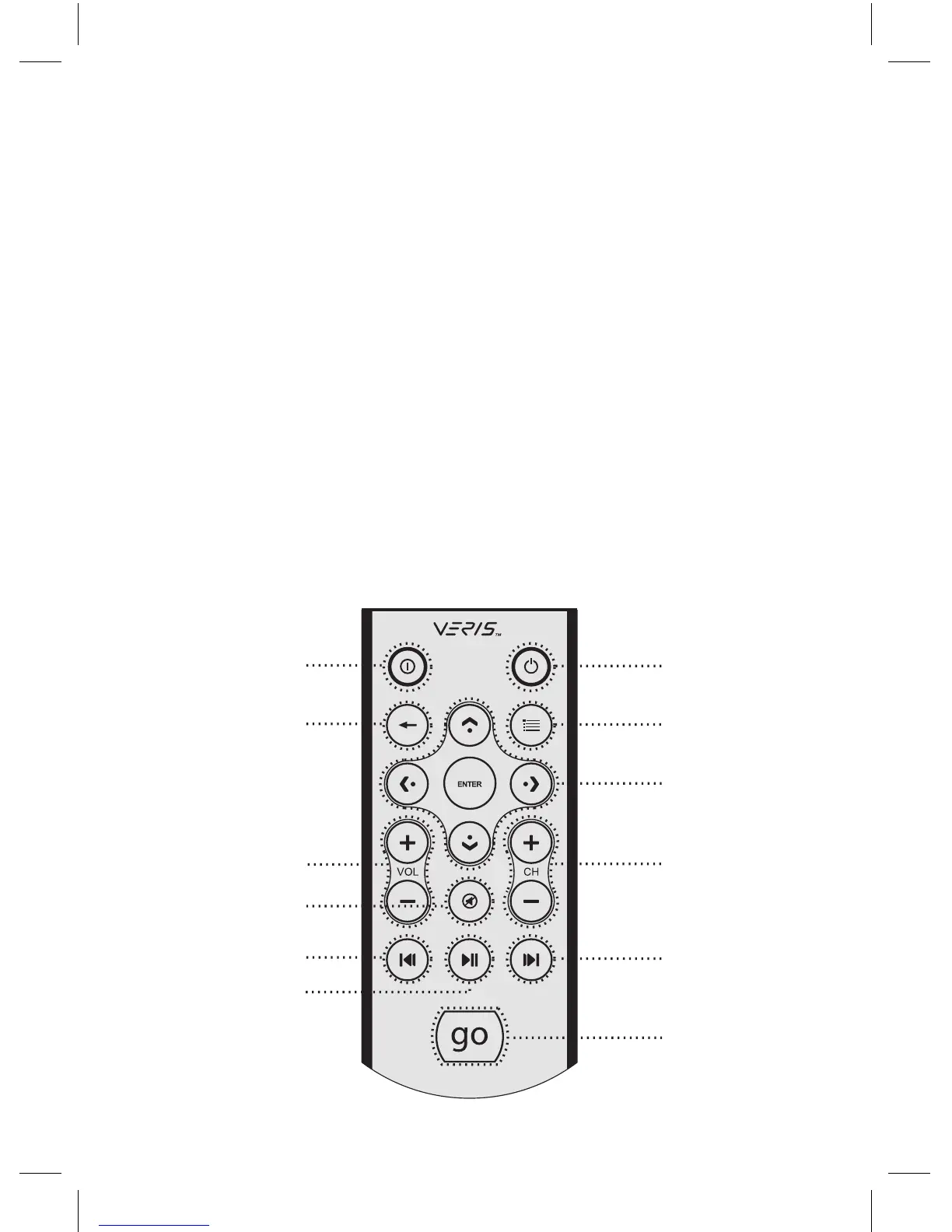
3. RM100(PC用红外线遥控器)
1. Power: 开启或关闭PC电源
2. Application Exit: 关闭使用中的视窗,或是关闭iMEDIAN HD
[ALT + F4]
3. Menu: 进入 iMEDIAN HD选单画面
4. Back: 返回上一页选单
5. 4 Way Navigation and Enter: 4向导航键:上/下/右/左键,
ENTER确认键
6. Volume +/–: 音量调整
7. Mute: 静音键
8. Channel +/–: iMEDIAN HD 模式中电视频道切换/上一页/下一页
9. Play: 短押时: 放映/暂停,长押时: 停止
10. Prev/Rewind: 短押时: 返回,长押时: 回转
11. Next/Fast forward: 短押时: 跳过,长押时: 快转
12. “go“: 启动 iMEDIAN HD 应用程式
1
3
5
11
8
12
4
6
2
7
10
9



 To Next Page