Installation
Mounting 1/2
Verkada Inc. 405 E 4th Ave, San Mateo, CA 94401
sales@verkada.com
All specifications are subject to change without notice
Copyright © Verkada Inc. All rights reserved.
15
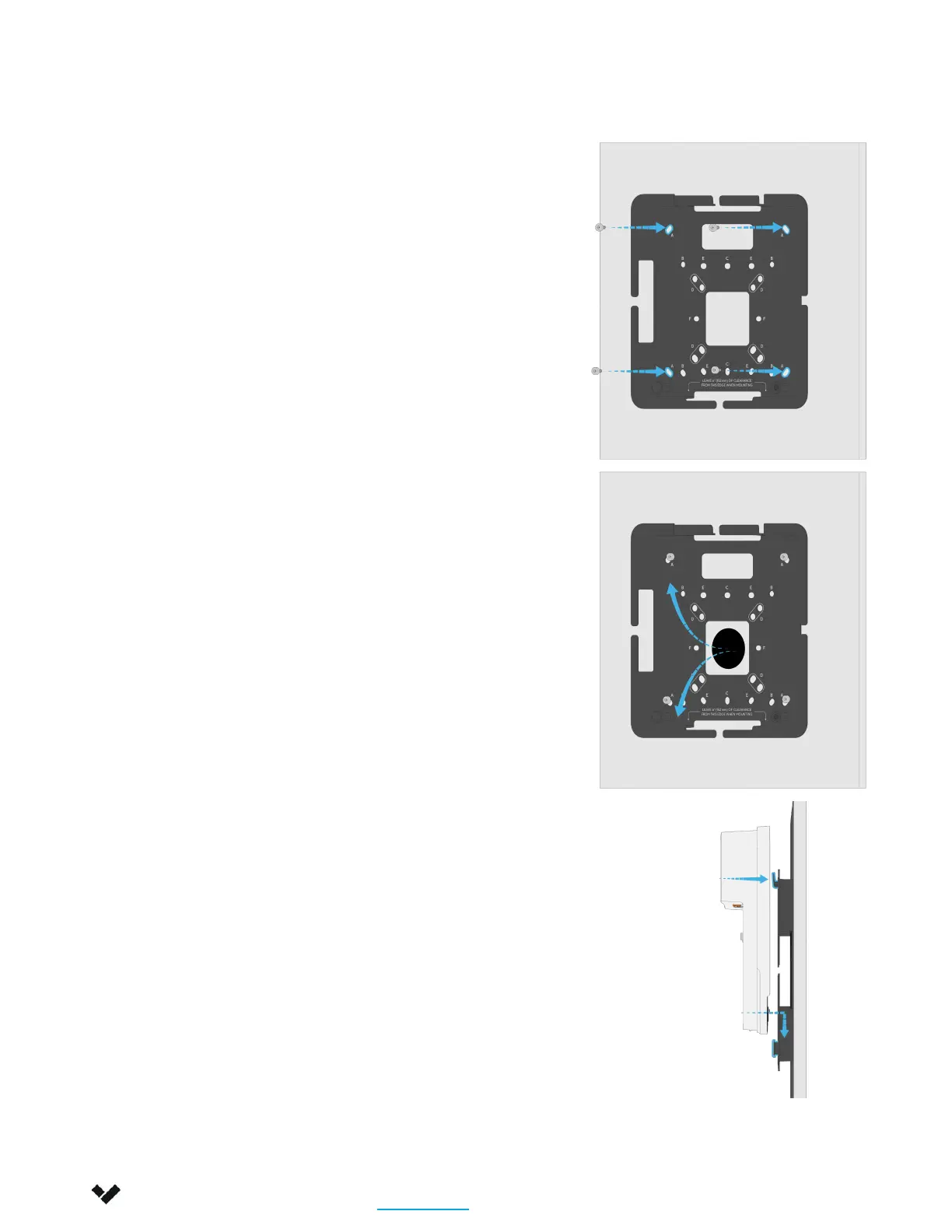
For wall mounting, drill pilot holes
using pattern ‘A’ on mount plate.
For a solid material like wood or
metal, drill ⅛-in (3.17mm) pilot
holes.
Drive the mounting screws
directly into the pilot holes.
For drywall, plaster or masonry,
separate wall anchors may be
required.
Once mount plate is firmly
attached to surface, bring the
cables through the mount plate.
Align the hook features of the
mount plate to the corresponding
cavities on the controller.
Gently set the controller into
position and slide it downwards.


 To Next Page
 Loading...