FCC ID: K6620223X20
IC ID: 511B-20223X20
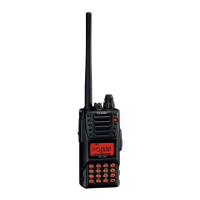
VX-120/170 O
PERATING MANUAL
10/64
Vertex Standard Co., Ltd.
allows free tuning throughout the currently-selected operating band.
Three basic frequency navigation methods are available on the VX-120/170:
1) Tuning Dial
Rotation of the DIAL allows tuning in the pre-programmed steps established for the current
operating band. Clockwise rotation of the DIAL causes the VX-120/170 to be tuned toward a
higher frequency, while counter-clockwise rotation will lower the operating frequency.
If you press the [F/W] key momentarily, then rotate the DIAL, frequency steps of 1 MHz will be
selected. This feature is extremely useful for making rapid frequency excursions over the
wide tuning range of the VX-120/170.
2) Direct Keypad Frequency Entry (VX-170 only)
The desired operating frequency may be entered directly from the keypad.
To enter a frequency directly, just keying in the 10 MHz, 1 MHz, and the kHz digits.
Examples:
To enter 146.560 MHz, press [4] [6] [5] [6] [0]
To enter 146.5625 MHz (12.5 kHz steps), [4] [6] [5] [6] [2]
3) Scanning
Press and hold in either the [▲] or [▼] key for one second to initiate upward or downward
scanning, respectively (Manual VFO Scan).
For scanning within a limited sub-band range, from the VFO mode, press and hold in the
[MR(SKIP)] key for one second to begin scanning toward a higher frequency within the
previously-defined sub-band (Programmed VFO Scan). Details regarding sub-band setup
may be found on page ??.
If you wish to reverse the direction of the scan (i.e. toward a lower frequency, instead of a
higher frequency), just rotate the DIAL one click in the counter-clockwise direction while the
VX-120/170 is scanning. The scanning direction will be reversed. To revert to scanning
toward a higher frequency once more, rotate the DIAL one click clockwise.
The scanner will stop when it receives a signal strong enough to break through the Squelch
threshold. The VX-120/170 will then hold on that frequency according to the setting of the
“RESUME” mode (Set Mode Item 32: RESUME). Press the PTT switch momentarily to
cancel the scanning. This only stops the scan; it does not cause transmission to occur. See
page // for details regarding Scan Operation.
Transmission
Once you have set up an appropriate frequency inside the 144 MHz Amateur band on which


 To Next Page
 Loading...