1
2
2
1
3
5
6
8
9
11
12
12
14
4
7
10
13
USB
Earphone jack
1
2
3
4
Volume+/-
START/STOP
TONE
POWER
5
6
7
RHYTHM
FILL-IN/SYNC
DEMO
8
9
10
11
RECORD
Metronome
PLAY
CHORD
12
13
14
MENU
Bluetooth/MP3 mode
CHOOSE+/-
PFDAL
Audio output
(earphone)
AUDIO IN
POWER
SUSTAN PEDAL
MIDI
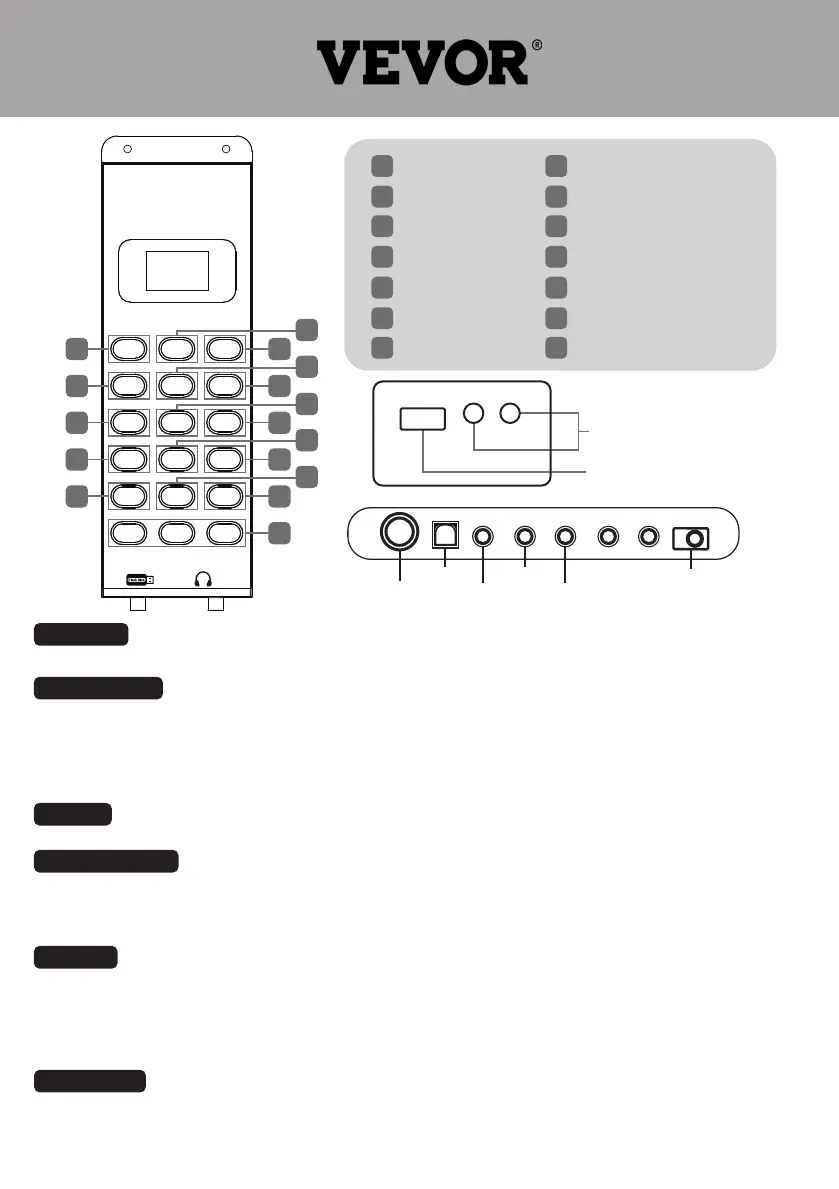
1.POWER
Turn on the power, you can play the keyboard, into the playing state.
2.Volume+/-
After pressing the 【VOLUME】, the 【+】【-】 key can be used to increase/decrease
the volume.
There are 16 volume control segments (ranging from 0 to 16). After the keyboard is
powered on, the default value is 13.
3.TONE
After pressing the【TONE】key, the 【+】【-】 key can be used to select the tone.
6.RHYTHM
Press the 【START/STOP】 key to enter rhythm mode. After pressing the rhythm key,
you can use the 【+】【-】 key to select rhythm.
5.DEMO
Press the【DEMO】 key for the first time to enter the demo song mode, playing from the
first song until the last song is played, will not repeat the current song. Press the“Demo”
button a second time to exit the demo mode. In demo mode, press the【Selectlect +/-】
key to switch songs.
4.START/STOP
Press the 【START/STOP】 key for the first time to start playing the rhythm. Press the
【START/STOP】key for the second time to stop playing the rhythm. Exit the mode
after entering the recording, playback, metronome function, etc.


 To Next Page
 Loading...