
 Need help?
Do you have a question about the VEVOR CM03 and is the answer not in the manual?
Instructions on reading manual carefully, wearing eye protection, and understanding hazard symbols.
Device compliance with FCC Rules, conditions for operation, and interference.
Warnings about direct laser exposure, using optical instruments, disassembly, and child operation.
Details the laser line emission capabilities for CM03 and CM04 models.
How to activate and use self-leveling feature, including range and alarm.
How to activate pulse mode for use with a laser receiver.
How to activate manual mode for tilt line functionality.
How to adjust the brightness of laser beams in different modes.
Guidance on cleaning, using damp cloths, and avoiding solvents.
Recommendations for tool storage, battery removal, and safe disposal.
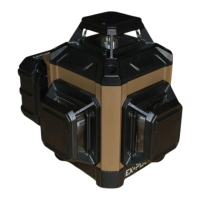
This document outlines the features and operational guidelines for the VEVOR Cross Line Laser, models CM03 and CM04. These devices are designed to project laser lines for various leveling and alignment tasks, offering both self-leveling and manual modes.
The VEVOR Cross Line Laser is a precision tool used for projecting laser lines. Model CM03 emits three 360° laser lines: one horizontal and two vertical. Model CM04 emits four 360° laser lines: two horizontal and two vertical. These lasers are suitable for tasks requiring accurate horizontal and vertical alignment. The device operates in two primary modes: Self-leveling Mode and Manual Mode. In Self-leveling Mode, the laser automatically levels itself within a specified range, ensuring accuracy. If the device is outside its leveling range, it will provide an alarm. Manual Mode allows for projecting tilt lines, where the self-leveling function is deactivated. A Pulse Mode is also available, which dims the beams and enables compatibility with a laser receiver for extended range applications. The device also features a Brightness Adjustment Mode, allowing users to control the intensity of the laser lines.
The VEVOR Cross Line Laser operates with a laser wavelength of 520±10nm and is classified as a Class 2 laser product. It offers a line accuracy of ±3mm/10m. The working range of the laser is 30m, which can be extended to 50m when used with a laser detector. The self-leveling range is 3°±1°, and the leveling time is approximately 3 seconds. The device is powered by a 3.7V 5200mAh Li-Ion Battery, with a charger output of 5V1A. The working time for the CM03 (3CM) model is 8 hours, and for the CM04 (4CM) model, it is 6 hours. The operating temperature range is -10°C to 40°C, and the storage temperature range is -20°C to 60°C.
To operate the device, slide the lock switch to the unlocked position to activate the Self-leveling Mode, which automatically turns on the horizontal lines. A short press of the "H" button toggles the horizontal laser line ON/OFF, while a quick press of the "V" button toggles the vertical laser line ON/OFF. Both horizontal and vertical lines can operate independently or simultaneously. If the laser level is outside its 3°±1° working range in Self-leveling Mode, it will flash rapidly and emit an audible alarm.
For Pulse Mode, a short press of the "M" button on the keypad activates this feature, dimming the beams and allowing the use of a laser receiver. To enter or exit Manual Mode, long press the "M" button. In Manual Mode, the self-leveling function is off, and the laser will not flash or beep if tilted, enabling the projection of tilt lines.
Brightness Adjustment Mode is activated by holding the "H" button to dim all beams until they are no longer visible, or by holding the "V" button to increase brightness to the maximum. This adjustment can be made in both Self-leveling and Manual modes.
The laser tool is factory-sealed and calibrated for specified accuracy. It is recommended to perform an accuracy check before first use and periodically thereafter, especially for precise layouts. When not in use, the tool should be powered OFF, and the pendulum lock should be placed in its locked position.
Users should avoid mixing old and new batteries or different brands/types of batteries; instead, replace all batteries simultaneously with new ones of the same brand and type. Batteries should be kept out of reach of children and removed if the tool will not be used for several months.
The laser tool should not be stored in direct sunlight or exposed to high temperatures, as this can deform the plastic housing and internal parts. Exterior plastic parts can be cleaned with a damp cloth, but solvents should never be used. A soft, dry cloth should be used to remove moisture before storage.
The tool should be stored in its case when not in use. If storing for an extended period, remove batteries to prevent potential damage. This product should not be disposed of with household waste. Batteries and the product itself should be disposed of according to local regulations for electrical and electronic waste, in line with the WEEE Directive. The customer is responsible for the correct use and care of the tool, including periodically checking its accuracy and calibration.
 General
| Brand | VEVOR |
|---|---|
| Model | CM03 |
| Category | Laser Level |
| Language | English |

 To Next Page