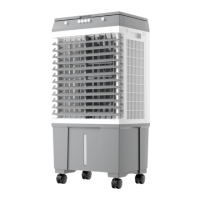
This document outlines the operation, maintenance, and safety precautions for the VEVOR Air Cooler, models JH-320Y and JH-390Y. It serves as an original instruction manual, emphasizing the importance of careful reading before operation. VEVOR reserves the right to interpret the user manual and notes that product appearance may vary, with updates not always explicitly communicated.
Function Description
The VEVOR Air Cooler is designed to provide cooling and air circulation. Its primary functions are controlled via a user-friendly interface.
- Power: A dedicated power button allows users to turn the air cooler on and off. Pressing it once initiates operation, and pressing it again stops it, regardless of the current operating state.
- Swing: This feature controls the left-right oscillation of the louvers, distributing air across a wider area. Pressing the swing button activates the oscillation, and pressing it again stops it.
- Cool: The cool button engages or disengages the cooling system. When activated, the air cooler utilizes water evaporation to lower the air temperature.
- Timer: The timer function allows users to set an operating duration for the air cooler. The timer range is adjustable from 1 to 12 hours, providing flexibility for scheduled operation.
- Speed: This control adjusts the wind speed, offering different levels of airflow intensity to suit user preferences.
- Air Type: The air type button allows users to switch between different wind modes, typically offering "natural wind" and "normal wind" settings. Natural wind often simulates a more varied, natural breeze, while normal wind provides a consistent airflow.
Usage Features
The air cooler incorporates several features for ease of use and safety during operation.
- Water Filling: To operate the cooling system, the water tank must be filled with clean water. The manual describes a slow filling process through an open cover plate, ensuring the water level does not exceed the highest scale mark.
- Automatic Water Filling (Specific Models): Some models are equipped with an automatic water injection device. This system allows for connection to an external pipe (25mm diameter). An internal floating ball mechanism automatically opens or closes water injection based on the water level in the tank, simplifying the refilling process.
- Ice Box Usage: For enhanced cooling, ice boxes can be utilized. The initial preparation involves opening the ice box lid, injecting water up to the scale, and then tightening the lid. After 30-40 minutes, the water and ice crystal mix completely. The ice box should then be placed in a refrigerator's freezer room for two hours. Once frozen, it can be placed into the air cooler's ice container to cool the water temperature. After prolonged use, when the ice crystal turns to jelly, the ice box can be refrozen and reused.
- Water Tank Empty Warning: A crucial safety feature is the warning system for an empty water tank. If the water tank is empty, a specific mark on the control panel will shine, and a buzzer will sound for approximately 10 seconds. Subsequently, the pump switch will automatically cut off to prevent damage to the cooling system. Users are advised not to open the cooling system when the water tank is empty.
- Drainage: The drain outlet is located at the bottom of the unit. To empty the water tank, the drain nut should be loosened, and the machine body tilted. Regular drainage and cleaning are recommended, especially if the machine will not be used for an extended period.
- Assembly: Complete assembly of the air cooler is required before switching it on to ensure proper and safe operation.
- Label Maintenance: Labels and nameplates on the air cooler should be maintained. If they become unreadable or go missing, VEVOR should be contacted for replacements to ensure all safety and operational information is accessible.
- Environmental Use: The air cooler is intended for use only in dry areas. It should not be used in bathrooms, laundry areas, near sinks, or other sources of water to prevent electrical hazards.
- Stability: Ensure the air cooler is placed on a stable surface during operation to prevent overturning.
- Window Use: The air cooler should NOT be used in a window, as rain may create an electrical hazard.
- Unattended Operation: Do not leave the air cooler running unattended.
- Cord Management: The power cord should not be run under carpeting, covered with rugs or similar coverings, or routed under furniture or appliances. It should be arranged away from traffic areas to prevent tripping hazards.
- Obstruction Prevention: Never insert fingers, pencils, or any other objects through the front or rear blade guards.
- Movement: Disconnect the air cooler from power when moving it from one location to another.
Maintenance Features
Regular maintenance is essential to ensure the air cooler's optimal performance and longevity. The manual provides clear instructions for cleaning various components.
- General Cleaning Prompt: After long periods of operation, dust accumulation on the pre-filters and the wet curtain can affect airflow and air purification efficiency. Therefore, regular cleaning of the machine is strongly recommended.
- Cleaning Pre-filter:
- Turn off the power.
- Loosen the screws and pull out the pre-filter.
- Clean the pre-filter with a soft brush and mild detergent.
- Rinse thoroughly with water.
- Dry the pre-filter under the sunshine before reinstallation.
- Cleaning Wet Curtain:
- Turn off the power.
- Loosen the screws in the back-cover plate and remove it.
- Loosen the plastic nuts on the wet curtain to remove the side of the wet pad.
- Clean the wet curtain with a soft brush and mild detergent.
- Rinse thoroughly with water.
- Dry the wet curtain under the sunshine before reinstallation into the machine.
- If dirt is difficult to remove after long-term usage, it is recommended to replace the wet curtain with a new one.
- Cleaning the Surface:
- Turn off the power.
- Clean the surface of the air cooler with a mild detergent and a soft cloth.
- Notice: The control panel should not be touched by water during cleaning.
- Troubleshooting and Solutions: The manual includes a section dedicated to common faults and their solutions, guiding users through basic diagnostic and repair steps.
- LED Display Off: Possible causes include an unplugged or poorly connected power cord, a damaged LED screen, or a circuit board error. Solutions involve checking the power connection, replacing the LED screen, or replacing the circuit board.
- Water Pump Not Working: This could be due to a blocked water pipe, long-term waterless refrigeration leading to pump damage, or dirt jamming the center shaft. Solutions include cleaning the water pipe, replacing the water pump if damaged, or cleaning the center shaft and applying lubricating oil.
- No Wind or Too Slow Wind: Potential causes are a stuck wind blade, an unfixed wind blade, or a faulty main control board. Solutions involve checking and fixing the wind blades, replacing them if necessary, or replacing the main control board.
- Motor Fails: This may be caused by a damaged control panel button or a disconnected wiring between the motor and control panel. Solutions include replacing the control panel or replacing the wiring.
- Drain Valve Leaking: This can be due to a ruptured drain valve or a fallen rubber band. Solutions involve replacing the drain valve or adding a rubber band.
- Safety Device Reinstallation: After any servicing, all safety devices must be reinstalled or remounted as they were previously to ensure continued safe operation.
- Damaged Cord or Plug: Do not operate the air cooler with a damaged cord or plug. It should be discarded or returned to an authorized service facility for examination and/or repair. If the supply cord is damaged, it must be replaced by the manufacturer, its service agent, or similarly qualified persons to avoid hazards.
- Speed Control Devices: To reduce the risk of fire or electric shock, do not use this air cooler with any solid-state speed control device.
- Children and Supervision: This appliance is not a toy and should be kept out of reach of children. It can be used by children aged 8 years and above, and persons with reduced physical, sensory, or mental capabilities, or lack of experience and knowledge, if they have been given supervision or instruction concerning safe use and understand the hazards involved. Children should not play with the appliance. Cleaning and user maintenance should not be performed by children without supervision.
- Pacemakers: Individuals with pacemakers should consult their physician(s) before use, as electromagnetic fields in close proximity to a heart pacemaker could cause interference or failure.
- Common Sense and Caution: The manual emphasizes that while it covers many conditions and situations, common sense and caution are critical factors that cannot be built into the air cooler and must be supplied by the operator.

 Need help?
 General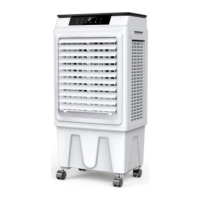

 To Next Page