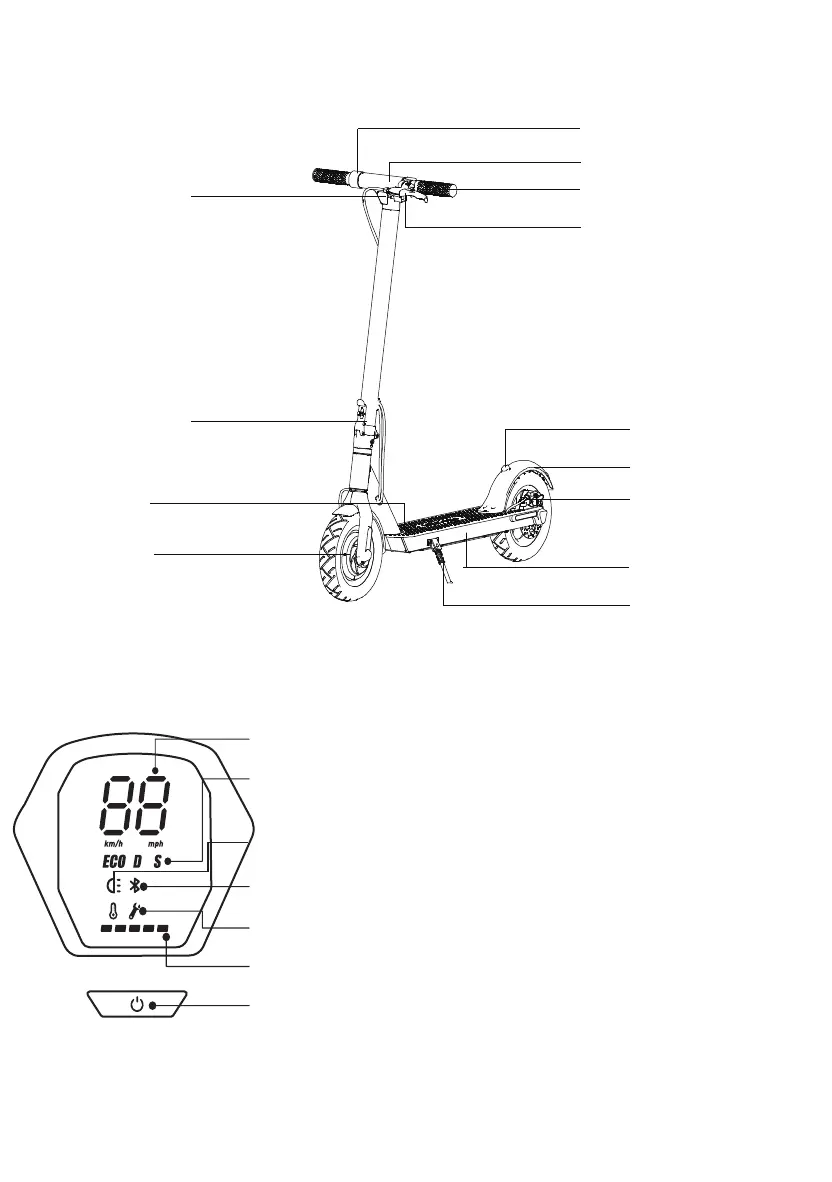
Speedometer: Display the current speed of the scooter, as well as
to display error codes.
Modes: Three modes available. "ECO"for Energy saving mode,(smooth
acceleraƟŽŶƐƵŝƚable for beginners ,"D for Standard mode and"S"for
Sport mode(powerful only recommended for skilled riders).
"
Bluetooth: The icon indicates that the scooter has been successfully
connected to the mobile device.
Error: The wrench icon indicates that the scooter has detected an error.
Battery Level:
The battery power is indicated by 5 bars, each
represenƟŶŐĂƉƉƌoximately 20% of a full battery.
Power Button: Press the button to turn the scooter on, and press and
hold the button for 3 seconds to turn the scooter off.
When the scooter is on,
double press to turn the headlight on/off.
Headlight:
When the scooter is on, press the button to switch between modes.
2.
&ƵŶĐƟŽŶƐ
Display
04
Top speed of e scooter on 3 modes:
“ECO” mode: top speed is 10KM/H
“D” mode: top speed is 20KM/H
“S” mode: top speed is KM/H
Speed lever
Control panel
Headlight
Folding mechanism
Wheel motor
Charging port
Signal
Brake handle
Clamp
Break lights
Brake disc
Stand
ĂƩĞƌLJĂŶĚĐŽŶƚƌŽůůĞƌ
compartment
Pull out the button (called a safety switch), make it stand
up, and then fold it
Before using the product, please keep the button (called
a safety switch) 90 degrees perpendicular to the pole


 To Next Page
 Loading...