9 2
Troubleshooting / Problemaufnahme English Ver.
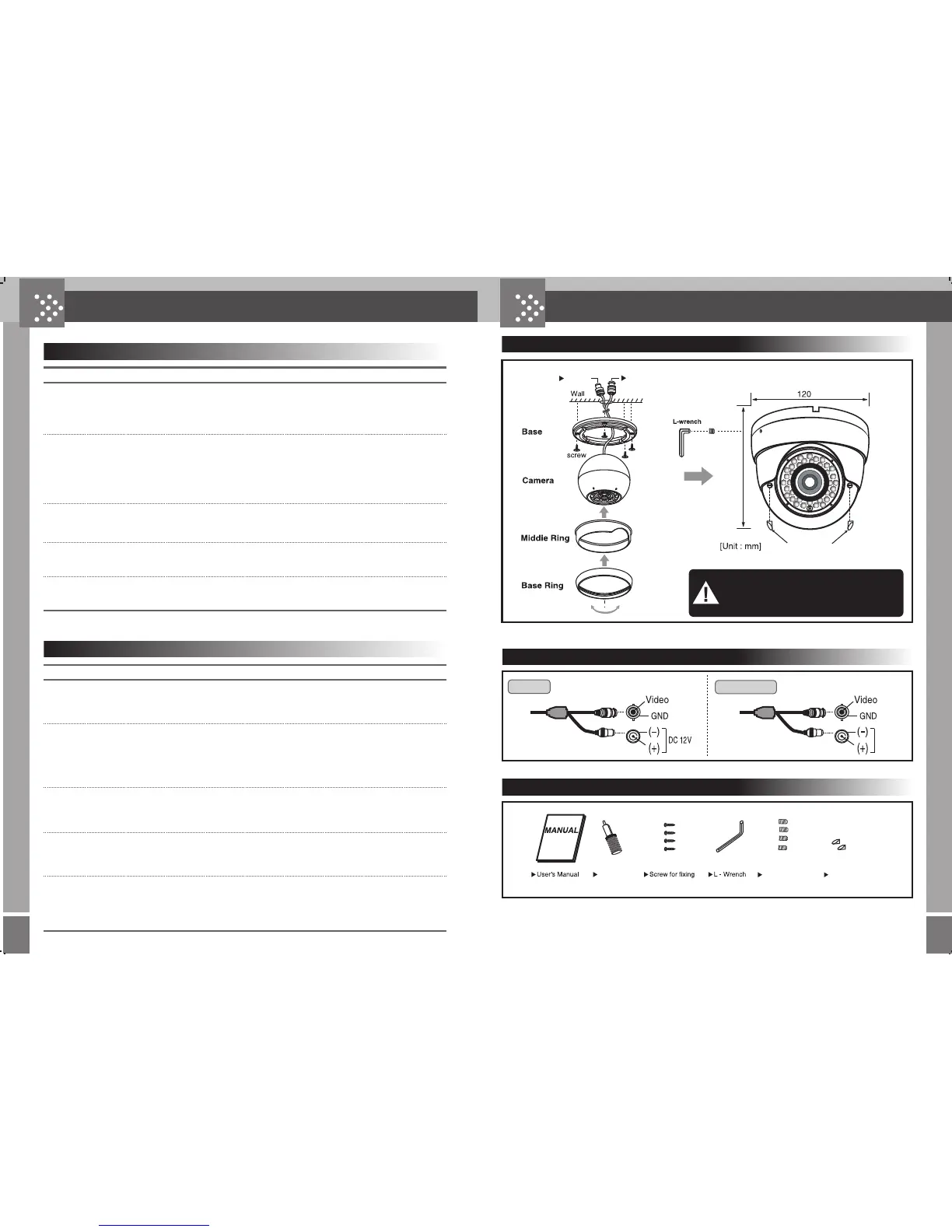
Connector
DC 12V
AC 24V
DC12V
DUAL VOLTAGE
Power
Video
Mounting
Accessories
waterproof
rubber stopper
Please note ;
To prevent liquid ingress, the rubber seals supplied
must be fitted over the camera adjustment screws.
waterproof
rubber stopper
Trouble Check Points
Is noting displayed in the screen? · Check that the power is normally connected to the constant voltage
adaptor (DC12V/500mA).
· Check that the video signal is normally connected.
Picture not clear? · Check to see if the lens needs cleaning.
· Check the monitor.
· If too much bright light reflecting into the camera installation angle,
please adjust such angle.
·
Readjust the back focus of camera.
Is the screen dim? · Adjust the monitor state.
.
Are black lines showon in the camera
image screen?
· Check the adaptor connected to the camera.
(Check that there is no problem in rated voltage).
· Is camera lens directed to the sun or fluorescent lamp?
· Check the installation angle of camera.
Is there a flicker on the screen?
English
Probleme Kontrollen
Kein Signal · Kontrollieren Sie die angelegte Spannung
· Kontrollieren Sie den Videoanschluss
Unscharfes Bild · Kontrollieren Sie die Sauberkeit der Linse
· Kontrollieren Sie den Monitor
· Fallt zu viel Licht direkt auf die Line Justieren Sie den Winkel
· Kontrollieren Sie die Focuseinstellung
Dunkles Bild · Kontrollieren Sie die Monitoreinstellungen
·
Schwarze Streifen im Bild der Kamera
· Kontrollieren Sie das Netzteil
· Kontrollieren Sie den Wert der angelelegten Spannung
· Schaut die Kamera direkt in das Sonnenlicht oder in fluoreszierendes
Licht?
· Ggfs. den Winkel der Kamera neu justieren
Flimmerndes Bild
Deutsch
Locking Screw
Adjustment
Tool
Wall Plugs
100


 To Next Page