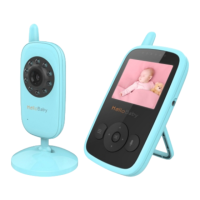
http://www. Video tim es.com.hk
—8— —9— —10— —11— —12— —13—
Li-ion baery (3.7V 950mAh). We suggest to conn ec t the
monitor to the adapter plugged into the mains whenever
possible, in order to keep the baery charged;
1. Locate the co nnector socket on the right side of the
parent unit;
2. Connect the ad ap ter cable to the parent unit;
3. Plug the A/C adapter into the wall outlet;
4. Press and hold the power key on the top of the pa rent
unit;
5. Once parent unit turned on , the power LED will light
up and the image will display on the LC D ;
6.3 TO C H A RGE T H E PARENT U N I T:
1. Connect the power adapter to the parent unit;
2. Plug the adapter into the mains, then the ch arging LED
on the parent unit will light in R E D ; the baery icon at
the top right corner of the screen is rolling;
3. The baery pack takes less th an 8 h ours to charge fully
then the baery icon at the top right corner of the screen
will be fixe d;
Warning:
Choking hazard – Keep the cord out of the baby' s reach.
Never place a camera with cable s less than 3 feet from
the cot.
Never use extensi on cords with A/ C ad apters.
Use only the A/C adapters supplied.
7.0 OSD M O D E OPERATION
7.1 POWER S AV E / SCREEN O F F
Short press the power key to turn on / off the screen.
7.2 VOLU M E ADJUST M E N T
Press the UP key to increase the volume;
Press the DOWN key to decrease the volume;
7.3 BRIGHTNESS A DJUSTMENT
Press the Le key to decrease the brightness;
Press the Right key to increase the brightness;
7.5 CAMERA V I E W / SCAN
Press Scan key to view / scan ca mera;
During scan mode, the scan icon will be disp layed on
the top of screen. And each cameras' video will be stay on
the LCD around 12 se cond s then change to n ext camera;
7.4 DIGITAL Z O O M & PAN / T I LT
Press and hold the key around 3 seconds to operate
Zoom in / out;
At the Zoom mode , press the L E F T key to Pan le;
press RIGHT key to Pan right; press U P key to
lt up; press DOWN key to l t down;
During digital zoom mode, the zoom icon w ill be
displayed o n the to p of scree n.
7.6 TA LK T O BA BY
To talk, press and hold the talk key on the front of the
monitor. A microp hone ico n will be displayed on t he top
of the L C D scree n wh ile this funcon is working.
Release the buon when you have finish ed talking to listen
to the sound from the baby's room again .
Bear in mind that you can't listen to your baby whilst you're
talking to it; to listen to it, you will have to stop pressing this
buon.
7.7 INFRARED N I G H T VIS ION(Automac )
The infra red night visi on f uncon allows the camera to pick
up images of your baby or the monitored area in dark or low
light condions.
In this mode, only bla ck a nd white image s will be displayed
on the monitor , the opmum image is 6 feet distanc e
between baby unit and parent unit.
When the camera is in night vision mode, the icon will
be displaye d on the top of scre en .
8. M E N U OPERATION
8.1 PA I R I N G T H E CAMERA A N D MONI TOR
The baby monitor is pre-registered to your parent unit.
You do not n ee d to register it again unless the baby unit
loses its link with th e pa rent unit. To re-register you r ba by
unit, or register a new b aby unit, follow the p rocedure below:
Note: Before you begin pairing, be sure to have the monitor
and the camera side by side.
1. Press the M E N U key then the menu will pop up;
2. Press the L E F T key or RIGHT key unl the camera
icon is highlighted then press U P key or DOWN
key to select your desired camera;
3. Press O K key ente r into sub-men u;
4. Press U P key or DOWN key to select ADD C A M
then press O K key;
5. While the “Pairing” dialogue displayed on the LCD screen ,
then press the PAIR buon on the back of camera;
6. Once paired, there will display “pair is succeed” on t he
LCD screen.
7. If unsuccessful, ple ase repeat above steps.
8. Press the key to Exit.
8.2 DELETE C A M E R A
1. Press the M E N U key and the menu will pop up;
2. Press the L E F T key or RIGHT key unl the camera
icon is highlighted then press U P key or DOWN
key to select your desired camera;
3. Press O K key ente r into sub-men u;
4. Press U P key or DOWN key to select DEL C A M
then press O K key;
5. Press U P key or DOWN key to select
connue to delete the camera;
6. Press O K key to confir m the opon.
7. Press the k ey to Exit.
8.3 VOX SETTING
This mode allows you to control the sound a cvaon of your
baby monitor. The VOX default seng is on. If the re is no
sound around the camera within 30 Seconds, it will stops
tra nsming.
The monitor screen turns off when the camera is not
tra nsming. When the camera detects a nd sound louder
than set sensivity level it will start tra nsming the signal
to the monitor agai n.
To change the VOX level, please follow th e next instruco ns:
1. Press the M E N U key and the menu will pop up;
2. Press the L E F T key or RIGHT key unl the the V OX
icon is highlighted then press U P key or DOWN key
to select desired level;
3. Press O K key to confir m;
4. Press the k ey to Exit.
Note: is Low sensivity level;
is High sensivity l evel;
8.4 TEMPERATURE U N I T SETTING
1. Press the M E N U /OK key and the menu will pop up;
2. Press the L E F T key or RIGHT key unl the
temperature icon is highlighted;
3. Press U P key or DOWN key to select b et ween
and ;
4. Press O K key to confir m;
5. Press the key to Exit.
Note: The temperature unit default seng is
8.5 LULLABY SET TING
You can soothe the b aby to sle ep by pl aying a gentle lullaby
from the baby unit.
1. Press the M E N U key and the menu will pop up;
2. Press the L E F T key or RIGHT key unl the lullaby
icon is highlighted;
3. Press U P key or DOWN key to se lect one of the 8
available l ullabies, silence or loop playing ;
4. Press O K key to confirm;
5. Press the k ey to Exit.
Note 1: Once the lullaby was turned on, the lull ab y icon
will display on the top of the screen.
Note 2: The lullaby defau lt se ng is O F F.
Note 3: Lullaby loop playing funcon is play all the lullabies
one me.
8.6 ALARM S E T T I N G
You can use the alar m to remind yourself to feeding baby /
change diaper / sleeping , etc.
1. Press the M E N U key and the menu will pop up;
2. Press the L E F T key or RIGHT key unl the alarm icon
is highlighted;
3. Press U P key to decre me nt or press D OWN key to
increment ;
4. Press O K key to confir m;
5. Press the key to Exit.
Note 1: The minimum unit is 0.5 hour. The maximum
seng is 4 hours (8 levels).
Note 2:Once the alarm was turned on, alarm i con
will display on the top of the screen.
Note 3: The alarm defau lt seng is O F F.
Note 4: When the alarm is ringing, pre ss any key to stop it.
Note 5: If there is no answer, the ringing will last 1 minute
and then stop , ae r 2 minute s the ringing will be ring again.
The ringing will sou nd u p three m es total if no one a ns wer.


 To Previous Page
 Loading...