SETTI~JG
UP
Configuration
0:
Your
VCR
connects
to
a
stereo
TV,
with
audio
and
video
cables
also
attached.
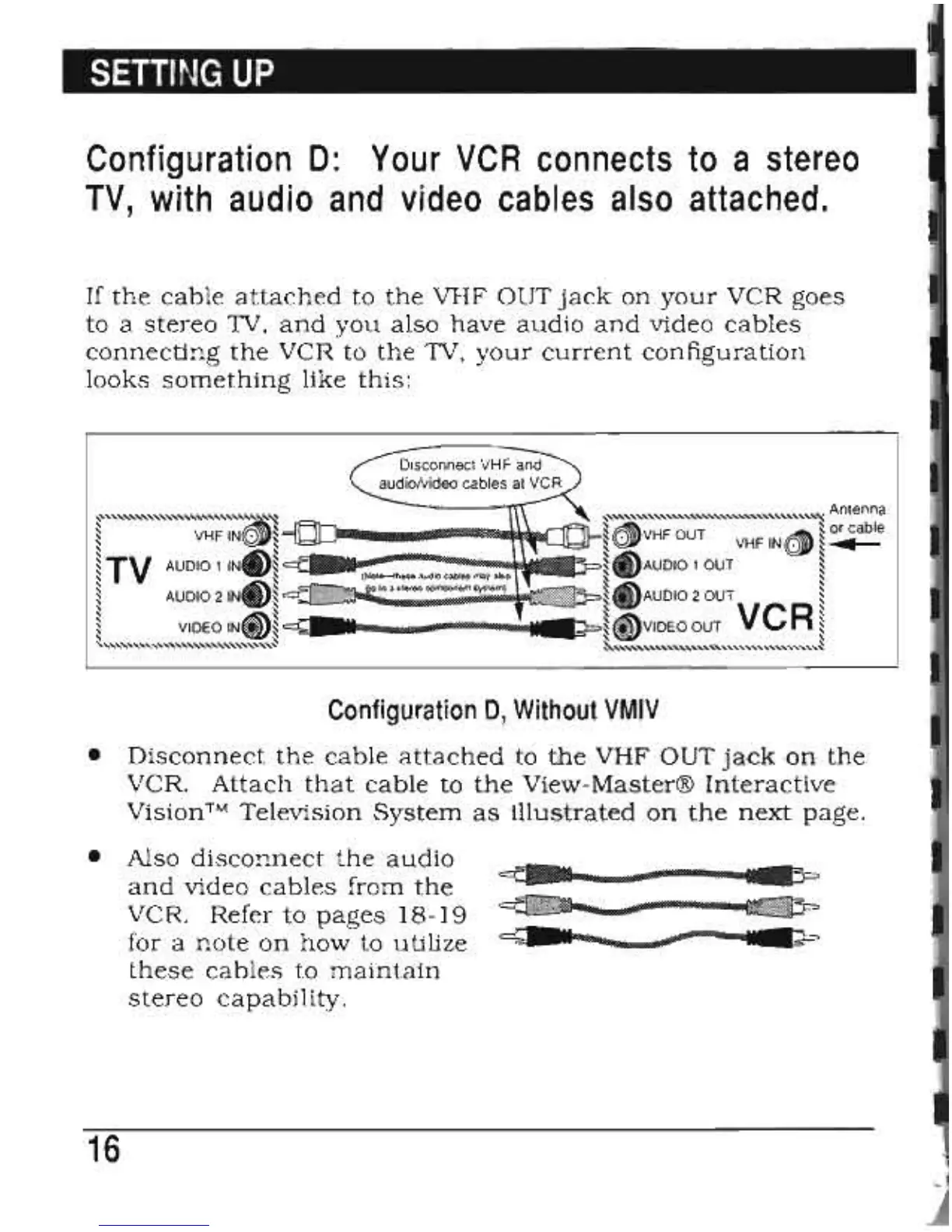
If
the
cable
attached
to
the
VHF
OUT
jack
on
your
VCR
goes
to
a
stereo
1V,
and
you
also
have
audio
and
video
cables
connecting
the
VCR
to
the
1V,
your
current
configuration
looks
something
like
this:
~'''''''''''''''''''''''''''''':~
~"""""""""""""'''''''''''~
Antenna
~
~s
~~
~
or cable
~
VHF
INlQI~
~tQ;vVHF
OUT VHF
IN6)
~
...
~
TV AUDIO 1
INe~
~
t)AUDIO
1 OUT
~
~,6'\~
~
4"\
~
~
AUDIO 2
IN..,~
~
\UJAUDIO
2 OUT
~
~
VIDEO
IN<iD~
~.II!!!8ii~IBIlIBIlIl!!Z~~~i8Sii1888s4i
II~~
<i)VIDEO
OUT VCR
~
s.."""""""",,-,,,,,,,,,,~
~""""""""""""""""'-,~
Configuration
D"
Without
VMIV
•
Disconnect
the
cable
attached
to
the
VHF
OUT
jack
on
the
VCR.
Attach
that
cable
to
the
View-Master®
Interactive
Vision™
Television
System
as
illustrated
on
the
next
page.
•
Also
disconnect
the
audio
~i·Wl
!
and
video
cables
from
the
.......
;.:.
VCR.
Refer
to
pages
18-19
~II
&*
for
a
note
on
how
to
utilize
these
cables
to
maintain
stereo
capability.
16



 To Next Page