EasyManua.ls Logo

ViewSonic VB-STND-002 - User Manual

ViewSonic VB-STND-002
2 pages
Print Icon
To Next Page IconTo Next Page
Loading...
VB-STND-002
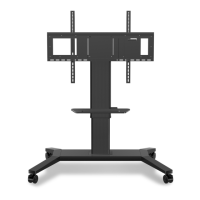
Motorized Trolley Cart
Quick Setup Guide
Guide rapide début
Guía de configuración rápida
Konfigurationskurzanleitung
This device complies with part 15 of FCC Rules. Operation is subject to the following two conditions:
(1) This device may not cause harmful interference, and
(2) This device must accept any interference received, including interference that may cause undesired
operation.
Industry Canada Statement
CAN ICES-3 (B)/NMB-3(B)
CE Conformity for European Countries
The device complies with the relevant section of the EMC Directive 2014/30/EU, Low Voltage Directive
2014/35/EC, Eco-Design Directive 2009/125/EC, RoHS Directive (RED) 2011/65/EU
Following information is only for EU-member states:
The mark shown to the right is in compliance with the Waste Electrical and Electronic Equipment Directive
2012/19/EU (WEEE). The mark indicates the requirement NOT to dispose the equipment as unsorted
municipal waste, but use the return and collection system according to local law.
CAUTION
1
This Cart for use only with specific ViewSonic Commercial Touch
Display.
See apparatus instructions. Use with other models is capable of
resulting in instability causing possible injury.
TIPPING HAZARD!
DO NOT move Cart with Display in highest position. DO NOT push
Cart from front or back of Lift. DO NOT move Cart over cords or
uneven, dirty, soft or sloping surfaces. DO NOT move Cart by
pushing on Display. Failure to comply with this caution may result in
Cart instability leading to equipment damage or personal injury.
Max.weight loading is 100kg
1.Duty cycle : please take rest for 18minutes for every
2 minutes continuous operation of the lift/ tilt
mechanism.
2.Please have the panel to the lowestposition while
moving the trolley.
2
Physical Dimensions
3
2
2
5
6
1
A
A
4
Question and Answer IconNeed help?

Do you have a question about the ViewSonic VB-STND-002 and is the answer not in the manual?

Overview

This document describes the ViewSonic VB-STND-002 Motorized Trolley Cart, a mobile stand designed for commercial touch displays. The cart is compliant with FCC Part 15 rules, Industry Canada Statement CAN ICES-3 (B)/NMB-3(B), and CE conformity for European Countries, adhering to EMC Directive 2014/30/EU, Low Voltage Directive 2014/35/EC, Eco-Design Directive 2009/125/EC, and RoHS Directive (RED) 2011/65/EU. It also complies with the Waste Electrical and Electronic Equipment Directive 2012/19/EU (WEEE), indicating that it should not be disposed of as unsorted municipal waste but through proper return and collection systems.

Function Description:

The VB-STND-002 is a motorized trolley cart designed to provide a mobile and adjustable platform for specific ViewSonic Commercial Touch Displays. It allows for easy movement and height adjustment of large displays, making them versatile for various environments such as classrooms, meeting rooms, or public spaces. The motorized lift mechanism enables users to adjust the display's height with ease, while the trolley's wheels facilitate mobility. The cart also features a control pad for operating the lift mechanism and memory settings for preferred heights.

Important Technical Specifications:

  • Model: VB-STND-002 (Model No. VS17473)
  • Swivel: 360 degrees
  • Height Adjust Range: 500 mm (19.69 in)
  • Wall Mount Pattern: Supports VESA patterns up to 800x600mm max.
  • Loading Capacity: Designed for displays up to 75" and a maximum weight of 100 kg (220.46 lb).
  • Input Voltage: AC-in 100~240V, 50/60Hz, 1.0A
  • Control: Physical button control, control pad (UP/DOWN)
  • Physical Dimensions: 1234 x 1284 x 844 mm (48.58 x 50.55 x 33.23 in)
  • Net Weight: 51.7 kg (113.98 lb)
  • Operation Conditions:
    • Temperature: 0°C to 40°C (32°F to 104°F)
    • Humidity: 20%~80% non-condensing
    • Altitude: ≤2000M
  • Storage Conditions:
    • Temperature: -20°C to 60°C (-4°F to 140°F)
    • Humidity: 10%~90% non-condensing
    • Altitude: ≤2000M

Usage Features:

The trolley cart is equipped with a control pad that includes "LIFT Up," "LIFT Down," "Memory Setting (1~3)," and "STOP" buttons. These features allow users to:

  • LIFT Up/Down: Precisely adjust the display's height to an optimal viewing level.
  • Memory Setting: Save up to three preferred height positions for quick recall, enhancing convenience in multi-user environments.
  • STOP: Immediately halt the motorized movement at any point. The cart's design facilitates easy assembly with clearly labeled parts and step-by-step instructions. Its mobility is supported by robust wheels, allowing for smooth transitions between locations. The motorized mechanism ensures effortless height adjustments, reducing physical strain.

Maintenance Features & Safety Precautions:

  • Duty Cycle: To ensure longevity of the lift/tilt mechanism, it is recommended to take a rest for 18 minutes for every 2 minutes of continuous operation.
  • Moving the Trolley: Always lower the panel to its lowest position before moving the trolley to prevent instability and potential injury.
  • Weight Limit: The maximum weight loading is 100kg. Exceeding this limit can compromise stability and lead to equipment damage or personal injury.
  • Specific Use: This cart is designed for use only with specific ViewSonic Commercial Touch Displays. Using it with other models may result in instability and possible injury.
  • Tipping Hazard Warnings:
    • DO NOT move the cart with the display in its highest position.
    • DO NOT push the cart from the front or back of the lift.
    • DO NOT move the cart over cords or uneven, dirty, soft, or sloping surfaces.
    • DO NOT move the cart by pushing on the display itself.
    • Failure to comply with these cautions can lead to cart instability, equipment damage, or personal injury.
  • Pinch Point Warning: Users should be aware of potential pinch points during operation, especially when adjusting the height of the display.

The package includes various components for assembly, such as screws, brackets, and tools, ensuring a complete setup. For additional support, users can visit the ViewSonic support website provided in the manual.

ViewSonic VB-STND-002 Specifications

General IconGeneral
BrandViewSonic
ModelVB-STND-002
CategoryOutdoor Cart
LanguageEnglish

Related product manuals