4.0 Features Overview
Due to the dynamic nature of the product design, the information contained in this document is subject to change without notice. Viking Electronics, and its affiliates and/or subsidiaries
assume no responsibility for errors and omissions contained in this information. Revisions of this document or new editions of it may be issued to incorporate such changes.
See the Product Manual for complete installation and programming instructions.
Questions? Call Viking Product Support: 715-386-8666
E-60-BK-IP Quick Start Guide ZF303684 REV A
• Make sure the port is not in trunk mode
• Make sure port is capable of 100mbps full duplex
• Disable Spanning Tree Protocol (STP) or enable Portfast
3.0 Network Port Settings
MAC:
18E80FXXXXXX
asdesaxtff
N.C. (Gray)
N.O. (Yellow)
COM. (Blue)
3 Gel-Filled Butt
Connectors (included)
- Black
+ Red
Black
Black
- Black
+ Red
LED
Help Switch
Request for Exit (REX Input)
Speaker
Microphone
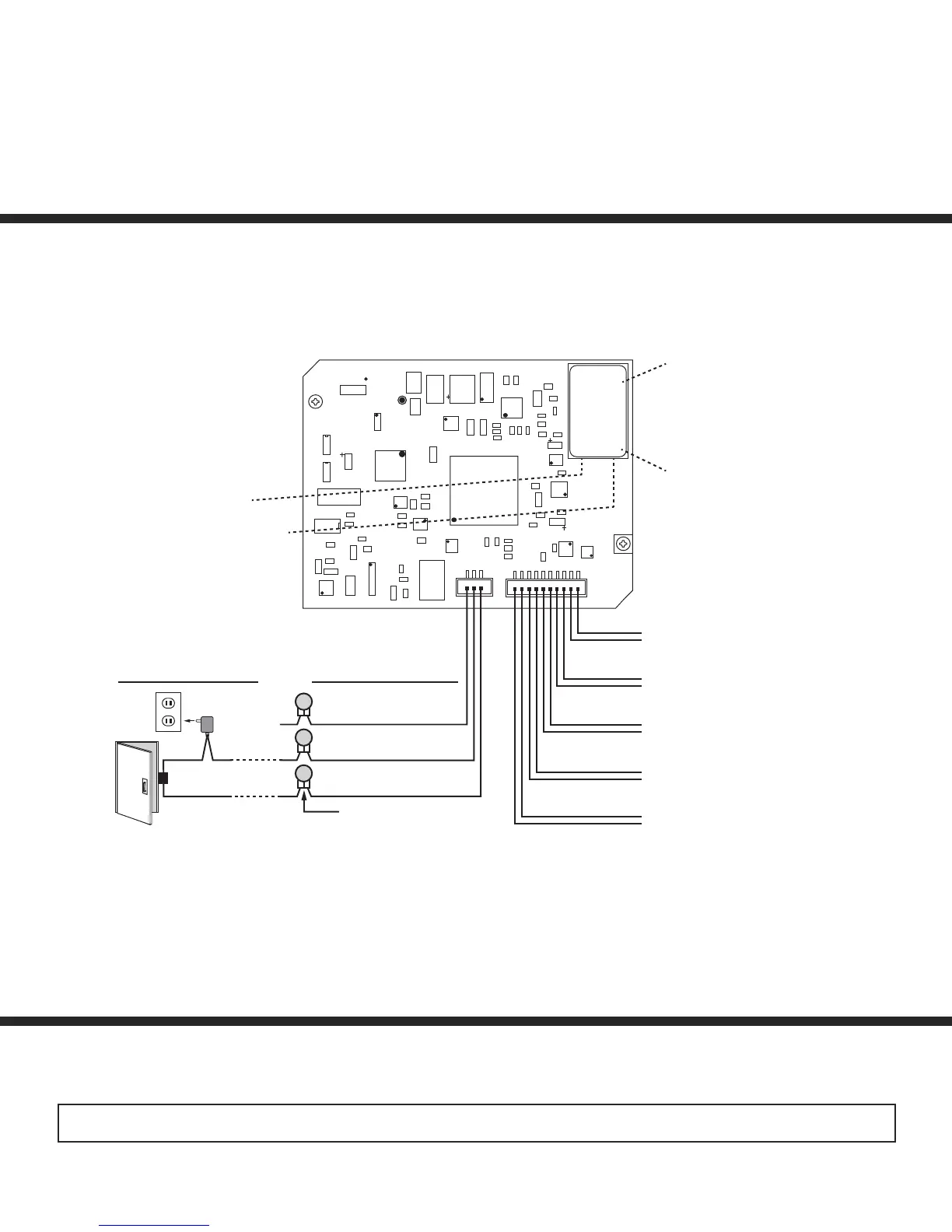
MAC Address Label: The
MAC address is aunique 12
digit number used by routers
to send network traffic to the
correct IP address.
PoE LAN Port 10/100, PoE
Class 1 (<4 Watts): Connect
to your LAN via RJ45 plug
and CAT5 or greater twisted
pair wire.
Yellow Network Status LED:
Lights steady to indicate power
and data link. Blinks to indicate
network activity.
Green Unit Status LED
Rear (PCB) View
of E-60-IP
Green
Green
White
White
(Power typically not
required for gate controllers)
Doorstrike /
Magnetic Lock
120V AC
Connect to Optional
Doorstrike, Mag Lock,
Gate Controller, etc.
(not
connected)
* On-Board 2 Amp
Relay Output Contacts
(2A@30VDC/ 250VAC max)
Note: The gel-filled (water-tight) butt connectors are designed for insulation displacement on 19-26 gauge wire with a
maximum insulation of 0.082 inches. Cut off stripped wire ends before terminating.
* Note: For applications requiring additional security, a Viking model RC-4A remote relay controller can be used. The relay
controller is mounted securely inside the building and connected to the same LAN as the E-60-BK-IP. For more information
on the RC-4A Secure Relay Controller, see DOD 582.


 To Previous Page
 Loading...