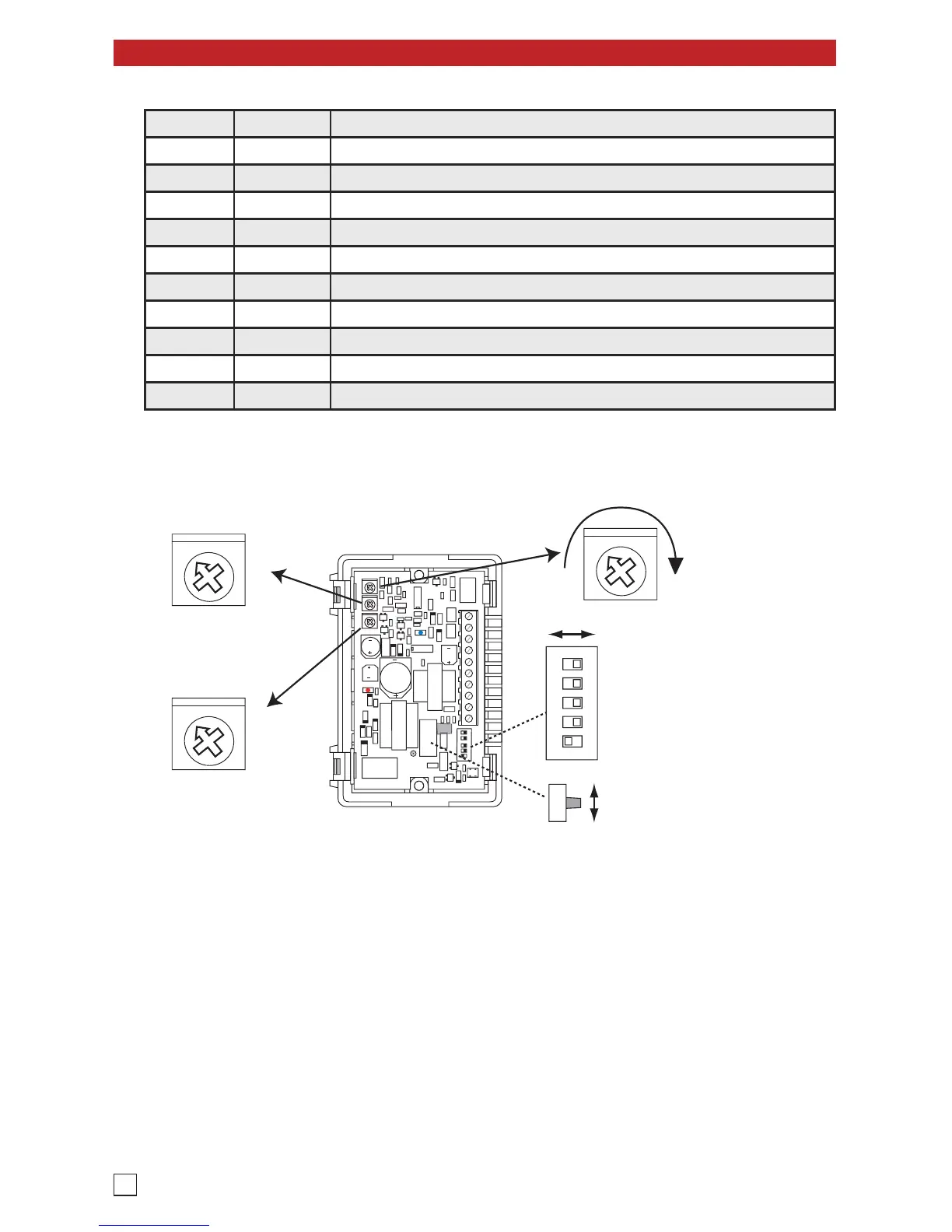
Internal View of the FXI-1A
Master Volume Control
ON
1 2 3 4 5
Note: DIP Switches shown
in factory default settings.
ON OFF
MIN MAX
Enable Page Port Operation
Enable VOX Mode
VOX Sensitivity
Enable Busy Detect
Enable Pre-page Alert Tone
Silence Time Out
(seconds)
Page Time Out
(seconds)
20
10
60
Disabled
40
5
Talk Battery Switch
FXS
FXO
5
10
Disabled
2.5
An FXO port is an analog input RJ11 port just like a POTS trunk input on a PABX or key system. An FXO port
receives talk battery and ring voltage. In the FXO mode, the FXI-1A provides 30V talk battery to connect to
an FXO port, trunk input, or plain analog phone.
An FXS port is an analog output RJ11 port just like a station port on a phone system or PABX extension. It
provides talk battery, dial tone and ring voltage. In the FXS mode, the FXI-1A is triggered by ring voltage to
seize the line, it is then powered by the talk battery being provided, so the supplied 12VDC power supply is
not needed.
NOTE: If both the Page Time Out POT and Silence Time Out POT are turned to the “Disabled” position, and if
the phone system does not provide a CPC or Busy Signal, the FXI-1A will appear as if it is locked up. In actuality,
the FXI-1A simply does not have anything to tell it the page has ended. When this happens, the only way to clear
the ongoing page is to power down the unit by disconnecting the power and/ or disconnecting it from the ringing
station. Be sure to move the Page and Silence Time Out POTS from the “Disabled” position before reconnecting.
Switch Position Description
5 ON Enables Page Port Operation
5 OFF* Disables Page Port Operation
4 ON Enables Vox Mode
4 OFF* Disables Vox Mode
3ONLower Vox Sensitivity
3 OFF* Normal Vox Sensitivity
2ONEnables Busy Detection Disconnect
2 OFF* Disables Busy Detection Disconnect
1 ON* Enables the Pre-Page Alert Tone - a High tone before the page
1 OFF Disables the Pre-Page Alert Tone


 To Next Page
 Loading...