TALK BACK
Printed in the U.S.A. ZF280370 Rev DFax Back Doc # 480
Due to the dynamic nature of the product design, the information contained in this document is subject to change without notice. Viking
Electronics, its affiliates and/or subsidiaries assume no responsibility for errors and/or omissions contained in this information. Revisions of
this document or new editions of it may be issued to incorporate such changes.
Product Support Line...(715) 386-8666 Fax Back Line...(715) 386-4345
25AE Paging Horn
Single
Line Phone
VIKING©
MODEL HF-2WC
POWER - 13.5V AC 1 2 3 4 5
UNUSED
TRUNK
INPUT
HANDS-FREE TALK-BACK
PAGING SYSTEM
VIKING
ELECTRONICS
HUDSON, WI 54016
PAGING
Paging Volume Control
+-+-
Talk-Back Volume Control
120V AC
Installation
Programming
or
Unused PABX/KSU
Trunk Port
Note: Turn the Paging
Volume Control counter
clockwise (+) to increase paging
volume, clockwise (-) to
decrease paging volume.
Note: Turn the Talk-Bac
Volume Control counter
clockwise (+) to increase
microphone sensitivity,
clockwise (-) to decrease
microphone sensitivity.
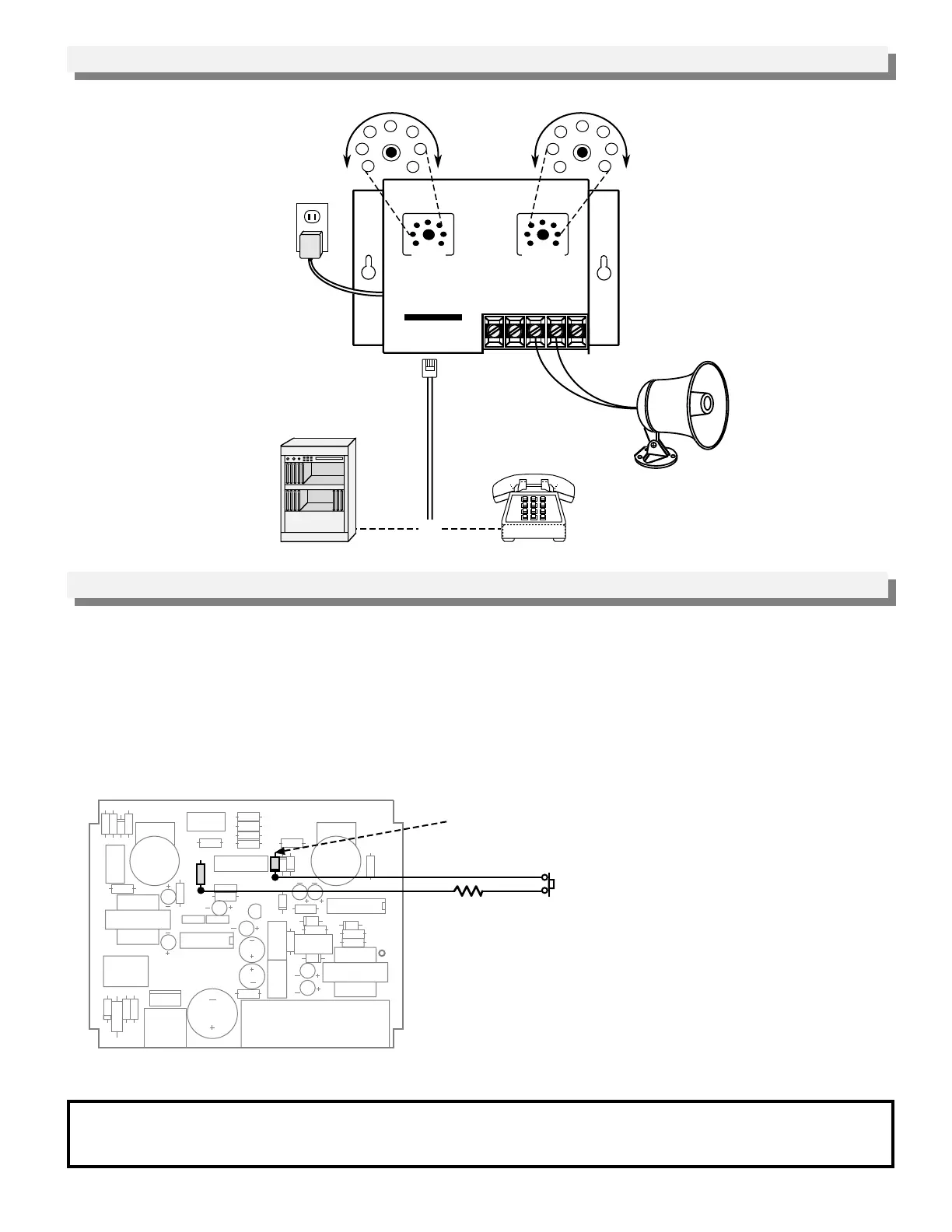
Under a normal background noise environment, set the Paging Volume Control so that the page may be heard as
required. Then set the Talk-Back Volume Control in the middle between the “+” and “-” position. Test talk-back to be
sure that the HF-2WC will switch between paging and talk-back for your desired operating range and noise level. Adjust
the Talk-Back Volume Control as necessary for your environment. The louder the ambient noise level, the more you
will have to decrease the microphone sensitivity and the smaller your talk-back range will be.
If the background noise is too loud for the HF-2WC to operate properly, you may have to add a “Push to Talk” button as
shown in the diagram below.
R9
CR8
100Ω 1/4W
Resistor
Normally
Closed
Button
Whenever the button is pressed,
the talk-back will be activated.
Whenever the button is released,
the HF-2WC will function only as
a one-way paging unit.
HF-2WC Circuit Board Layout
Cut this end of CR8


 To Previous Page
 Loading...