1. Call the phone connected to the dialer.
2. Answer phone. Enter , & security code.
3. Enter your spped dial number & #00.
K-1900-5 Technical Practice.
Viking Electronics, Inc.
1. Call the phone connected to the dialer.
2. Answer phone. Enter , & security code.
3. Enter your spped dial number & #00.
K-1900-5 Technical Practice.
Viking Electronics, Inc.
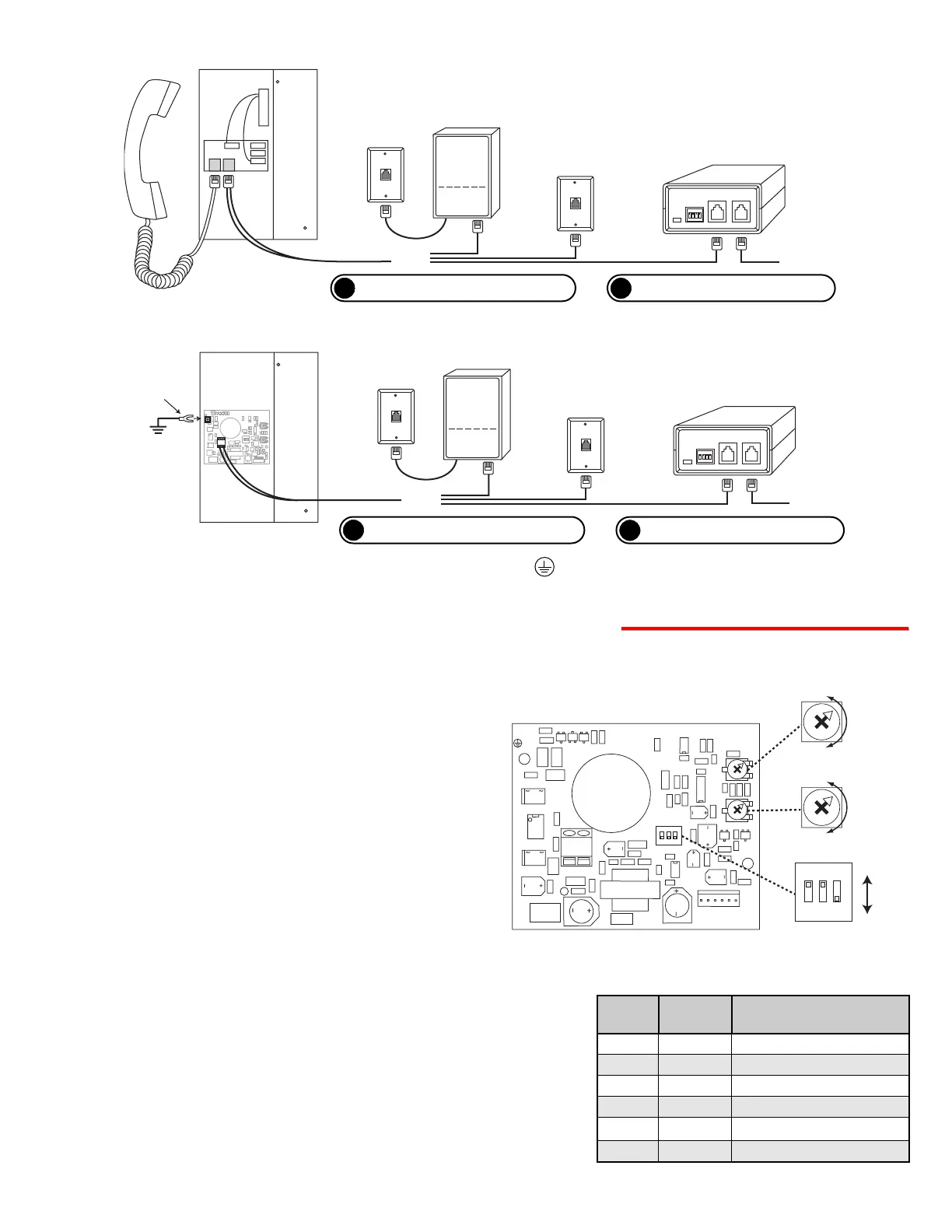
Rear View of
the K-1500-E
DLE-200B Two Way Ringdown
Circuit (not included)
C.O. Line or analog
PABX/KSU station
programmed for
ringdown
To dedicated
phone or unused
trunk/line input
of phone system
Optional
Viking Dialer
(not included)
C.O. Line
or analog
PABX/KSU
station
?
Need More Information on the DLE-200B?
Call (715) 386-4345 and select 605.
A. Adjusting Speaker Volume
The SPKR VOL pot can be adjusted to increase or
decrease the speaker volume to the level desired as
shown right.
?
Need More Information on Hot-Line Dialers?
Call (715) 386-4345 and select 833.
?
Need More Information on the DLE-200B?
Call (715) 386-4345 and select 605.
?
Need More Information on Hot-Line Dialers?
Call (715) 386-4345 and select 833.
B. Adjusting the Microphone Volume
In certain noisy locations (background traffic, machin-
ery or wind), the microphone volume may need to be
decreased. A symptom of this is one-way talk path, in
which the distant party cannot be heard over the
speaker. A MIC VOL pot is provided on the K-1500-
EHFA for increasing or decreasing the microphone vol-
ume. Note: If the microphone volume is set too high
or too low, one-way talk path may occur.
C. DIP Switch Programming
DIP switch 1 is for turning the Auto Answer feature ON and OFF.
The K-1500-EHFA is factory set to auto answer when an inbound
call is detected.
1. Auto Answer Feature ON/OFF (DIP Switch 1)
With DIP switch 2 in the ON position, if the K-1500-EHFA detects
more than 5 seconds of continued dial tone, the unit will auto-
matically disconnect. If the K-1500-EHFA is installed on a con-
tinuously noisy line, it may detect the noise as dial tone and auto-
matically disconnect. If this happens, turn the dial tone detection
(DIP switch 2) OFF.
2. Dial Tone Detection ON/OFF (DIP Switch 2)
DIP
Switch
1
1
2
2
3
3
Position
ON
OFF
ON
OFF
ON
OFF
Description
Auto-Answer ON *
Auto-Answer OFF
Dial Tone Detection ON *
Dial Tone Detection OFF
Programming Mode
Normal Operation Mode *
* Note: These are the factory settings.


 To Next Page
 Loading...