f. Stop Bits 1
g. Address 254
h. Timeout 2000
5) Connect with the configurator software (MB_250). The Manual of the Viltrus MB-10/100/250 gives some
indications on how to set up the device to discover your M-BUS meters and get data over to the Modbus
serial port.
What is missing is how you get the configurator connected and how you can check the connection is
successful.
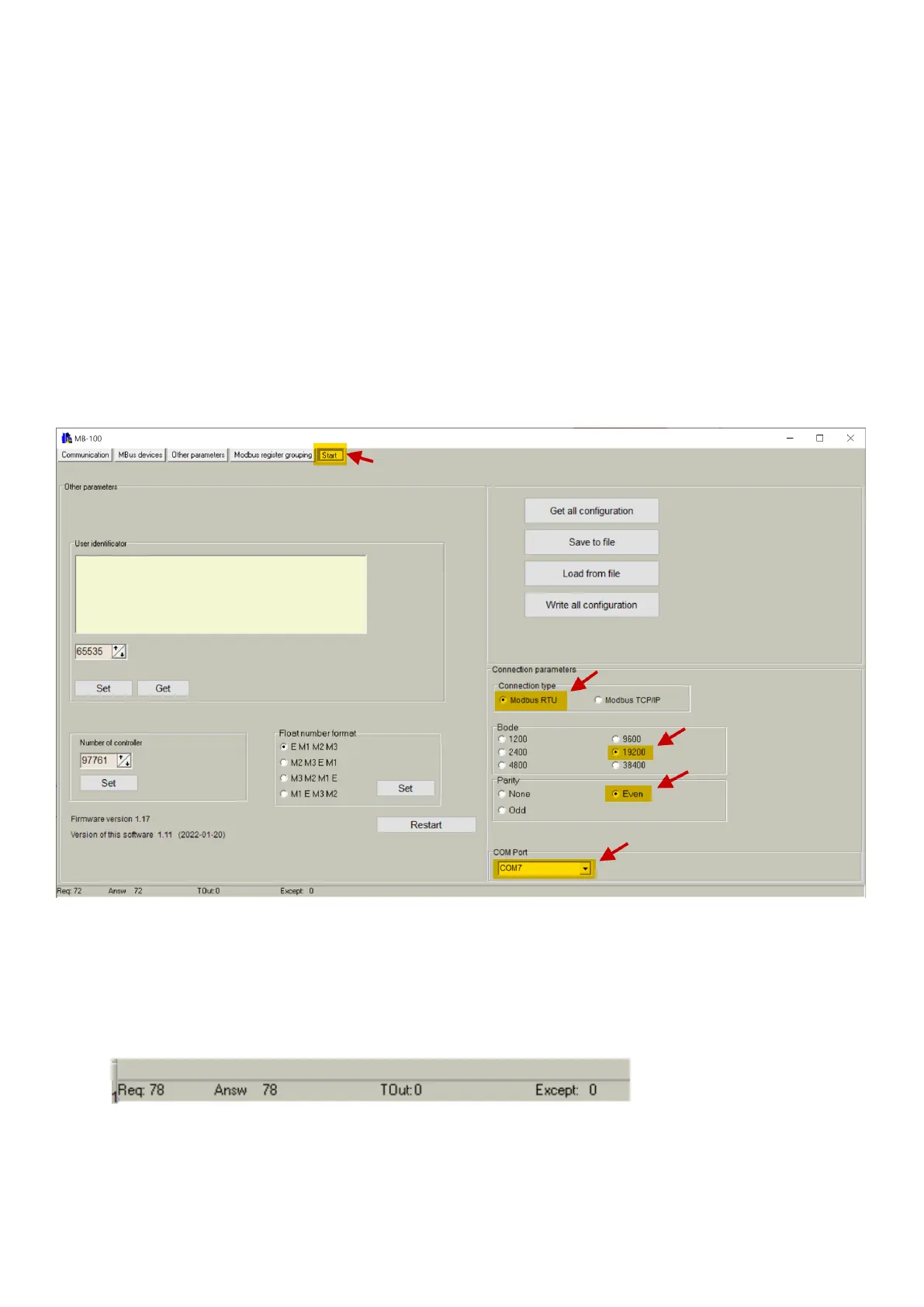
a. Open the MB_250 configuration software
b. Click on “Start” on the top right corner
c. Select the “Connection Type” as “Modbus RTU”
d. Select baud rate “19200”
e. Select “Parity” a “Even”
f. Select the COM port according to what the Windows Device Manager shows when connecting the
device via USB
6) Verify you are connected. Go to the “Communication” tab, clicking on the “Communication” button on the
top left corner.
Press then the “Get” button to read the configuration from the device.
You should notice the “Req” and “Answ” numbers at the bottom increasing both by the same value,
notifying a successful reading
7) Now you can continue your device configuration following the official manual, available in our support
website



 To Previous Page