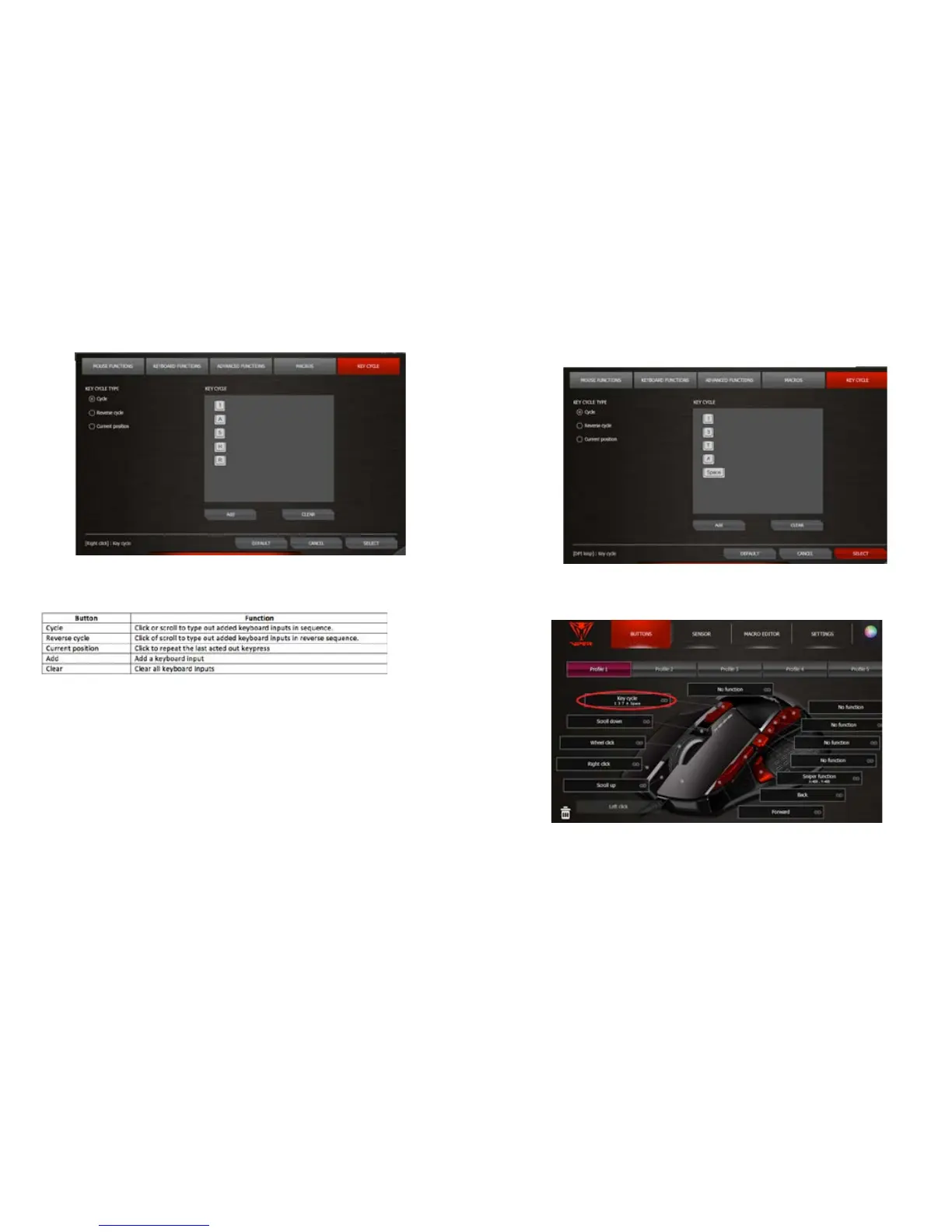
KEY CYCLE
The key cycle function allows you to assign up to 5 keyboard inputs and assign it to a mouse button or
scroll.
Note-
For each prole, there will be only one sequence of keyboard inputs to be set in Key Cycle, that can be
applied to all programmable buttons and scrolls. If you change the Key Cycle setting in a certain prole,
then it will automatically be applied to all the buttons/scrolls which have be set as a Key Cycle function in
this prole. The cycle type can be independent for each button.
Create a Key Cycle Sequence
Click a programmable button.
Click KEY CYCLE to access the Key Cycle window.
Select the KEY CYCLE TYPE; add keyboard inputs, as desired (up to 5).
Click Select to enable key cycle on the programmable button.
To disable the cycle function, click the Default button in the Key Cycle window.


 To Next Page