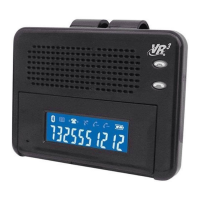
cacnel button will flash blue. When the
VRBT200V is in standby mode, press
and hold the Multi-Function Button for 3
seconds to turn the unit off. You will hear
a long BEEP, and both LED lights are
off.
Pairing with a Bluetooth
®
Enabled Cell Phone
1 Make sure both the VRBT200V
and the Bluetooth
®
enabled cell phone
within a distance of 3 feet (1 meter).
Keep within a distance of 1 foot (30cm)
for best reception.
2 With the VRBT200V OFF, press
the Multi-Function button for 6 seconds.
The Red & Blue LEDs will flash
alternately and the speaker will make a
long BEEPsound.
3 The Bluetooth
®
cell phone will
search for nearby Bluetooth
®
devices.
The cell phone will display “VRBT200V”
in the list of Bluetooth
®
devices. If you
are using a “dongle” type Bluetooth
®
adaptor
,
follow the manufacturers’
instructions for that device.
4 Select “VRBT200V” to add this
Blue-tooth
®
device into the list of paired
devices.
1 Enter in the PIN Code “0000”
and your mobile phone will show that
pairing is complete.
2 If pairing is successful, user will
hear a long BEEP and the Blue LED will
flash about every 3 seconds.
Answer a Call
To answer an incoming call press the
Multi-Function Button once to answer the
call.
End a Call
Press the Cancel Button once to end a
voice call in progress.
Reject a Call
To reject an incoming call press the
Cancel Button once.
Volume Adjustment
With a call in progress, move the 3 Way
button to the right repeatedly to increase
the volume, or move the 3 Way button to
the left repeatedly to decrease the
volume.
Mute
With a call in progress, press and hold
the 3-Way button for 3 seconds, you will
hear a short BEEP indicating the call is
muted. You can hear the caller, but the
caller cannot hear you. press and hold
the 3-Way button again to un-mute the
call.
Last Number Redial*
With the VRBT200V paired and
connected to your phone, press the
Multi-Function Button quickly two times
or more, depending on your phone’s
features.*
*Note: Please refer to the product user
manual from the manufacturer of your
cell phone for Voice Dialing & Redial
functionality and settings.
Operation
Call Transfer to VRBT200V
To transfer the voice of a call in
progress from your paired cell phone
to theVRBT200V, press the
Multi-Function Button once.
Call Transfer to Cell Phone
To transfer a call in progress from the
VRBT200V to your paired cell
phone,press and Hold the
Multi-function buttonfor 3 seconds.
Voice Activated Calling*
Note: The cell phone paired with the


 To Next Page
 Loading...