Model Number MCS003
customercare@winplus.com.au
4. With the shaver at a 90°C angle to your face, stretch the skin and using a circular
motion proceed to shave desired area.
WARNING: Do not open head unit when unit is turned on as blades may fall out.
5. Press the ON/OFF button to turn the shaver off when finished.
Trimming
The shaver comes equipped with a handy beard trimmer to tackle difficult hairs or side burns.
To Trim
1. Remove the protective cap.
2. Turn the shaver on by pressing the ON/OFF button once.
3. The ON/OFF light will illuminate red.
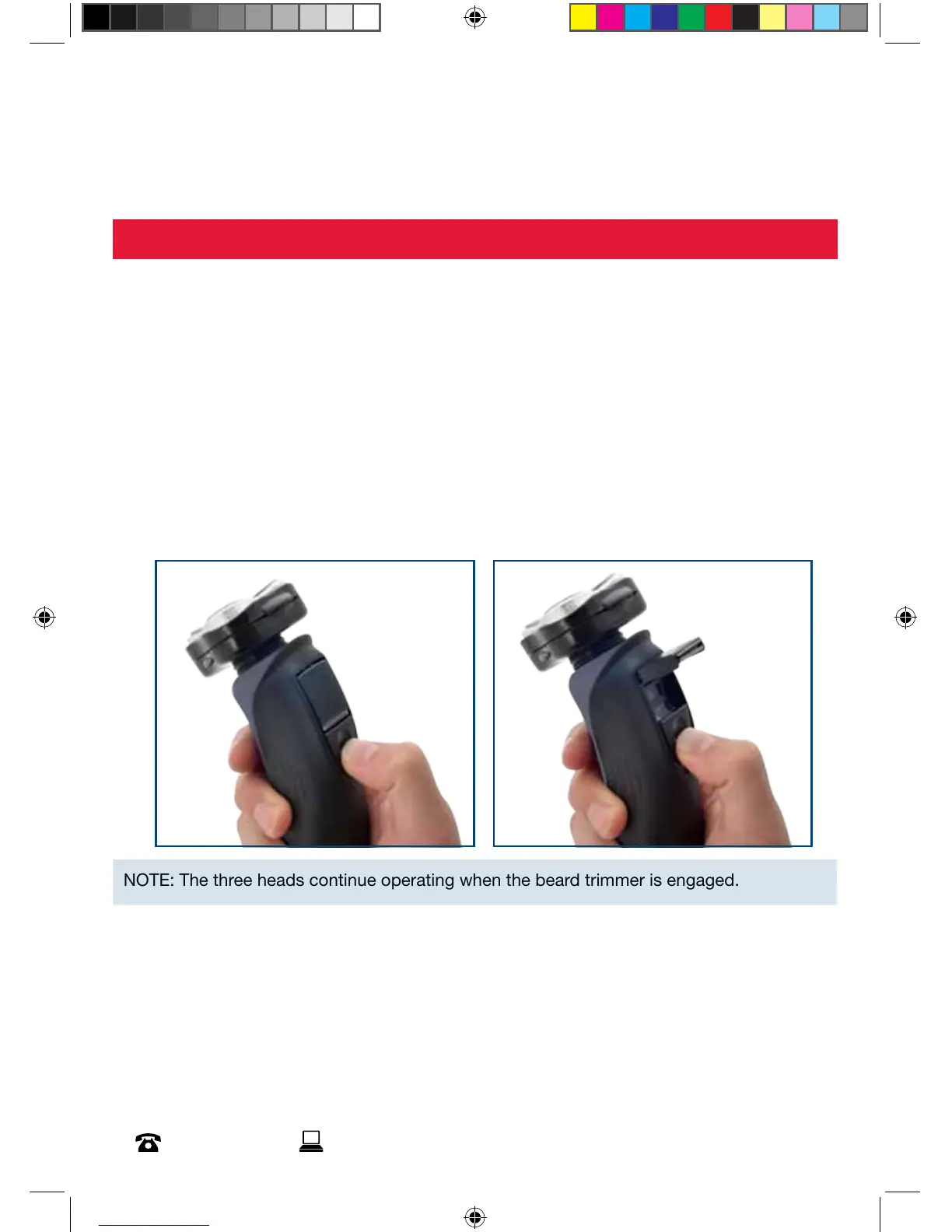
4. Push the trimmer slide towards the head to pop up the trimmer.
NOTE: The three heads continue operating when the beard trimmer is engaged.
5. With the trimmer at a 90°C angle to your face stretch the skin and gently shave
desired area.
6. Slide the trimmer back down when finished.
7. Press the ON/OFF button to turn the shaver off.



 To Next Page