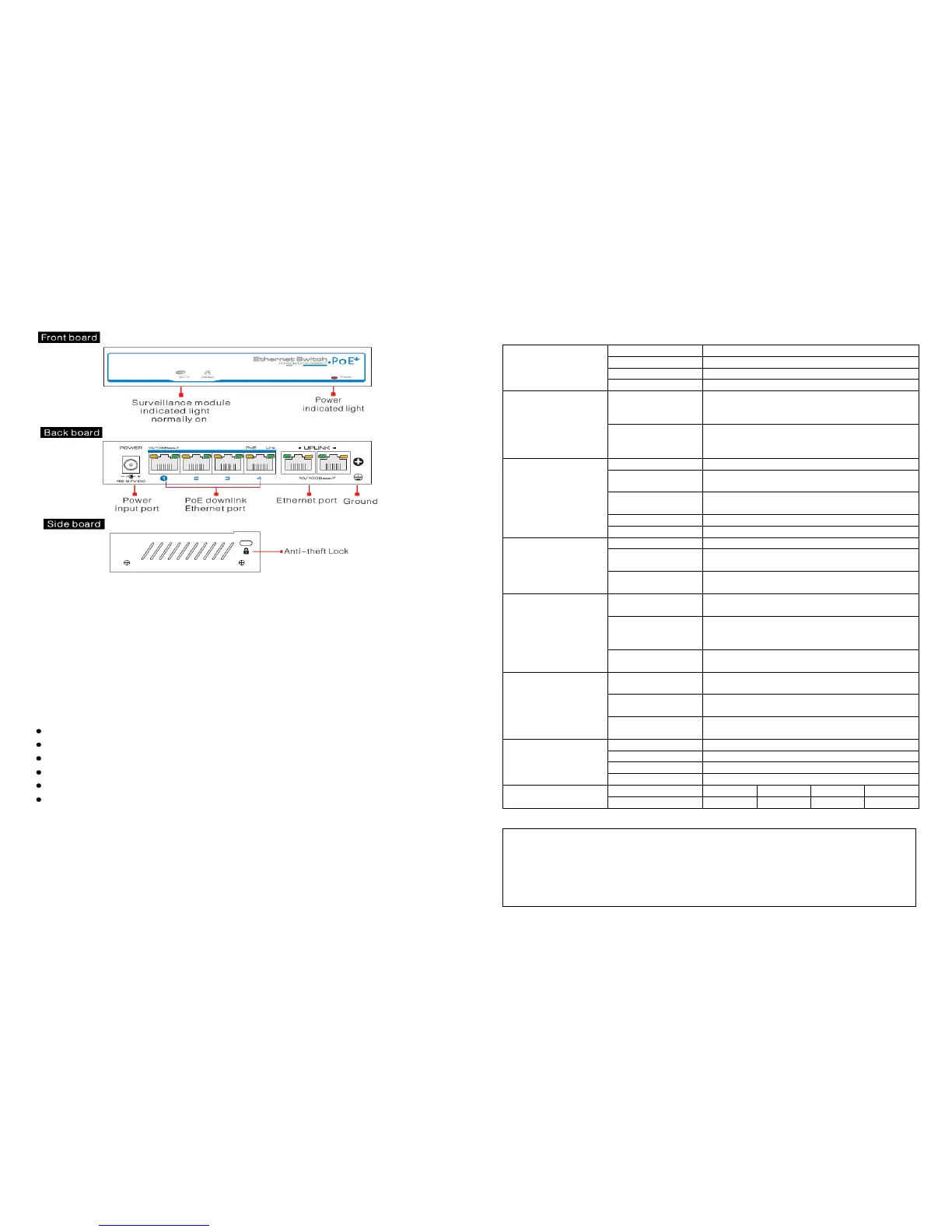
Connections and indicators:
Note:
1. Device must be connected with lightning protection grounding, otherwise the
protection will be reduced. Use a 20 gauge or larger wire to connect the grounding
terminal.
2. To enter surveillance mode, down power the switch, slide the switch to the left
and the repower. The LED will then be illuminated green.
Installation steps:
Please check the following items before installation, if any are missing, please
contact your dealer
1 x 4 port PoE ethernet switch
1 x power adaptor
1 x power cable
1 x accessory pack
1 x user manual
1) Ensure power is turned off to switch
2) Use network cable connect PoE IP camera to the 4 PoE ports
3) Use a network cable connect the uplink ports to NVR or computer;
4) Connect power adapter;
5) Check if the installation is correct, equipment is in good condition, the
connections are stable, turn power on to the system.
6) Ensure all equipment is working correctly.
Specification:
2 (yellow & green) on RJ45, yellow indicates
PoE, green indicates Link/Act
CE COMPLIANCE STATEMENT
WARNING
This is a Class A product. In a domestic environment this product may cause
radio interference in which case the user may be required to take adequate
measures.”



 To Previous Page
 Loading...