EasyManua.ls Logo

Visual Land Prestige 7 - Navigating Your CONNECT

Visual Land Prestige 7
45 pages
Print Icon
To Next Page IconTo Next Page
To Previous Page IconTo Previous Page
Loading...
Android
Internet
Tablet - U
ser's
Ma
nu
al
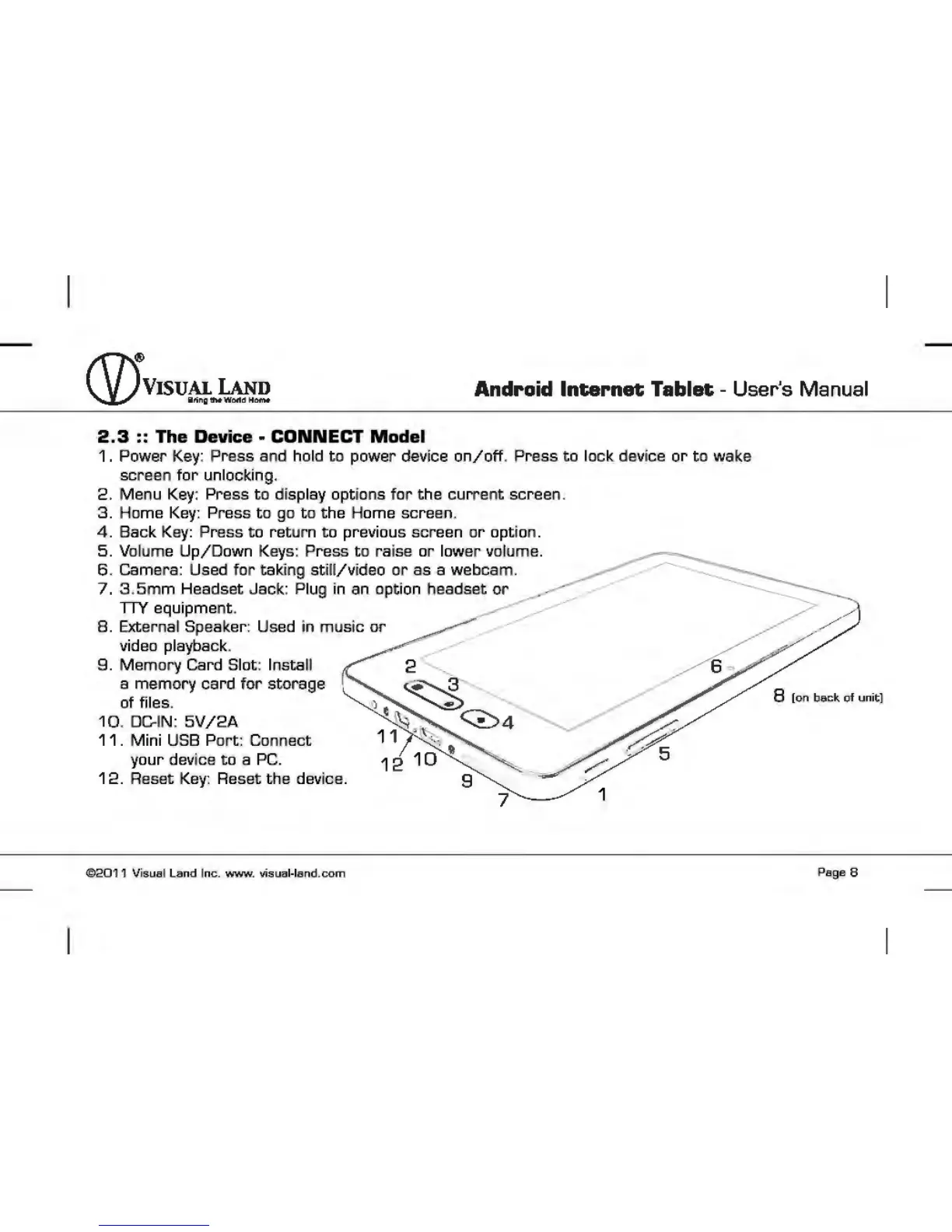
2 .3 :: The Device -
CONNECT
Model
1.
Power Key: Press and hold
to
power device
on/off
. Press
to
lock device
or
to
wake
screen
for
unlocking.
2. Menu Key: Press
to
display options
for
the
current
screen.
3.
Home Key: Press
to
go
to
the Home screen.
4.
Back Key: Press
to
return
to
previous screen
or
option.
5.
Volume
Up/Down
Keys: Press
to
raise
or
lower volume.
6 .
camera:
Used
for
taking
still/video
or
as a webcam.
7. 3 .
5mm
Headset Jack: Plug in an option headset
or
nY
equipment.
8.
External Speaker: Used in music
or
video playback.
9.
Memory Card Slot: Install
a memory
card
for
storage
of files.
10 . DC-IN:
5V
/2A
11 . Mini USS
Port:
Connect
your device
to
a
PC.
12.
Reset
Key:
Reset
the
device.
©2011
Visual Land I
nc.
www
.
visua~land.com
Page
8

Other manuals for Visual Land Prestige 7

Related product manuals