Need help?
Do you have a question about the Visual Sound H2O and is the answer not in the manual?
Details the V2 Series construction, durability, buffer circuit, and power supply compatibility.
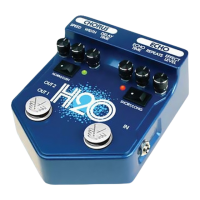
Explains the Chorus and Echo channels, including stereo output options.
Example setting for the Chorus channel, focusing on a subtle phasing effect.
Example setting for the Chorus channel, providing a lush and full chorus sound.
Example setting for the Chorus channel, simulating an underwater or Leslie speaker effect.
Example setting for the Chorus channel, replicating a classic 70s chorus tone.
Example setting for the Echo channel, creating a classic slapback echo sound.
Example setting for the Echo channel, producing harmonized echo effects.
Example setting for the Echo channel, creating a spacious and ambient echo.
Example setting for the Echo channel, designed for rockabilly music styles.
 General
| Technology | Analog |
|---|---|
| True Bypass | Yes |
| Type | Chorus and Echo |
| Inputs | 1 x Instrument |
| Outputs | 1 x Instrument |
| Power Supply | 9V DC |

 To Next Page