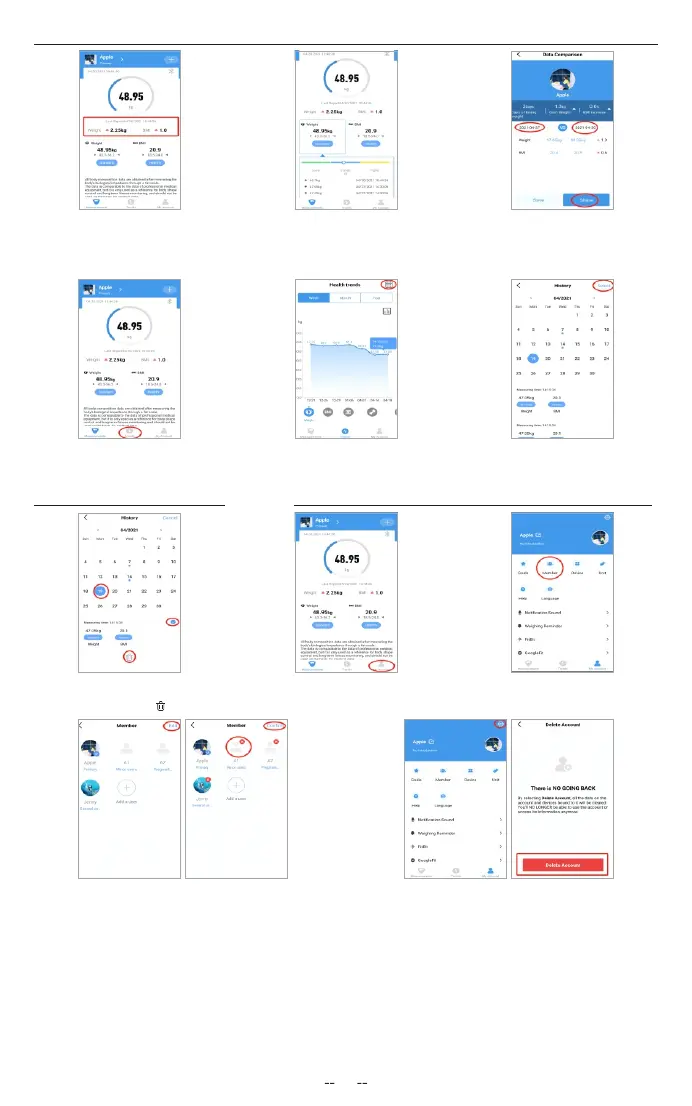
4.Click Trend to view your progress
history. You can select your progress
for the week, month, or year.
1.On the Measurement
page, tap My Account at
the bottom of the screen.
2.To add new users, click Member
and select “Add a user” and then
enter their information.
5.To view data for a specic
day, click calendar logo the
top right corner of the screen.
6.To view reference data from
a specic time frame, click Data
Select, then select date.
Deleting Reference Data Adding/Deleting Users and Other Setting
1.To delete a reference
data, click Select and select
date, then click the“ ”.
3.To delete a user,rst click Edit and delete,and then
conrm.
4.To delete the account, rst click SET logo and click
” Delete Account” .
5.other setting: You can set goal weights, change weight units, select sounds, select languages, and set weighing reminder on the
current page.
03
1.At the bottom you will nd
a bar when you can click
compare data to display.
2.Click Weight or BMI bar,
you can view history data
for the previous three times.
3.To view comparison data for a specic time,
select starting date and ending date to generate
the report, you can save or share your progress
with friends via Facebook and Instagram by
Click the “share” button on this page.
Viewing Reports


 To Next Page