EasyManua.ls Logo

Vitafit VT708 - Page 2

Vitafit VT708
3 pages
Print Icon
To Next Page IconTo Next Page
To Previous Page IconTo Previous Page
Loading...
Product
Introduction
Thank
you
for
choosing
Vitafit
Kitchen
Scale
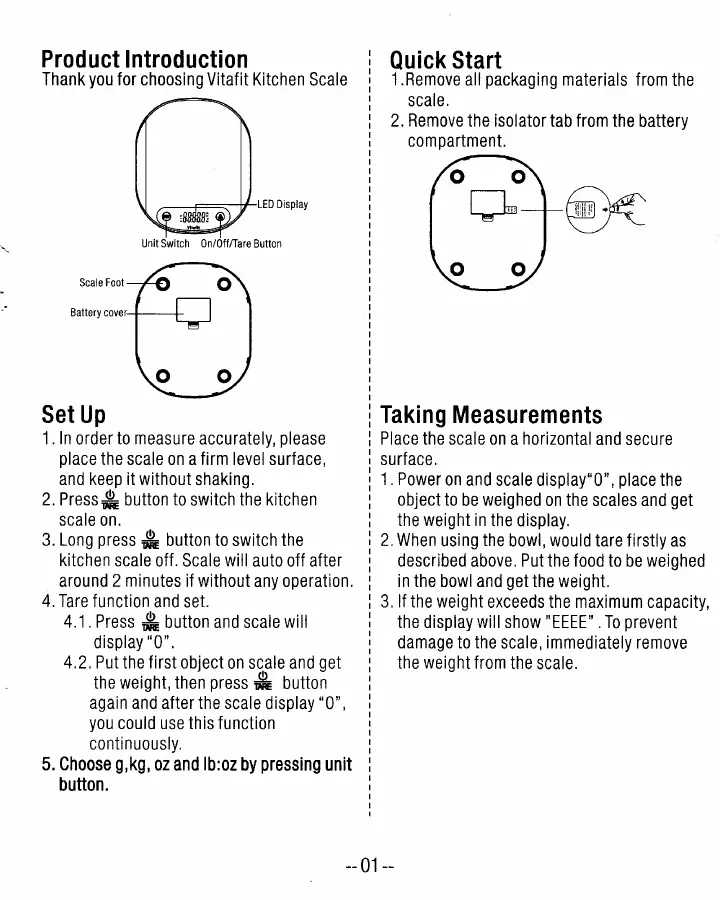
~--F~-V-LED
Display
Unit
Switch
On/OfflTare
Button
Scale
Foot
Battery
cover
Set
Up
1.
In
order
to
measure
accurately,
please
place
the
scale
on
a
firm
level
surface,
and
keep
it
without
shaking.
2.
Press:':
button
to
switch
the
kitchen
scale
on.
3.
Long
press
.&
button
to
switch
the
kitchen
scale
off.
Scale
will
auto
off
after
around
2
minutes
if
without
any
operation.
4.
Tare
function
and
set.
4.1.
Press
:.:
button
and
scale
will
display
"0".
4.2.
Put
the
first
object
on
scale
and
get
the
weight,
then
press.&
button
again
and
after
the
scale
display
"0",
you
could
use
this
function
continuously.
5.
Choose
g,kg,
oz
and
Ib:oz
by
pressing
unit
button.
Quick
Start
1.Remove
all
packaging
materials
from
the
scale.
2.
Remove
the
isolator
tab
from
the
battery
compartment.
Taking
Measurements
Place
the
scale
on
a
horizontal
and
secure
surface.
1.
Power
on
and
scale
display"O",
place
the
object
to
be
weighed
on
the
scales
and
get
the
weight
in
the
display.
2.
When
using
the
bowl,
would
tare
firstly
as
described
above.
Put
the
food
to
be
weighed
in
the
bowl
and
get
the
weight.
3.
If
the
weight
exceeds
the
maximum
capacity,
the
display
will
show
"EEEE"
.
To
prevent
damage
to
the
scale,
immediately
remove
the
weight
from
the
scale.
--
01
--

Related product manuals